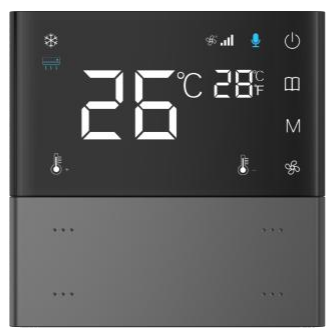
Device Page Switching Interaction
When the device is powered on, short press  to switch between pages of different device types, such as Ventilation
  , Floor Heating
  , Air Conditioning
  , and others (a total of 8 device pages).
Temperature Control On/Off
This function is available only on the Air Conditioning, Floor Heating, or Ventilation pages.
Power On: Long-press
 when the device is off to activate the corresponding mode.
Power Off: Long-press
 when the device is on to deactivate the corresponding mode.
The panel also synchronizes on/off status feedback from the bus.
Fan Speed Adjustment
In Ventilation or Air Conditioning modes during dehumidification or air supply, each press of  cycles the fan speed through Low, Medium, and High.
The Auto fan speed is available only in Cooling or Heating mode when the panel is in Air Conditioning mode.
Mode Switching
In Air Conditioning mode, each press of the M key switches between Cooling  , Heating
  , Dehumidification
  , and Fan Only
  modes.
Value Increment/Decrement
Floor Heating Panel: Adjust floor heating setpoint.
Air Conditioning Panel: Adjust air conditioning setpoint.
Short-press +/- key: change value by 1°C
Long-press +/- key: continuously change value
Sensor Parameter Display
Only temperature and humidity sensors can display specific values on their corresponding function pages.
After database configuration, temperature and humidity values can be viewed by pressing  . Other data, such as CO₂ and VOC, cannot display numeric values directly on the device. Instead, the device calculates and displays the corresponding air quality level as Good, Moderate, or Poor.