The parameter setting interface “Event Group function", shown in the Figure 5.5.1, is used to enable the event group function. Up to 8 event groups can be configured, and each group contains 8 outputs, as shown in the Figure 5.5.2.
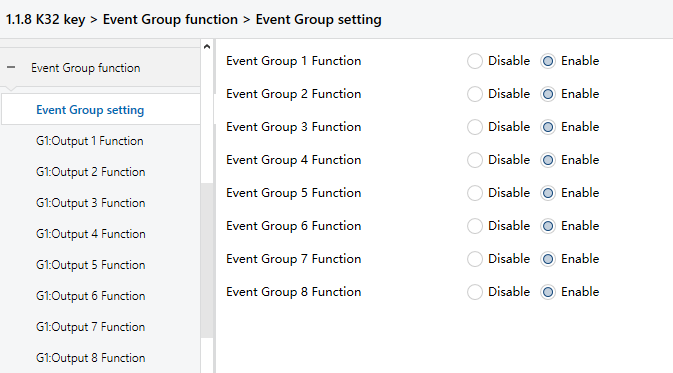
Figure 5.5.1 ”Event Group setting” Interface
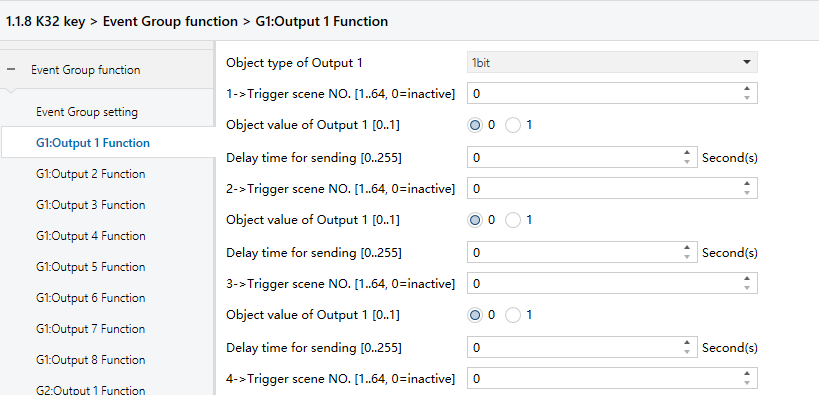
Figure 5.5.2 “Groupx: Output y Function” Interface
Event Group x Function (x:1..8)
Set to enable Event Group x.
Options:
Disable
Enable
When Event Group x Function is enabled, the configuration parameters for the group's eight outputs become available. All eight groups use the same functionality and share identical configuration options. The following settings use one output as an example.
Object type of Output y (y:1..8)
Define the data type of output y in group x.
Options:
1bit
1byte
2byte
z->Trigger scene NO.[1..64,0=inactive] (z:1..8)
Specify the scene number(s) that trigger Output y in Group x. Each output supports up to 8 scene triggers.
Options: 0 to 64, 0=inactive.
NOTE:
If multiple scene numbers are set to the same value, only the first matched trigger will be executed. The output will be sent according to the configured delay time.
Object value of Output y [0..1/0..255/0..65535]
Set the output value based on the data type of output y.
Options:
1bit 0..1
1byte 0..255
2byte 0..65535
Delay time for sending [0...255]*0.1s
Set the delay time before sending the output value to the bus.
Options: 0..255