Figure 5.9.1 shows the parameter setting interface for the "Event Group function," facilitating the configuration of up to 8 event groups. Each group, as shown in Figure 5.9.2, has 8 outputs.
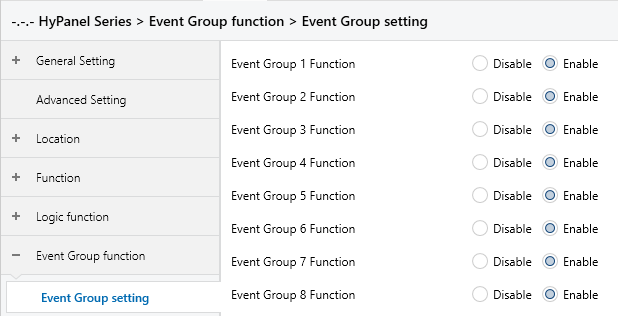
Figure 5.9.1 “Event Group function” Interface
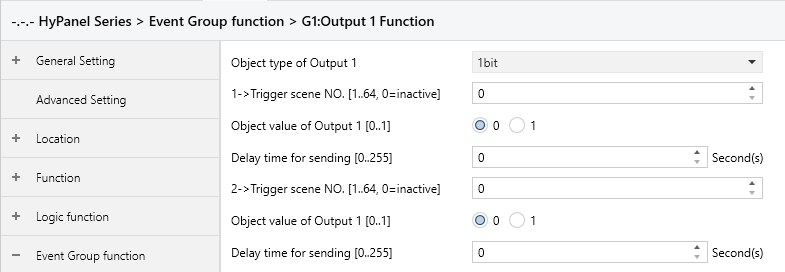
Figure 5.9.2 “Groupx:Output y Function” Interface
Event Group x Function (x:1..8)
Enables or disables event group x function.
Options:
Disable
Enable: When a specific group is enabled, the parameters for its 8 outputs become visible.
All eight groups share the same function, with identical configurations for each group's 8 outputs. Here we use one of the outputs as an example.
Object type of Output y (y:1..8)
Defines the data type of output y in group x.
Options:
1bit
1byte
2byte
z->Trigger scene NO.[1..64,0=inactive] (z:1..8)
Specifies the scene number that triggers output y in group x. Each output can configure up to 8 triggered scenes.
Options: 0 to 64, 0=inactive.
NOTE:
When multiple “Trigger scene No.” are set to the same value, the output value will directly forward the value of the first condition met, and the delay time will follow the configured delay before being sent.
Object value of Output y [0..1/0..255/0..65535]
Sets the output value. The value range is determined by the data type of output y:
1bit: 0 .. 1
1byte: 0 .. 255
2byte: 0 .. 65535
Delay time for sending [0...255]*0.1s
Sets a delay before sending the output value to the bus.
Options: 0 .. 255