IP Call Configuration
Ein IP-Anruf ist ein direkter Anruf zwischen zwei Intercom-Geräten, die ihre IP-Adressen nutzen, ohne Server oder PBX. IP-Anrufe funktionieren, wenn die Geräte im selben Netzwerk sind.
Enable or disable the direct IP call function on the Intercom > Call Feature > Direct IP interface.
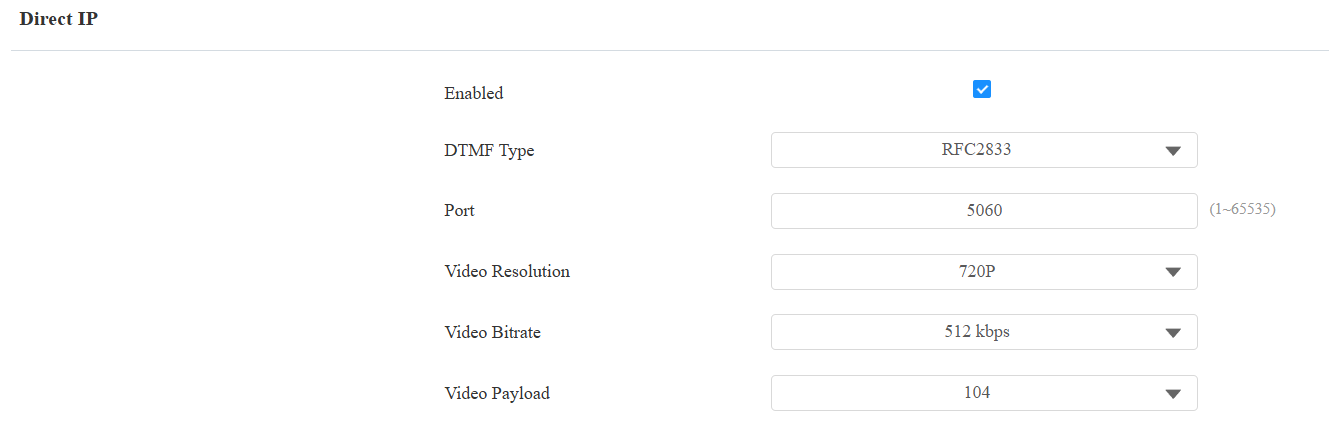
Port: Set the port for direct IP calls. The default is 5060, with a range from 1-65535. If you enter a value within this range other than 5060, ensure consistency with the corresponding device for data transmission.
SIP Call Configuration
Das Session Initiation Protocol (SIP) ist ein Signalisierungsübertragungsprotokoll, das zum Initiieren, Warten und Beenden von Gesprächen verwendet wird.
Ein SIP-Anruf verwendet SIP, um Daten zwischen SIP-Geräten zu senden und zu empfangen, und kann das Internet oder ein lokales Netzwerk nutzen, um eine hochwertige und sichere Kommunikation zu gewährleisten. Um einen SIP-Anruf zu starten, ist ein SIP-Konto, eine SIP-Adresse für jedes Gerät und die Konfiguration der SIP-Einstellungen auf den Geräten erforderlich.
SIP Account Registration
Jedes Gerät benötigt ein SIP-Konto, um SIP-Anrufe zu tätigen und zu empfangen.
Akuvox-Gegensprechanlagen unterstützen die Konfiguration von zwei SIP-Konten, die unter zwei unabhängigen Servern registriert werden können.
Klicken Sie hier , um das Beispiel zur Registrierung des SIP-Kontos anzusehen.
Register the SIP account on the Intercom > Account interface.
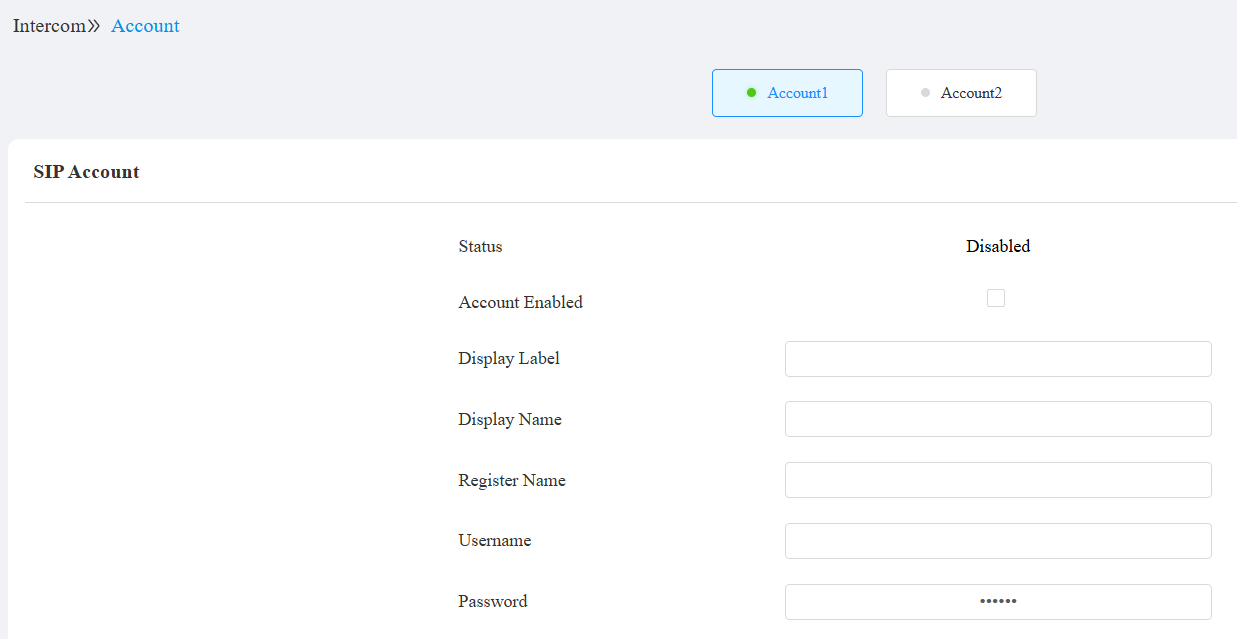
Account 1/Account 2: The device supports 2 SIP accounts.
- Account 1 is the default account for call processing. Also, it will be utilized when the Akuvox SmartPlus cloud service is activated.
- The system switches to Account 2 if Account 1 is not registered.
Status: Indicate whether the SIP account is registered or not.
Display Label: The label of the device.
Display Name: The designation for Account 1 or 2 is to be shown on the calling device’s screen.
Register Name: Same as the username from the PBX server.
Username: Same as the username from the PBX server for authentication.
Password: Same as the password from the PBX server for authentication.
Note
To add the device to the cloud, select its Device Type as Door Phone. Selecting Access Control will disable all the device’s intercom features.
When the device is connected to the SmartPlus Cloud, the display label, register name, and username will show its SIP number.
SIP Server Configuration
SIP-Server ermöglichen es Geräten, Anrufsitzungen mit anderen Intercom-Geräten über das SIP-Protokoll zu etablieren und zu verwalten. Sie können Drittanbieter-Server oder ein integrierter PBX im Akuvox-Innenmonitor sein.
To set it up, go to the web Intercom > Account interface.
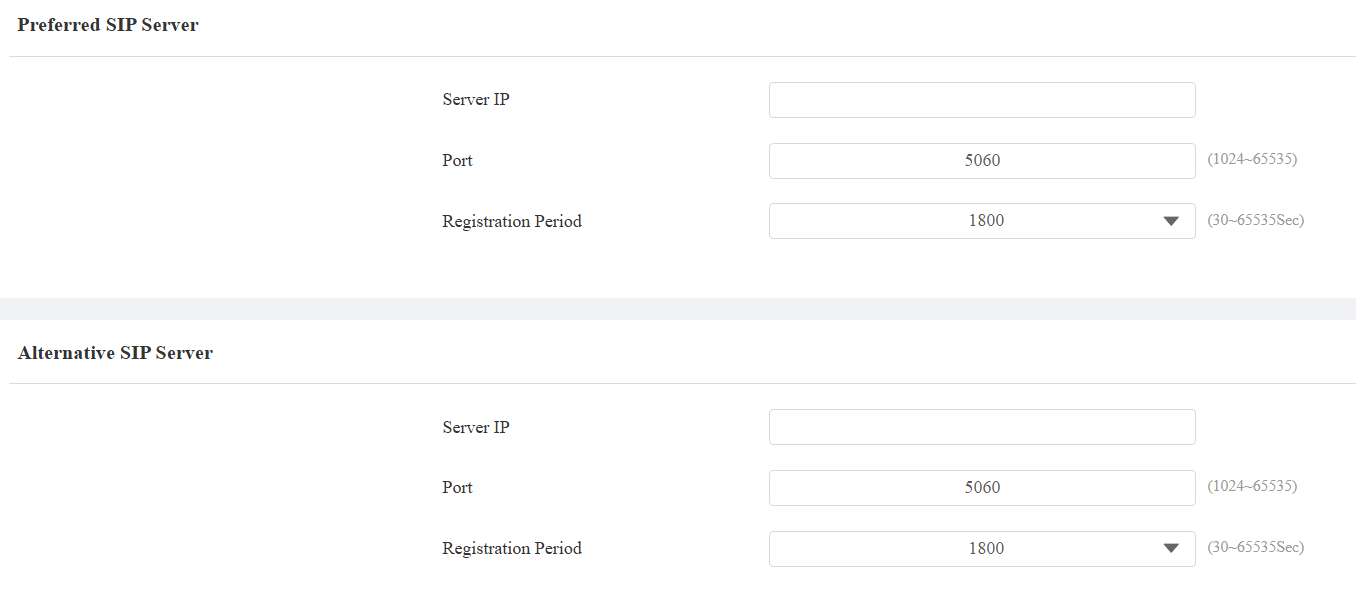
Server IP: Enter the server’s IP address or its domain name.
Port: Specify the SIP server port for data transmission.
Registration Period: Define the time limit for SIP account registration. Automatic re-registration will initiate if the account registration fails within this specified period.
SIP Account Selection
The Dial Type feature decides the default account to make SIP calls. It applies to calls by pressing the contacts and entering the SIP numbers on the device’s keypad.
You can select the default account on the Intercom > Call Feature > Dial Type interface.

Mode:
Auto: The device will use the registered account to make SIP calls. If both are registered, Account 1 will be used by default.
Account 1: Calls can only be made to Account 1’s contacts.
Account 2: Calls can only be made to Account 2’s contacts.
Outbound Proxy Server
Ein ausgehender Proxyserver wird verwendet, um alle initiierenden Anfragen zu empfangen und sie an den zugewiesenen SIP-Server weiterzuleiten, um eine Anrufsitzung über portbasierte Datenübertragung zu etablieren.
To set it up, go to the Intercom > Account > Outbound Proxy Server interface.
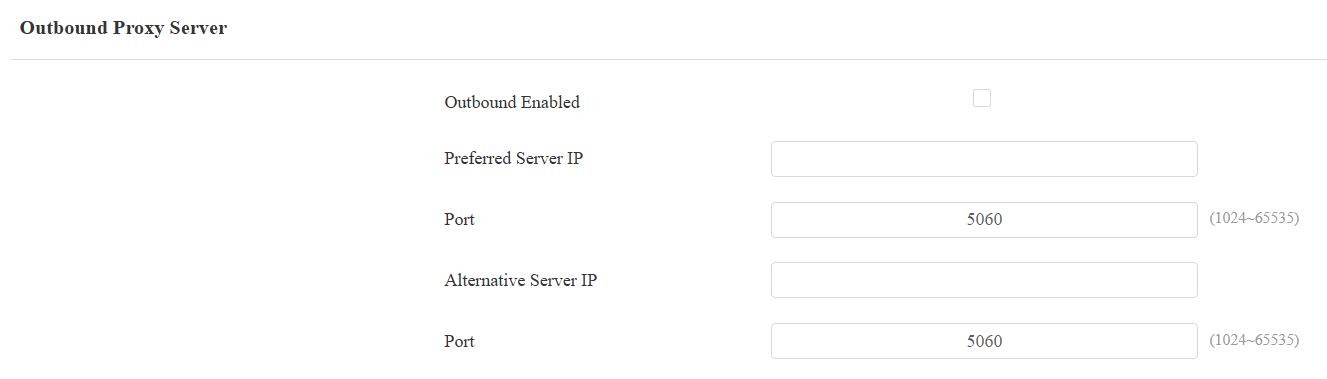
Preferred Server IP: Enter the SIP proxy server’s IP address.
Port: Set the port for establishing a call session via the outbound proxy server.
Alternative Server IP: Enter the SIP proxy IP address to be used when the main proxy server malfunctions.
Port: Set the proxy port for establishing a call session via the backup outbound proxy server.
Data Transmission Type
Akuvox-Gegensprechanlagen unterstützen vier Datenübertragungsprotokolle: User Datagram Protocol (UDP), Transmission Control Protocol (TCP), Transport Layer Security (TLS) und DNS-SRV.
Select the data transmission type on the Intercom > Account > Transport Type interface.

UDP: An unreliable but very efficient transport layer protocol. It is the default transport protocol.
TCP: A less efficient but reliable transport layer protocol.
TLS: An encrypted and secure transport layer protocol. Select this option if you wish to encrypt the SIP messages for enhanced security or if the other party’s server uses TLS. To use it, you need to upload certificates for authentication.
DNS-SRV: A DNS service record defines the location of servers. This record includes the hostname and port number of the server, as well as the priority and weight values that determine the order and frequency of using the server.
SIP Hacking Prevention
Das Abhören von Internettelefonen ist ein Netzwerkangriff, der es unbefugten Parteien ermöglicht, die Inhalte der Kommunikationssitzungen zwischen den Intercom-Nutzern abzufangen und darauf zuzugreifen. Dies kann sensible und vertrauliche Informationen für die Angreifer offenlegen. SIP-Hacking-Schutz ist eine Technik, die SIP-Anrufe vor Kompromittierungen im Internet schützt.
Enable SIP hacking prevention on the Intercom > Account > Call interface.
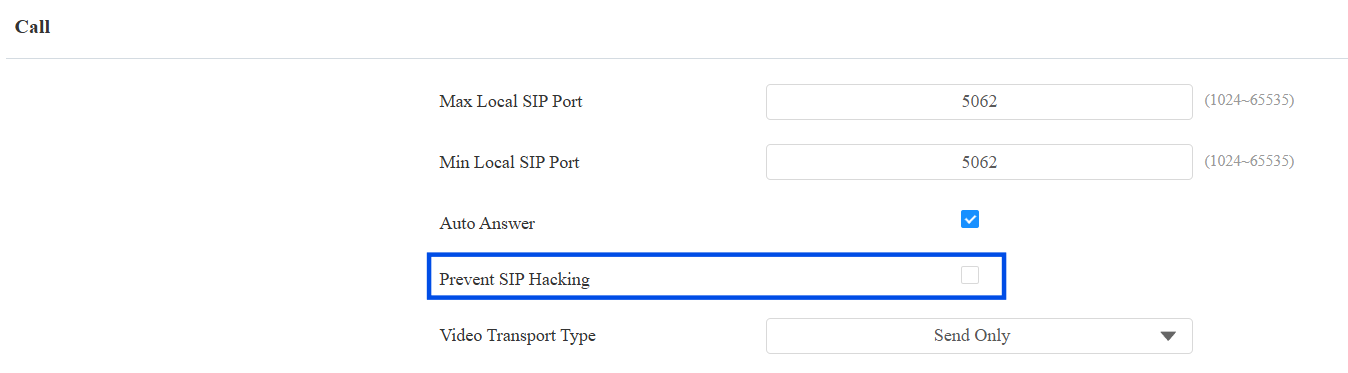
Prevent SIP Hacking: Activate this feature to only receive calls from contacts in the whitelist. This protects users’ private and secret information from potential hackers during SIP calls.