Device Network Configuration
Um die normale Funktion zu gewährleisten, stellen Sie sicher, dass das Gerät seine IP-Adresse korrekt eingestellt oder automatisch vom DHCP-Server erhalten hat.
Check the network status on the web Status > Info > Network Information interface.
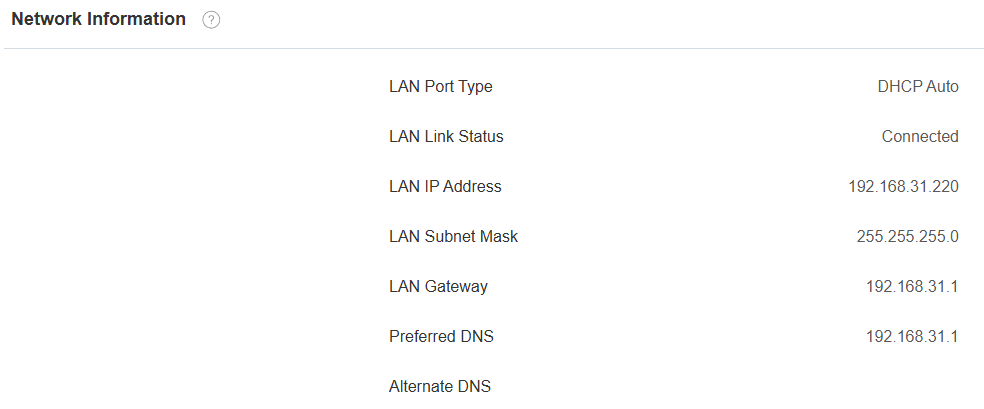
Set the network connection on the web Network > Basic interface.
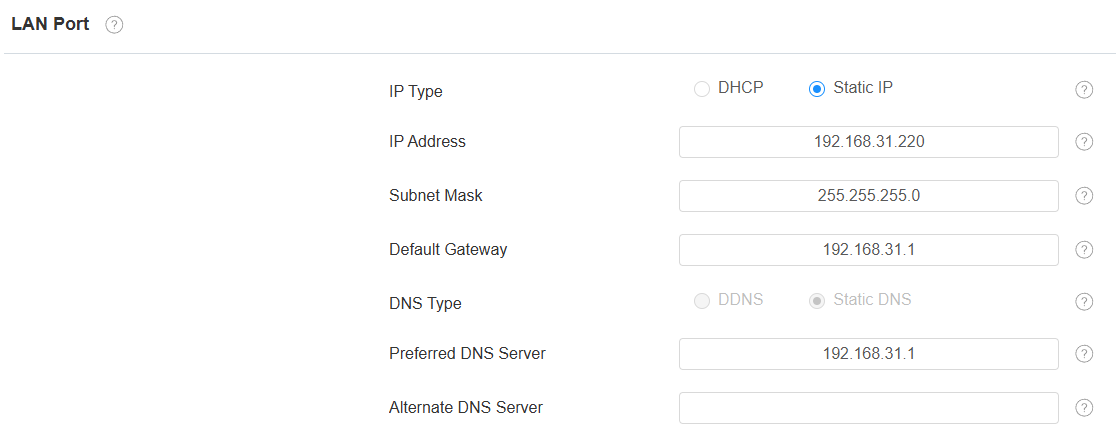
DHCP: DHCP mode is the default network connection. If the DHCP mode is selected, then the device will be assigned by the DHCP server with an IP address, subnet mask, default gateway, and DNS server address automatically.
Static IP: When static IP mode is selected, the IP address, subnet mask, default gateway, and DNS server address have to be manually configured according to the actual network environment.
IP Address: Set up the IP address when the static IP mode is selected. To access the device’s web settings with the IP, your computer should be on the same local network as the device.
Subnet Mask: A subnet mask tells your device which IP addresses are part of your local network and which ones are not. For example, if the subnet mask is 255.255.255.0, it means that devices with similar starting IPs (like 192.168.1.x) are in the same network.
Default Gateway: The gateway is like a bridge between your device and other networks, such as the internet. Usually, it’s the IP address of your router.
DNS Type: Domain Name System(DNS) type.
DDNS: Dynamic DNS. It is obtained automatically through the DHCP server.
Static DNS: When selected, you need to enter the DNS manually.
Preferred/Alternate DNS Server: Domain Name System(DNS) is the overall system or network that handles the translation of domain names (like www.example.com) into IP addresses (like 192.0.2.1), which computers use to identify each other on a network. The device connects to the alternate DNS server when the primary one is unavailable.
Device Local RTP Configuration
Das Echtzeit-Transportprotokoll (RTP) ermöglicht es Geräten, Audio- und Videodaten in Echtzeit über ein Netzwerk zu streamen.
Um RTP zu nutzen, benötigen Geräte eine Reihe von Ports. Ein Port ist wie ein Datenkanal in einem Netzwerk. Indem Sie RTP-Ports auf Ihrem Gerät und Router einrichten, können Sie Netzwerkstörungen vermeiden und die Audio- und Videoqualität verbessern.
Set it up on the web Network > Advanced interface.

Starting RTP Port: Set the port value to establish the start point for the exclusive data transmission range.
Max RTP Port: Set the port value to establish the endpoint for the exclusive data transmission range.
Device Web HTTP Setting
Diese Funktion verwaltet den Zugriff auf die Website des Geräts. Das Gerät unterstützt zwei Fernzugriffsmethoden: HTTP und HTTPS (Verschlüsselung).
Set it up on the Network > Advanced interface.

HTTPS Port: Specify the web server port for accessing the device web interface via HTTPS.
Device Deployment in Network
Um die Gerätesteuerung und -verwaltung zu erleichtern, konfigurieren Sie Akuvox-Gegensprechanlagen mit Details wie Standort, Betriebsmodus, Adresse und Durchwahlnummern.
Set it up on the Network > Advanced interface.
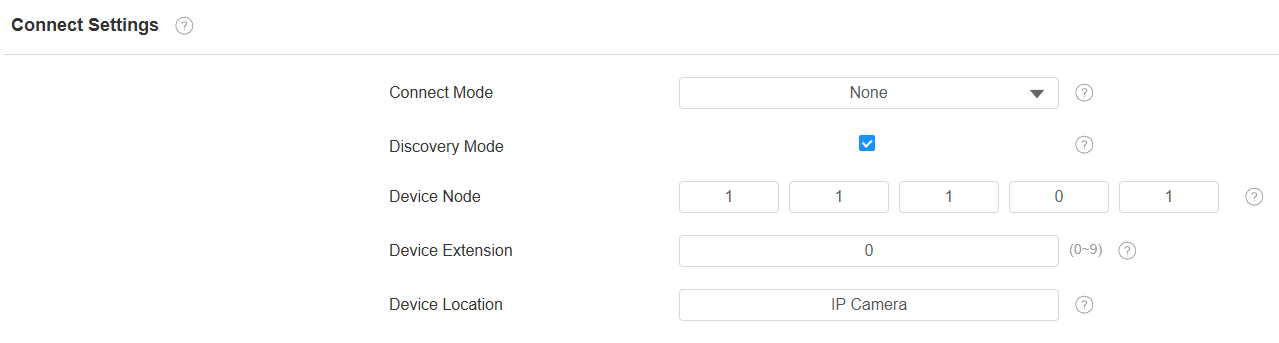
Connect Type: It is automatically set up according to the device connection with a specific server in the network, such as SDMC, Cloud, or None.
Keine: None ist die Standardeinstellung auf Werkseinstellung, was darauf hinweist, dass das Gerät sich in keinem Servertyp befindet. Geräte verbinden sich direkt miteinander oder innerhalb eines lokalen Netzwerks (LAN), ohne auf externe Server angewiesen zu sein.
Cloud: Das Gerät ist mit der SmartPlus Cloud verbunden, einem cloudbasierten System, das das Zugriffsmanagement von Immobilien vereinfacht. Der Cloud-Modus ermöglicht es Geräten, intelligent miteinander und mit der mobilen SmartPlus-App zu interagieren, wobei täglich Daten und auf verschiedenen Hosts gesichert werden. Sie eignet sich für Projekte, die intelligente, flexible und sichere Implementierung und Verwaltung erfordern.
SDMC: Das Gerät ist mit dem SDMC verbunden, einer Managementplattform, die für On-Premise-Projekte entwickelt wurde. Der SDMC-Modus verwaltet und sichert Daten aus der Ferne in einem lokalen Netzwerk. Es verfügt außerdem über viele Funktionen, die für Projekte geeignet sind, die hohe Privatsphäre, geringere Kosten und zentrale Verwaltung erfordern.
Discovery Mode: Enabled by default. Available for None server mode. The device can be discovered by other devices in the network. When disabled, the device will be concealed and not discovered by other devices.
Device Node: Available for None server mode. It can be used to call the device. Specify the device address by entering device location information from left to right: Community, Building, Unit, Floor, and Room in sequence.
Device Extension: Available for None server mode. The device extension number ranges from 0 to 10.
Device Location: The location where the device is installed and used.
Allowed Scanning Whitelist
You can limit devices from scanning the camera on the same LAN to enhance security.
Set it up on the Network > Advanced interface.

NAT Setting
Network Address Translation (NAT) ermöglicht es Geräten in einem privaten Netzwerk, eine einzige öffentliche IP-Adresse zu verwenden, um auf das Internet oder andere öffentliche Netzwerke zuzugreifen. NAT speichert die begrenzten öffentlichen IP-Adressen und verbirgt die internen IP-Adressen und Ports vor der Außenwelt.
Um SIP-Konten auf Drittanbieter-Servern in einem Wide Area Network (WAN) zu registrieren, müssen Sie die RPort-Funktion auf den Gegensprechgeräten aktivieren, um eine stabile Verbindung herzustellen.
Set it up on the web Account > Advanced > NAT interface.

Enable RPort: Enable RPort when the SIP server is in a WAN.