System Log for Debugging
System logs can be used for debugging purposes.
Set it up on the Upgrade > Diagnosis interface.
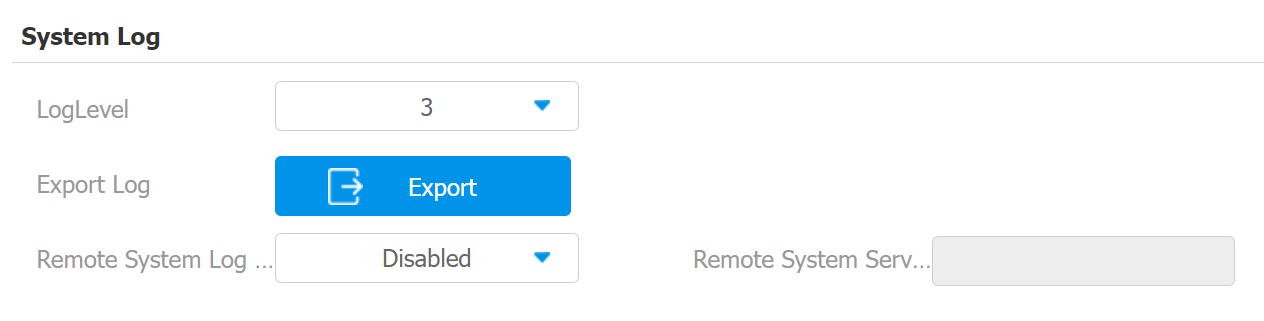
Log Level: Log level ranges from 0 to 7 levels. You will be instructed by Akuvox technical staff about the specific log level to be entered for debugging purposes. The default log level is 3. The higher the level is, the more complete the log is.
Export Log: Click the Export tab to export a temporary debug log file to a local PC.
Remote System Server: Enter the remote server address to receive the system log and it will be provided by Akuvox technical support.
PCAP for Debugging
PCAP is used to capture the data package going in and out of the devices for debugging and troubleshooting purposes.
Set it up on the Upgrade > Diagnosis interface.
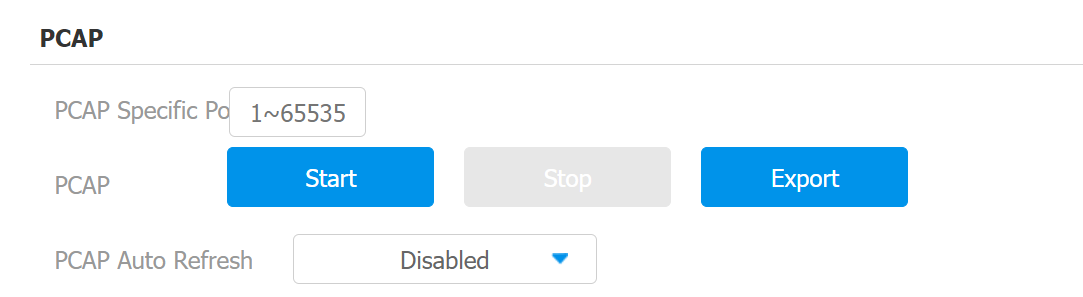
PCAP Specific Port: Select the specific port from 1-65535 so that only the data packet from the specific port can be captured. You can leave the field blank by default.
PCAP: Click the Start tab and Stop tab to capture a certain range of data packets before clicking the Export tab to export the data packets to your Local PC.
PCAP Auto Refresh: When enabled, the PCAP will continue to capture data packets even after the data packets reach 50M maximum in capacity. When disabled, the PCAP will stop data packet capturing when the data packets reach the maximum capturing capacity of 1MB.
User Agent
User agent is used for identification purpose when you are analyzing the SIP data packet.
Set it up on the Account > Advanced interface.
