Integration via HTTP API
La API HTTP está diseñada para lograr una integración basada en red entre el dispositivo de terceros y el dispositivo Akuvos.
Set it up on the web Setting > HTTP API interface for the integration.
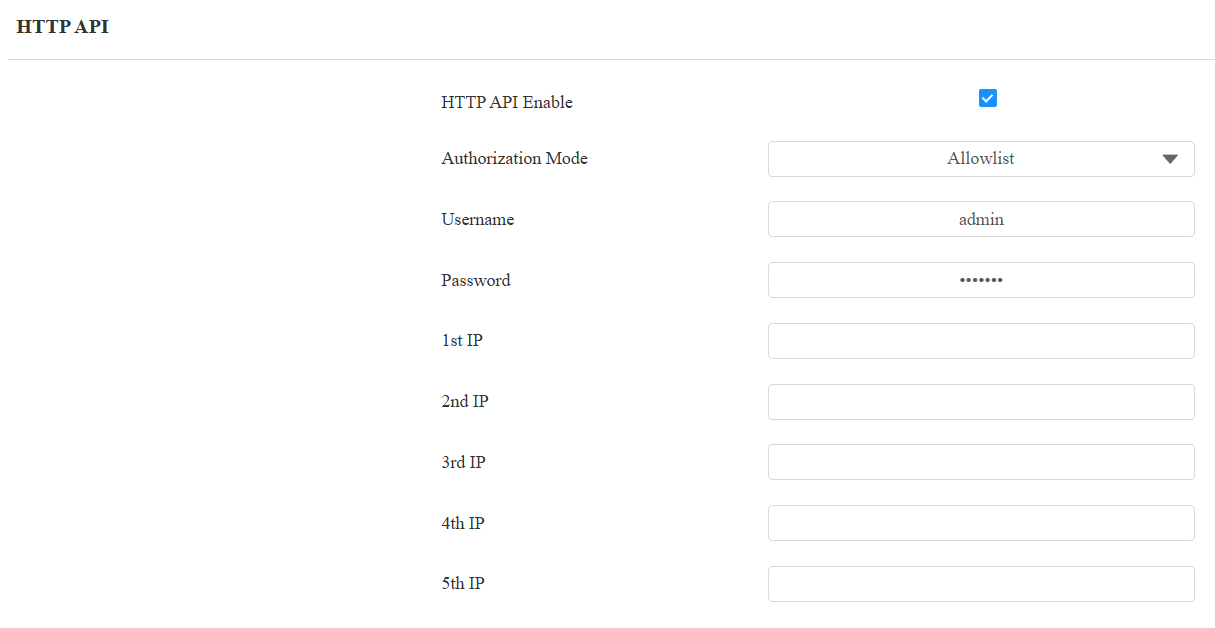
HTTP API Enabled: Enable or disable the HTTP API function for third-party integration. If the function is disabled, any request to initiate the integration will be denied and return HTTP 403 forbidden status.
Authorization Mode: Select among the following options: None, Normal, Allowlist, Basic, Digest, and Token for authorization type, which will be explained in detail in the following chart.
Username: Enter the username when Basic or Digest authorization mode is selected. The default username is admin.
Password: Enter the password when Basic or Digest authorization mode is selected. The default password is admin.
1st IP-5th IP: Enter the IP address of the third-party devices when the Allowlist authorization is selected for the integration.
Please refer to the following description for the authentication mode:
Authorization Mode | Description |
|---|---|
None | No authentication is required. This mode is intended for testing only and is not recommended in production environments. |
Normal | Reserved for Akuvox internal development and testing. |
Allowlist | Authenticates requests based on the source IP address. Add the IP address of the third-party device to the allowlist before sending requests. Recommended for trusted LAN environments. |
Basic | Authenticates requests using a username and password. The credentials must be Base64-encoded and included in the Authorization header. |
Digest | Authenticates requests using HTTP Digest authentication. Only the MD5 algorithm is supported. |
Token | Reserved for Akuvox internal development and testing. |
Power Output Control
El dispositivo puede servir como fuente de alimentación para los relés externos. Haz clic aquí para ver los requisitos de potencia de salida.
Set it up on the web Access Control > Relay > 12V Power Output interface.

12V Power Output:
Disabled: Disable the power output function.
Always: Provide continuous power to the third-party device.
Triggered By Open Relay: Provide power to the third-party device via the 12V output and GND interface during the timeout when the status of relays is shifted from low to high.
Time Out (Sec): Select the power supply time duration after the relay is triggered from 3, 5, or 10. It is 3 seconds by default. The power output is 12V, and the maximum output amperage is 0.5A.
Data Transmission Type for Third-Party Camera
You can select the data transmission type between the device and a third-party camera when it is connected to the SmartPlus Cloud.
To set it up, go to the Surveillance > Camera interface.

UDP: An unreliable but very efficient transport layer protocol.
TCP: A less efficient but reliable transport layer protocol. It is the default transport protocol.