Infrared LED Setting
El LED infrarrojo está diseñado principalmente para reforzar la luz por la noche o en ambientes oscuros.
Set it up on the web Device Setting > Light interface.
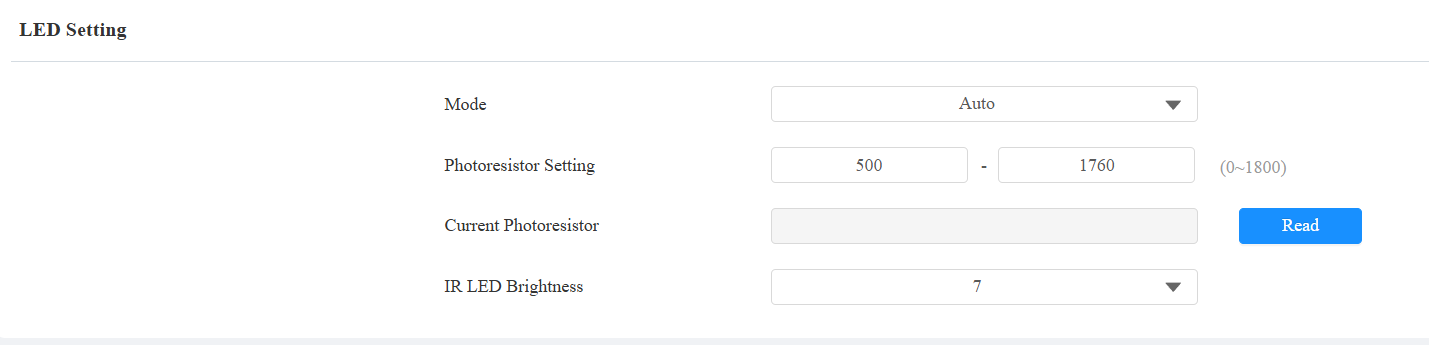
Mode:
Auto: Turn on the infrared LED automatically based on the minimum and maximum photoresistor value.
Always On: Enable the infrared LED.
Always Off: Disable the infrared LED.
Schedule: Turn on the infrared LED based on the schedule. Specify the Start Time and End Time when this option is selected. Beyond the schedule, the device adopts Auto mode.
Photoresistor Setting: Set the minimum and maximum photoresistor value to automatically control the ON-OFF of the LED fill light. The higher the value, the brighter the light is. If the photoresistor value is less than the minimum threshold, turn on the fill light. If it is greater than the maximum threshold, turn it off.
Current Photoresistor: Click Read to obtain the current photoresistor value.
IR LED Brightness: Adjust the IR LED brightness from level 0 to 10. The default is 7. The higher the level is, the brighter it is.
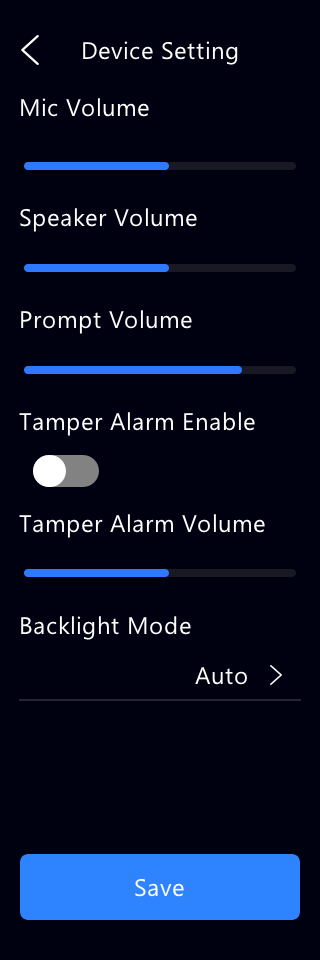
You can also select the Backlight Mode on the Setting > Device Setting screen.
LED White Light
El LED de luz blanca se utiliza principalmente para reforzar la iluminación en el acceso por código QR y para una mayor visibilidad de los visitantes al ver sus imágenes desde el interior en un entorno oscuro.
Set it up on the web Device Setting > Light interface.

Mode: Select Auto or OFF. If you select Auto, the white light will turn on only when all conditions are met: face recognition or QR code scanning is in progress, night mode is detected, and motion is detected by radar.
Max White Light Value: Set brightness level. Higher values increase brightness. Clicking Test turns on the light at the current level for 3 seconds.