Auto-answer Configuration
La fonction de réponse automatique permet à l’appareil de répondre automatiquement aux appels entrants sans intervention manuelle. Vous pouvez également personnaliser cette fonctionnalité en réglant la durée de la réponse automatique et en choisissant le mode de communication entre audio et vidéo.
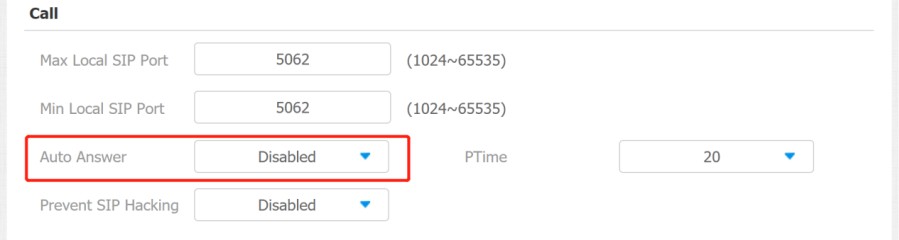
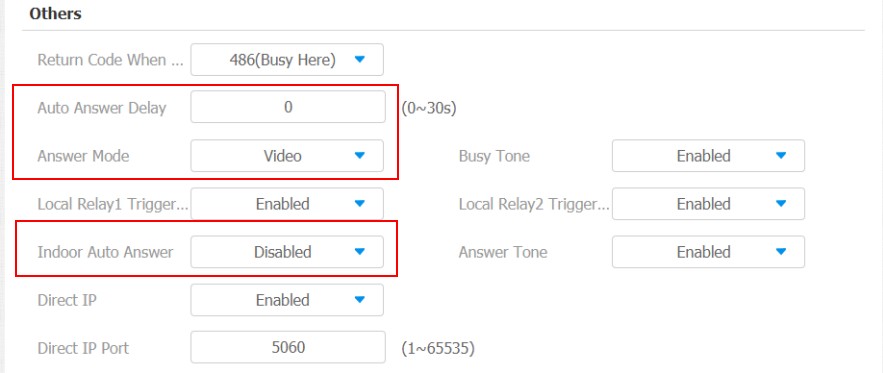
To enable or disable on web Account > Advanced > Call > Auto Answer interface. And set up the corresponding auto-answer parameters on the web Phone > Call Feature > Others interface.
 {height="" width=""900}
Parameter Set-up:
- Auto Answer: turn on the Auto Answer function by ticking the square box.
- Auto Answer Delay: set up the delay time (from 0-30 sec.) before the call can be answered automatically. For example, if you set the delay time as 1 second, then the call will be answered in 1 second automatically.
- Answer Mode: set up the video or audio mode you preferred for answering the call automatically.
- Indoor Auto Answer Mode: turn on the Auto Answer function for calls from other indoor monitors by ticking the check box.
Auto-answer Allow List setting
La réponse automatique ne peut s’appliquer qu’aux numéros SIP ou IP déjà ajoutés dans la liste des autorisations de réponse automatique de votre moniteur intérieur. Par conséquent, vous devez configurer ou modifier les numéros dans la liste des autorisations sur l’interface web.
Go to Security > Allowlist interface.
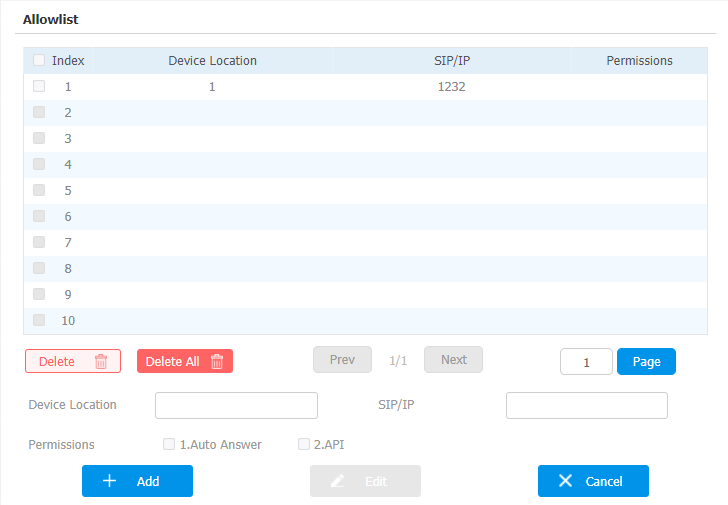
SIP/IP numbers can be imported to or exported out of the indoor monitor in batch on web Security > Allowlist > Allowlist Import/Export interface.

SIP/IP number files to be imported or exported must be in either .xml or .csv format.
SIP/IP numbers must be set up in the phone book of the indoor monitor before they can be valid for the auto-answer function.
Live Stream Setting
La fonction Receive Live Stream permet au moniteur intérieur de visionner le flux vidéo unidirectionnel de la personne appelante, que l’appel soit audio ou vidéo. Pendant ce temps, le flux vidéo du moniteur intérieur n’est pas transmis à l’appareil appelant, protégeant ainsi la vie privée.
To do the configuration on the web Phone > Call Feature >Audio Call Settings interface.

When the feature is enabled, once a caller requires a video call:
- Receive the incoming calls in video call mode so that both sides can see each while talking in the two-way video conversation.
- Receive the incoming calls in audio call so that you can see the caller in the one-way video conversation while the call can not see you.
- Only devices with camera module have this feature.
Intercom Call Configuration
If you want to see the image at the door station before answering the incoming call, you can enable the intercom preview function on web Phone > Call Feature > Intercom interface.

Parameter Set-up:
- Intercom Preview: enable the incoming call preview function.
PTime Configuration
Ptime donne la durée en millisecondes représentée par le média dans un paquet. Le SDP dans la requête INVITE envoyée par la partie appelante porte l’attribut Ptime, qui indique que la durée d’emballage des médias de la partie appelante est la valeur portée par Ptime. Après avoir reçu le message de requête, le serveur répond avec l’attribut Ptime dans le SDP dans 200 OK, indiquant que la prise en charge côté serveur pour le temps d’emballage du média est la valeur portée par Ptime. L’appelant négocie selon l’attribut Ptime porté dans le SDP dans le 200 OK, puis envoie enfin le temps du package média, c’est-à-dire la valeur Ptime.
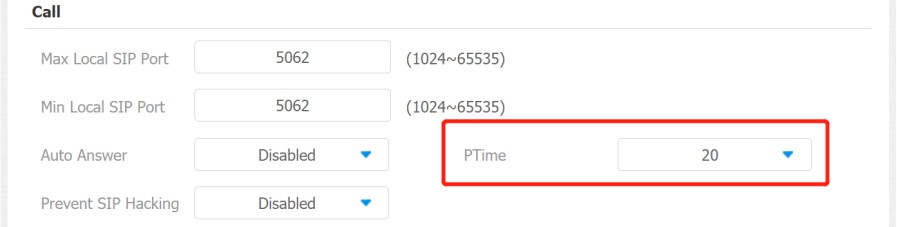
To set it up, go to Account > Advanced >Call.
Parameter Set-up:
- PTime: you can disable the PTime feature. Or set up it from 10 to 60 seconds.
SIP Hacking Protection
L’écoute clandestine par téléphone Internet est une attaque réseau qui permet aux parties non autorisées d’intercepter et d’accéder au contenu des sessions de communication entre les utilisateurs de l’interphone. Cela peut exposer des informations sensibles et confidentielles aux attaquants. La protection contre le piratage SIP est une technique qui protège les appels SIP contre toute compromission sur Internet.
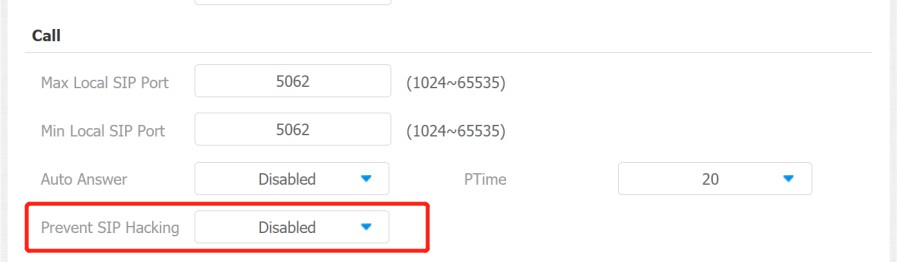
Parameters Set-up:
- Prevent SIP Hacking: enable activating this feature during using sip call. This feature is only available for SIP calls, not IP calls.
Emergency Call Setting
La fonction d’appel d’urgence est conçue pour les situations urgentes, particulièrement bénéfiques pour les personnes âgées et les enfants. Les utilisateurs peuvent afficher le bouton SOS sur l’écran du moniteur intérieur. Lorsque le bouton est pressé, l’appareil appelle automatiquement les contacts d’urgence désignés, garantissant une aide rapide au besoin.
SOS Number Display
To display SOS softkey on web Phone > Key/Display > Home Page Display interface. The icon will be shown in the main interface or more interface after configuring.
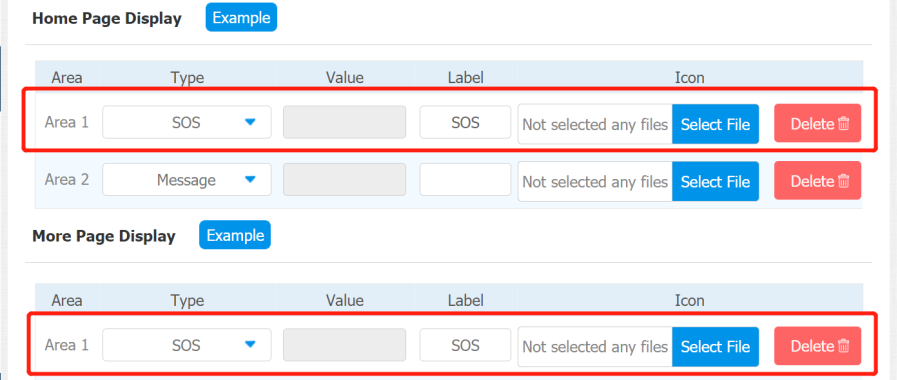
SOS Number Settings
To set up SOS numbers on the device web Phone > Intercom.
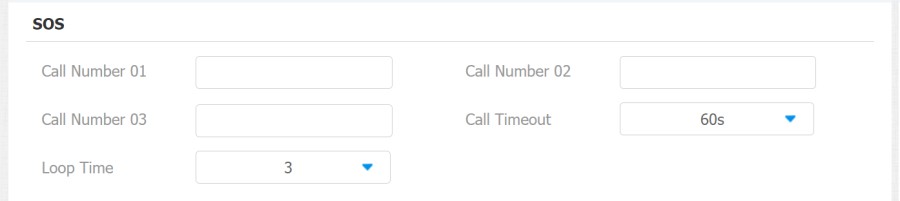
Parameter Set-up:
- Call Number: to set up 3 SOS numbers. Once users press the SOS key on the home screen (SOS display key shall be set on the web manually), indoor monitors will call out the number in order.
- Call Timeout: set up the timeout for each number. Once users call out, if the other side will not answer within the timeout, indoor monitors will continue to call the next number.
- Loop Time: set up the call loop times. For example, if you set it as 3 times, then the call will be canceled automatically if the call is not answered before reaching the timeout three times.
RF Setting (Optional)
Configure it on the device Advance Settings > RF Settings screen.
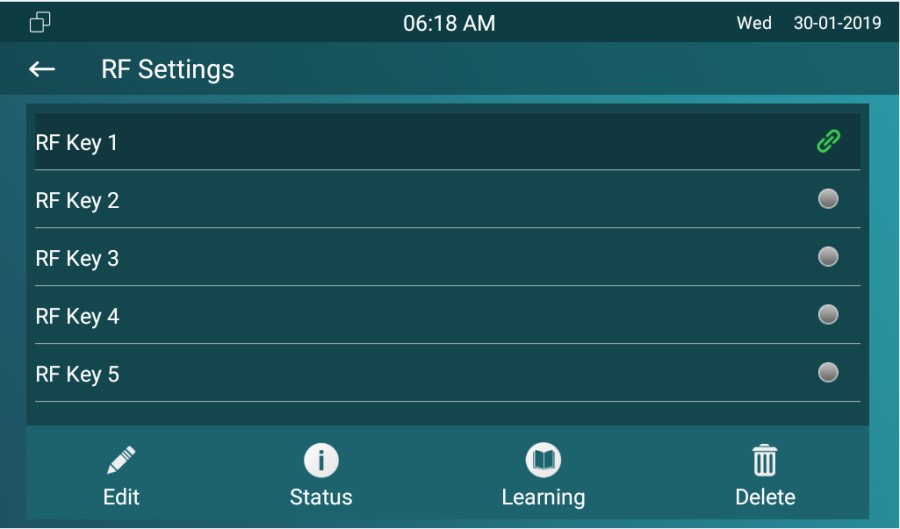
Parameters Set-up:
- Short Press When Idle: if you choose Assistance Call for short pressing which means when you press the pendant about 1s, the indoor monitor will make the pre- configured emergency call. No Action is default.
- Long Press: if you choose Unlock1/2/3 for long pressing which means when you press the pendant about 3s, it will send out an unlocking signal to the door phone during a call.
Multicast Configuration
La fonction Multicast permet la diffusion un-à-plusieurs pour différentes finalités. Par exemple, il permet au moniteur intérieur d’annoncer des messages de la cuisine vers d’autres pièces ou de diffuser des notifications du bureau de gestion vers plusieurs endroits. Dans ces situations, les moniteurs d’intérieur peuvent écouter ou envoyer des émissions audio.
Cliquez ici pour regarder la vidéo de démonstration.
Go to the web Phone > Multicast interface.
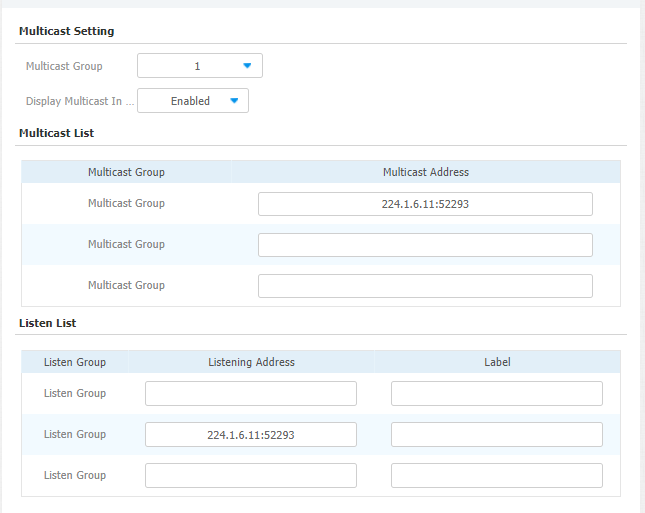
Parameter Set-up:
- Multicast Group: set the indoor monitor in one of the groups or disable this function.
- Display Multicast In Homepage: if you disable it, the All Call on the left side of the device screen will be hidden.
- Multicast List: to fill in the parameters of the multicast group. Indoor monitor will establish multicast calls to other indoor monitors which are set in the multicast group.
- Listen List: to fill in the parameters of listen group. Indoor monitor will receive multicast calls if some indoor monitors call the listening group.
- Label: to show the label name on the calling interface if users establish all calls.
Call Forwarding Setting
La réélection d’appel est une fonctionnalité qui permet de transférer les appels entrants vers un autre numéro. Les utilisateurs peuvent configurer le transfert d’appels selon différentes situations, comme le transfert constant des appels, le transfert des appels lorsque le moniteur intérieur est occupé, ou lorsqu’il ne répond pas.
Call Forwarding Configuration on the Device
To do the configuration on the Device Settings > Call Feature interface.
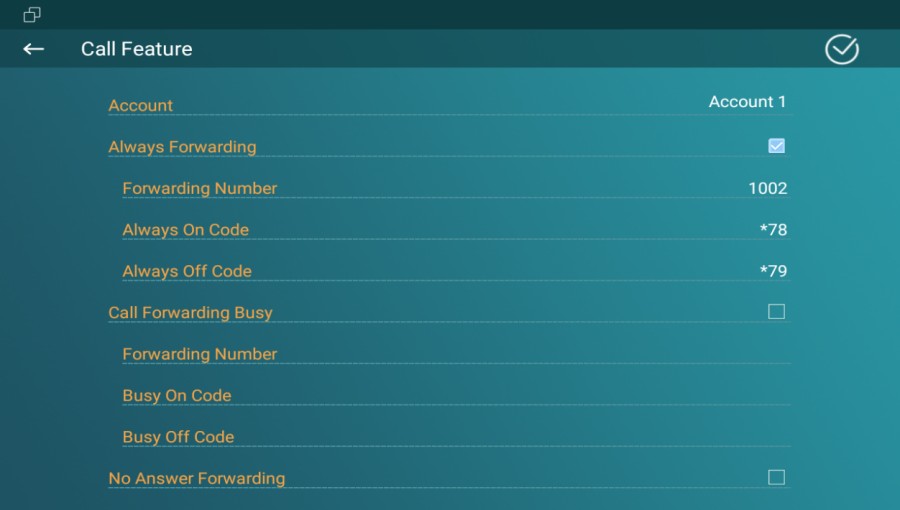
Parameter Set-up:
- Account: to choose which account to implement the call forwarding feature.
- Always Forwarding: to enable the always forwarding function; all incoming calls will be automatically forwarded to a specific number.
- Call Forwarding Busy: to enable the busy forwarding function; incoming calls will be forwarded to a specific number if the phone is busy.
- No Answer Forwarding: to enable the no answer forwarding function; incoming calls will be forwarded to a specific number if the phone is not picked up within the no answer ring time.
- Capture Path: select the storage location for all the captured pictures.
Call Forwarding Configuration on the Web Interface
To set up the forward function on web Phone > Call Feature > Forward Transfer interface.
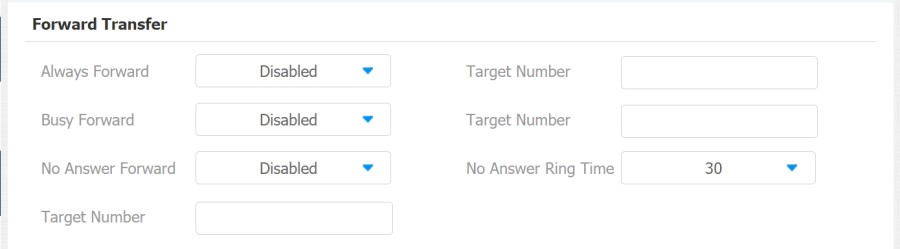
Parameter Set-up:
- Always Forward: to enable the Always Forward function; all incoming calls will be automatically forwarded to a specific number.
- Busy Forward: to enable the Busy Forward function; incoming calls will be forwarded to a specific number if the phone is busy.
- No Answer Forward: to enable the No Answer Forward function; incoming calls will be forwarded to a specific number if the phone is not picked up within the answer ring time.
- Target Number: to enter the specific forwarding number if IT83 enables always forwarding / busy forward / no answer forward.
- No Answer Ring Time: set the no answer time interval from 0-120 seconds before the call is transferred to a designated number.