Pour assurer un fonctionnement normal, assurez-vous que l’adresse IP de l’appareil est correctement configurée ou obtenue automatiquement depuis le serveur DHCP.
Pour le configurer, allez dans Réseau > interface Basic .
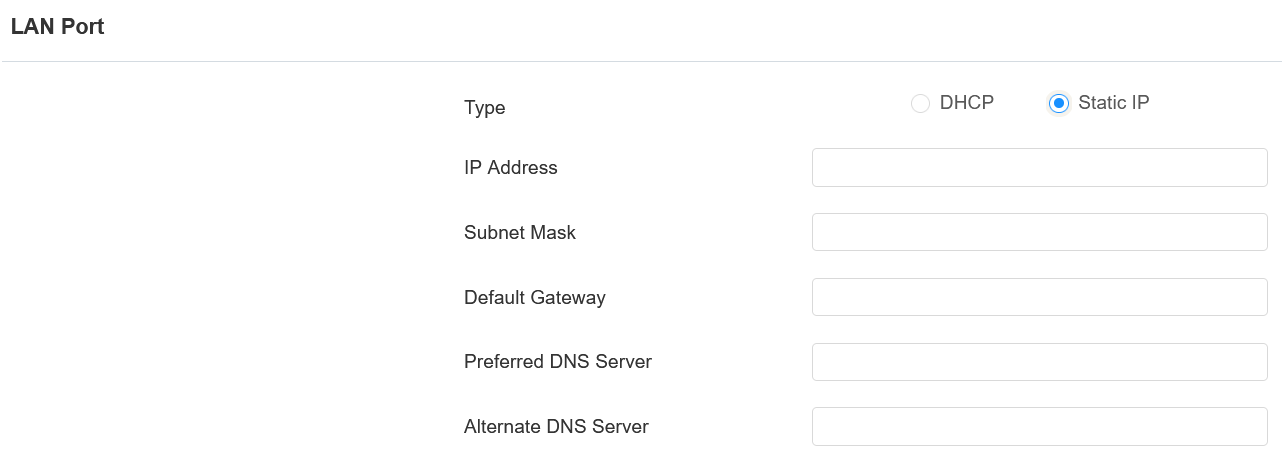
DHCP : Le mode DHCP est la connexion réseau par défaut. Si le mode DHCP est sélectionné, alors l’appareil sera automatiquement assigné par le serveur DHCP avec une adresse IP, un masque de sous-réseau, une passerelle par défaut et une adresse serveur DNS.
IP statique : Lorsque le mode IP statique est sélectionné, l’adresse IP, le masque de sous-réseau, la passerelle par défaut et l’adresse du serveur DNS doivent être configurés manuellement selon l’environnement réseau réel.
Adresse IP : Configurez l’adresse IP lorsque le mode IP statique est sélectionné. Pour accéder aux paramètres web de l’appareil avec l’IP, votre ordinateur doit être sur le même réseau local que l’appareil.
Masque de sous-réseau : Un masque de sous-réseau indique à votre appareil quelles adresses IP font partie de votre réseau local et lesquelles ne le font pas. Par exemple, si le masque de sous-réseau est 255.255.255.0, cela signifie que les appareils avec des IP de départ similaires (comme 192.168.1.x) sont dans le même réseau.
Passerelle par défaut : La passerelle est comme un pont entre votre appareil et d’autres réseaux, comme Internet. En général, c’est l’adresse IP de votre routeur.
Serveur DNS préféré/alternatif : Configurez le serveur DNS préféré ou alternatif selon l’environnement réseau réel. Le serveur DNS préféré est le serveur principal, tandis que le serveur DNS alternatif est le serveur secondaire. Le serveur secondaire sert de sauvegarde.
Cadre SNMP
Le protocole simple de gestion réseau (SNMP) est un protocole pour gérer les dispositifs réseau IP. Il permet aux administrateurs réseau de surveiller les appareils et de recevoir des alertes pour des conditions qui méritent une attention particulière. SNMP fournit des variables décrivant la configuration du système, organisées en hiérarchies et décrites par des bases d’information de gestion (MIB).
Pour le configurer, allez dans Réseau > Interface Avancée .
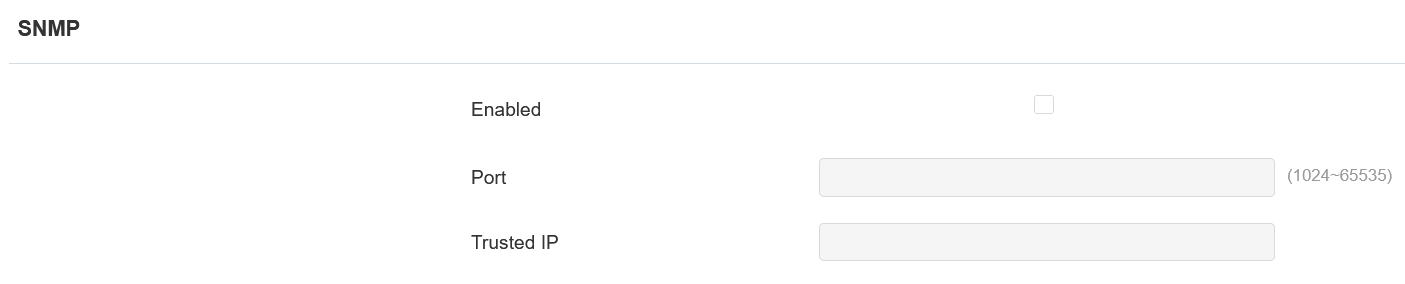
Port : Définir un port spécifique pour la transmission de données de 1024 à 65535.
IP de confiance : Saisissez l’adresse IP tierce.
Paramètres HTTP Web du périphérique
Cette fonction gère l’accès aux sites web de l’appareil. L’appareil prend en charge deux méthodes d’accès à distance : HTTP et HTTPS (chiffrement).
Configurez-le sur l’interface Réseau > Avancée .

Redirection HTTP : Elle est activée par défaut, ce qui signifie que toutes les requêtes HTTP seront automatiquement redirigées vers HTTPS. S’il est désactivé, l’interface web de l’appareil peut être accessible directement via HTTP.