Language
You can switch the web language in the upper right corner.
The device supports English, Simplified Chinese, and Spanish.

You can customize interface text including configuration names and prompt text.
To set it up, go to Setting > Time/Lang interface. Export and edit the .json file. Then import the file to the device.

Time
Les réglages d’heure de l’interface web permettent de configurer l’adresse du serveur NTP pour une synchronisation automatique de l’heure et de la date. Une fois un fuseau horaire sélectionné, l’appareil notifiera le serveur NTP du fuseau horaire choisi, lui permettant de synchroniser les réglages du fuseau horaire sur votre appareil.
To set up time, go to Setting > Time/Lang interface.
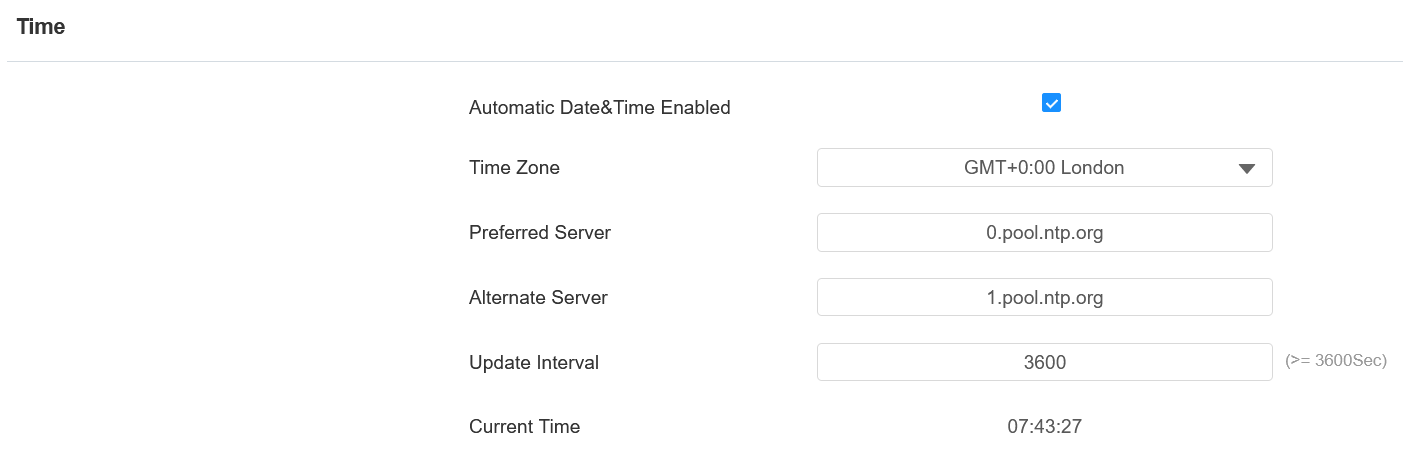
Automatic Date&Time Enabled: Set whether the device updates the time automatically via the Network Time Protocol(NTP) server.
Date/Time: Set the date and time for the device manually when you disable the automatic date and time service.
Time Zone: Select the specific time zone based on where the device is used. The default time zone is GMT+0:00.
Preferred Server: Enter the primary NTP server address for updating the time. The default NTP server address is 0.pool.ntp.org.
Alternate Server: Enter the backup NTP server address when the primary one fails.
Update Interval: Set the time update interval. For example, if you set it as 3600s, the device will send a request to the NTP server for the time update every 3600 seconds.
Current Time: Display the current device time.