Product Overview
Product Features
Tamper Alarm
Activated if the anti-pry switch is loosened or the external panel is forced away from the door surface.
A 60-second voice warning and audible alarm will sound, and the built-in camera will capture a snapshot which is recorded in the log.
Failed Attempt Alarm and Lockout
If an unauthorized access credential is used:
1st - 2nd failed attempt: “Verification failed” voice prompt.
3rd - 4th failed attempt: A beeping alarm sounds.
5th failed attempt: Lock enters a 90-second lockout. No unlocking is allowed.
TIP:
To cancel the lockout, power off the lock, then power it back on.
To exit lockout:
Wait 90 seconds for the lockout to clear automatically, or
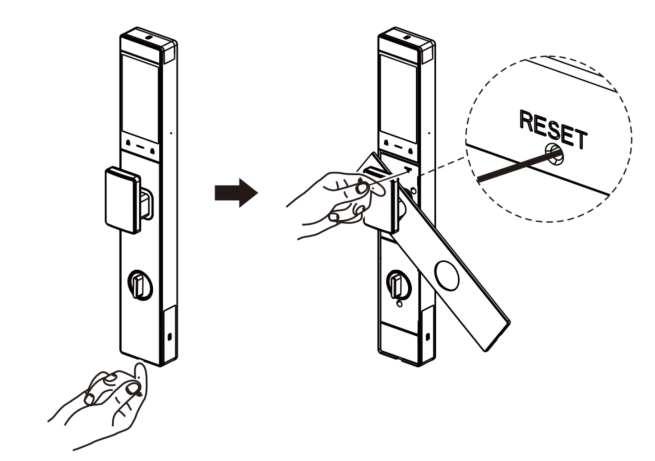
Unlock the door using a mechanical key, then press the Reset button.
Loitering Alarm
Triggered when an individual remains within the detection zone without a successful face or palm vein verification. If the preset timeout is reached, the lock initiates a voice warning and captures a snapshot.
Detection resets if the lock senses no movement for 5 seconds or if a successful unlock occurs.
Two-Factor Authentication (Dual Authentication)
For enhanced security, the lock can require two different credential types (e.g., Fingerprint + PIN) for entry.
This feature is automatically disabled if fewer than two credential types are registered in the system.
Low Battery Alert
When battery levels are critical, the lock will provide specific voice prompts:
“Top Battery Low": Replace/recharge the Main battery pack.
"Bottom Battery Low": Replace/recharge the Auxiliary battery pack.
Approximately 100 unlocks remain after the first alert. Replace batteries immediately to prevent lockout.
Door Status Alert
If the door is not fully latched or closed improperly, the lock will announce "Door is not closed securely" with an audible "tik" sound for 60 seconds.
Fake PIN Code
To prevent others from guessing your PIN, you can enter random digits before and/or after the correct PIN.
Doorbell
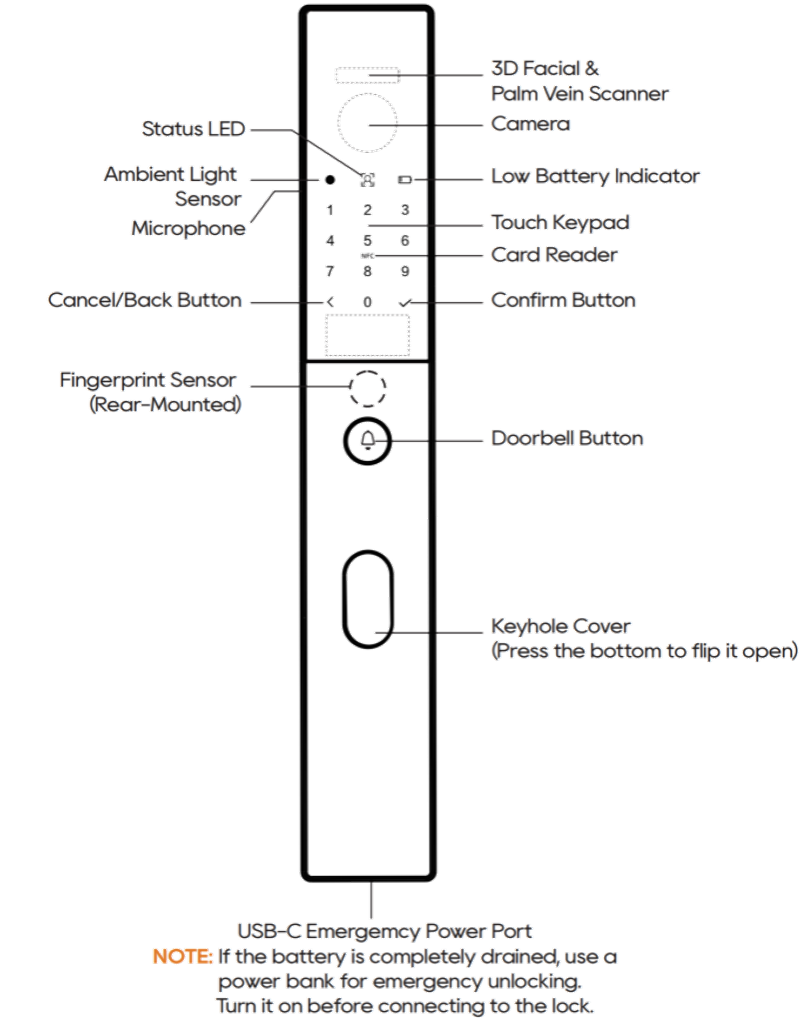
In standby mode, press the doorbell button to ring the doorbell.
The BelaHome app and HyPanel devices (if paired) will receive an unlock request notification.
Deadlock
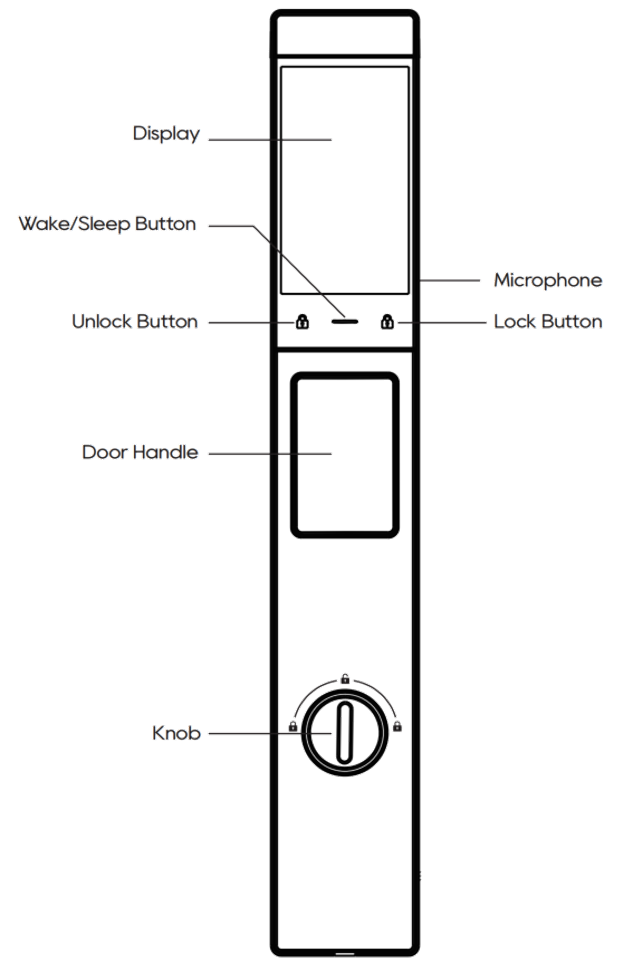
Rotate the thumbturn to engage the security bolt.
NOTE:
Once the deadlock is engaged, the door cannot be unlocked from outside by any method. Access can only be restored after the deadlock is manually disengaged from the inside.
Access Credential Capacity
Credential Type | Total Capacity (Admin + Users) |
PIN code | 100 |
Card | 50 |
Fingerprint | 100 |
Face data | 50 |
Palm vein | 50 |
Factory Reset
A factory reset permanently deletes all registered user data, restores the device to its default configuration, and unbinds the lock from the akubela system.
To factory reset the lock:
Lift the back faceplate from the bottom notch to expose the internal panel.
Use a pin to hold the Reset button at the top for 10 seconds.
When prompted by the voice, tap the ✔ key on the keypad.
Wait for the voice to confirm "Factory reset completed."
Reattach the faceplate.