Integration via Wiegand
The device can be integrated with third-party devices via Wiegand.
Set it up on the Device > Wiegand interface.
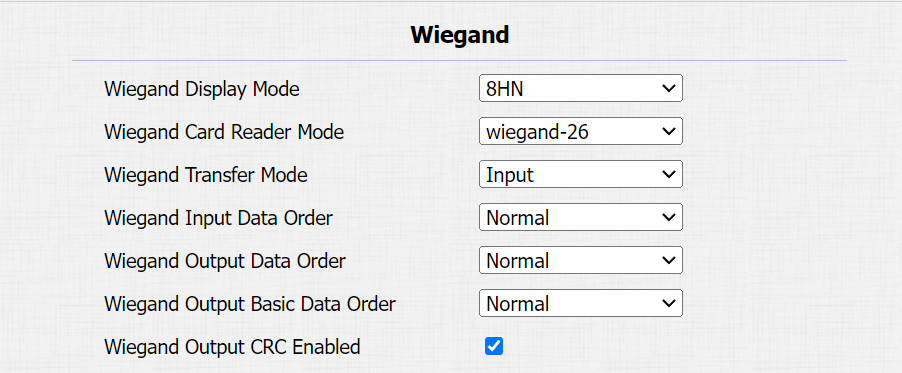
Wiegand Display Mode: Select the Wiegand card code format from the provided options.
Wiegand Card Reader Mode: The transmission format should be identical between the door phone and the third-party device.
Wiegand Transfer Mode:
Input: The device serves as a receiver.
Output: The device serves as a sender and can directly output the data, such as a card code.
Convert To Card No. Output: The device serves as a sender and cannot directly output the data.
Wiegand Input Data Order: Set the Wiegand input data sequence between Normal and Reversed. If you select Reversed, then the input card number will be reversed.
Wiegand Output Data Order: Determine the sequence of the card data after the Wiegand conversion.
For example, if the card data is 0x11 0x22 0x33 0x44 0x55, it will be 0x33 0x44 0x55 after the Wiegand conversion(e.g., Wiegand 26). If Reversed is selected, the card data is 0x55 0x44 0x33.
Wiegand Output Basic Data Order: Set the sequence of the card data before going through Wiegand conversion and outputting the card code.
For example, if the card data is 0x11 0x22 0x33 0x44 and the Reversed option is selected, the data will be 0x44 0x33 0x22 0x11.
Wiegand Output CRC Enabled: It is enabled by default for Wiegand data inspection. Disabling it may lead to integration failure with third-party devices.
Note
Click here to view more information on Wiegand settings including:
Akuvox devices work as Wiegand input/output;
Wiegand Card Reader Connection.
Facility Code Setting
A facility code is a unique number in access control cards. It identifies the device that issued the card.
When the Wiegand Transfer Mode is Output, you can set up the facility code on the Device > Wiegand interface.

Facility Code: The value ranges from 0 to 255. If filled in, the first two digits of the card number will be replaced by the code. If the code is less than 2 digits, a zero will be automatically added to the card number.
Tip
Since the Facility Code replaces the first two digits of the original card number, to keep the original card number intact, you can manually configure the Wiegand Card Reader Mode.
For example, if the card number is 3 bytes (Wiegand-26), you can select Wiegand-34 (4 bytes) to ensure the Facility Code replaces the first two digits with 0 instead of the original number.
Integration via HTTP API
HTTP API is designed to achieve a network-based integration between the third-party device and the Akuvox device.
Set it up on the web Setting > HTTP API interface.
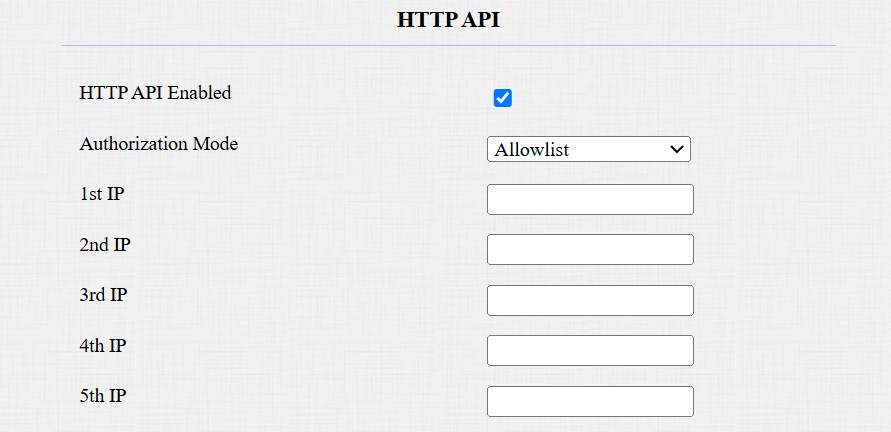
HTTP API Enabled: Enable or disable the HTTP API function for third-party integration. If the function is disabled, any request to initiate the integration will be denied and return HTTP 403 forbidden status.
Authorization Mode: It is Digest by default. You are required to fill in the username and password for the authentication. In the Authorization field of the HTTP request header, use the Base64 encode method to encode the username and password.
User Name: Enter the user name for authentication. The default is admin.
Password: Enter the password for authentication. The default is admin.
1st IP-5th IP: Enter the IP address of the third-party devices when the Allowlist authorization is selected for the integration.
Please refer to the following description for the authentication mode:
NO. | Authorization Mode | Description |
|---|---|---|
1 | None | No authentication is required for HTTP API as it is only used for demo testing. |
2 | Allowlist | If this mode is selected, you are only required to fill in the IP address of the third-party device for the authentication. The allowlist is suitable for operation in the LAN. |
3 | Basic | If this mode is selected, you are required to fill in the username and password for the authentication. In the Authorization field of the HTTP request header, use the Base64 encode method to encode the username and password. |
4 | Digest | The password encryption method only supports MD5. MD5( Message-Digest Algorithm) in Authorization field of HTTP request header: WWW-Authenticate:Digest realm="HTTPAPI",qop="auth,auth-int",nonce="xx", opaque="xx". |
5 | Token | This mode is used by Akuvox developers only. |