Integration via Wiegand
The Wiegand feature enables the Akuvox device to act as a controller or a card reader.
Set it up on the Intercom > Wiegand interface.
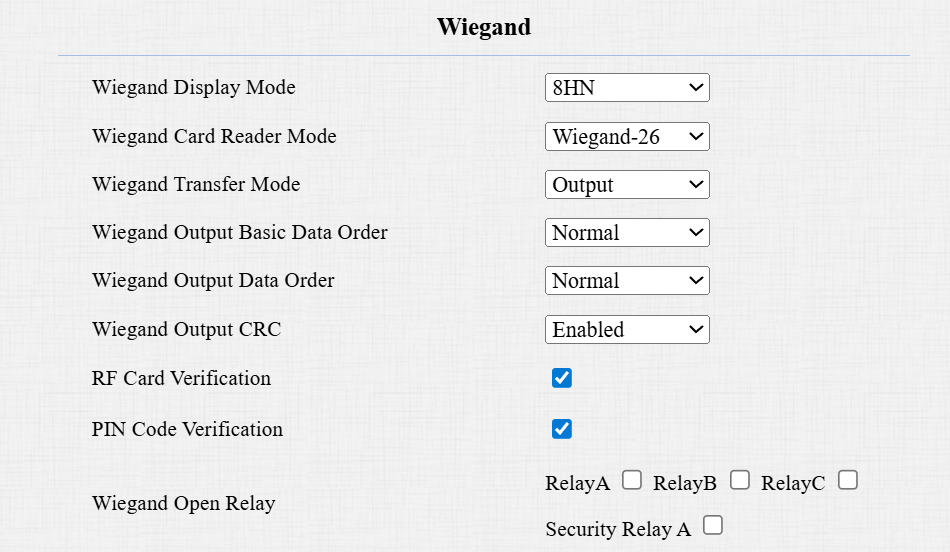
Wiegand Display Mode: Select the Wiegand card code format from the provided options.
Wiegand Card Reader Mode: The transmission format should be identical between the door phone and the third-party device. It is automatically configured.
Wiegand Transfer Mode:
Input: The device serves as a receiver.
Output: The device serves as a sender. If users can only open the door by swiping an RF card, select the Wiegand transfer mode as Output.
Convert To Card No. Output: The device serves as a sender. If users are assigned multiple door-opening methods, select the Wiegand transfer mode as Convert To Card No. Output.
Wiegand Input Data Order: Set the Wiegand input data sequence between Normal and Reversed. If you select Reversed, then the input card number will be reversed.
Wiegand Output Basic Data Order: Set the sequence of the card data before going through Wiegand conversion and outputting the card code.
For example, if the card data is 0x11 0x22 0x33 0x44 and the Reversed option is selected, the data will be 0x44 0x33 0x22 0x11.
Wiegand Output Data Order: Determine the sequence of the card data after the Wiegand conversion.
For example, if the card data is 0x11 0x22 0x33 0x44 0x55, it will be 0x33 0x44 0x55 after the Wiegand conversion(e.g., Wiegand 26). If Reversed is selected, the card data is 0x55 0x44 0x33.
Wiegand Output CRC: It is enabled by default for Wiegand data inspection. Disabling it may lead to integration failure with third-party devices.
RF Card/PIN Code Verification: Available when Output or Convert to Card No. Output is selected.
When enabled, the device will verify whether the card code/PIN code is assigned to a user. If it is not, a prompt "Opening Door Failed" will pop up on the door phone screen.
When disabled, the door phone will not perform local verification.
Wiegand Open Relay: Check the relay to be triggered through Wiegand.
Note
Click here to view more information on Wiegand settings including:
Akuvox devices work as Wiegand input/output;
Wiegand Card Reader Connection.
When the device is in Wiegand Output mode, you can set the Wiegand PIN code output format that determines how data is transmitted and the PIN output order. The format should be consistent with that of the third-party device.
Set it up on the Intercom > Wiegand > Convert To Wiegand Output interface.
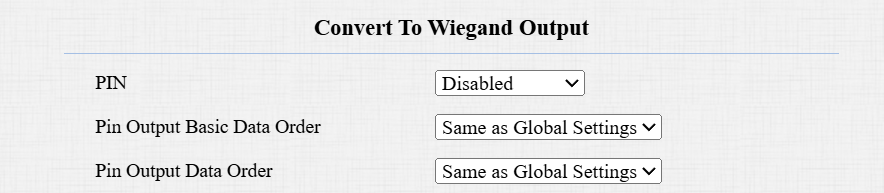
PIN:
8 bits per digit: When users press "1" on the keypad, the binary data will be transmitted in 8 bits, "11100001".
4 bits per digit: When users press "1" on the keypad, the binary data will be transmitted in 4 bits, "0001".
All at once: After users enter the whole PIN code, the data will be transmitted according to the Wiegand card reader mode.
PIN Output Basic Data Order:
Same as Global Settings: Same as the Wiegand Output Basic Data Order.
Normal: Output the PIN data as it is before Wiegand conversion.
Reversed: Reverse the PIN data before Wiegand conversion.
PIN Output Data Order:
Same as Global Settings: Same as the Wiegand Output Data Order.
Normal: Output the PIN data directly after the Wiegand conversion.
Reversed: Reverse the PIN data after the Wiegand conversion.
Note
The PIN output(basic) data order setting has the highest priority in the Wiegand output settings.
For example, if the PIN is 1234 and you set the PIN output order to be Normal, the basic output data to be Reversed, and the Wiegand card reader mode to be Wiegand 34.
The PIN data will be reversed before going through Wiegand 34 and output.
Original Data
Wiegand 34
000004D2
D2040000
Integration via HTTP API
HTTP API is designed to achieve a network-based integration between the third-party device and the Akuvox device.
Set it up on the Intercom > HTTP API interface.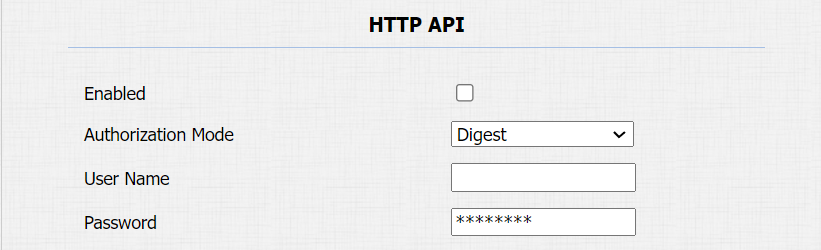
Enabled: Enable or disable the HTTP API function for third-party integration. If the function is disabled, any request to initiate the integration will be denied and return HTTP 403 forbidden status.
Authorization Mode: It is Digest by default.
Basic: If this mode is selected, you are required to fill in the username and password for the authentication. In the Authorization field of the HTTP request header, use the Base64 encoding method to encode of username and password.
Digest: The password encryption method only supports MD5(Message-Digest Algorithm). In the Authorization field of the HTTP request header: WWW-Authenticate: Digest realm="HTTPAPI",qop="auth,auth-int",nonce="xx", opaque="xx".
User Name: Enter the user name for authentication. The default is admin.
Password: Enter the password for authentication. The default is admin.
Power Output Control
The device can serve as a power supply for the external relays. Click here to view power output requirements.
To set up this feature, go to the Intercom > Advanced >12V Power Output interface.
Power Output Type:
Always: Provide continuous power to the third-party device.
Triggered by Open Relay: Provide power to the third-party device via 12 output and GND interface during the timeout when the status of relays is shifted from low to high.