Integration via HTTP API
HTTP API is designed to achieve a network-based integration between the third-party device and the Akuvox device.
Set it up on the web Setting > HTTP API interface for the integration.
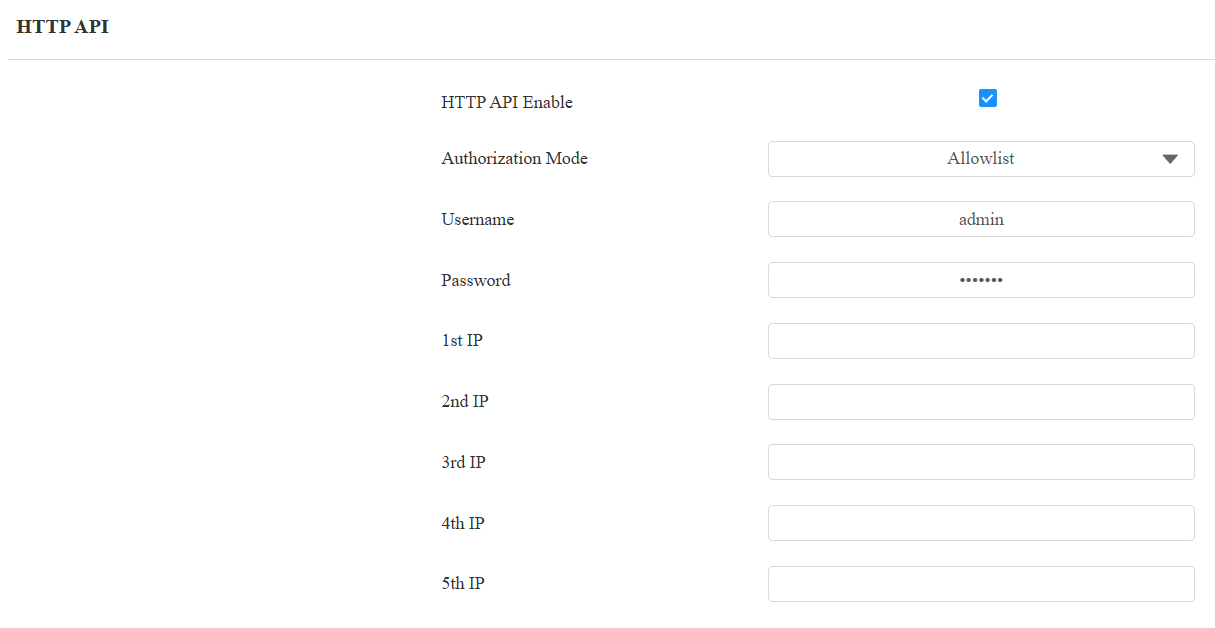
HTTP API Enabled: Enable or disable the HTTP API function for third-party integration. If the function is disabled, any request to initiate the integration will be denied and return HTTP 403 forbidden status.
Authorization Mode: Select among the following options: None, Normal, Allowlist, Basic, Digest, and Token for authorization type, which will be explained in detail in the following chart.
Username: Enter the username when Basic or Digest authorization mode is selected. The default username is admin.
Password: Enter the password when Basic or Digest authorization mode is selected. The default password is admin.
1st IP-5th IP: Enter the IP address of the third-party devices when the Allowlist authorization is selected for the integration.
Please refer to the following description for the authentication mode:
Authorization Mode | Description |
|---|---|
None | No authentication is required. This mode is intended for testing only and is not recommended in production environments. |
Normal | Reserved for Akuvox internal development and testing. |
Allowlist | Authenticates requests based on the source IP address. Add the IP address of the third-party device to the allowlist before sending requests. Recommended for trusted LAN environments. |
Basic | Authenticates requests using a username and password. The credentials must be Base64-encoded and included in the Authorization header. |
Digest | Authenticates requests using HTTP Digest authentication. Only the MD5 algorithm is supported. |
Token | Reserved for Akuvox internal development and testing. |
Power Output Control
The device can serve as a power supply for the external relays. Click here to view the power output requirements and the wiring example.
Set it up on the web Access Control > Relay > 12V Power Output interface.

12V Power Output:
Disabled: Disable the power output function.
Always: Provide continuous power to the third-party device.
Triggered By Open Relay: Provide power to the third-party device via the 12V output and GND interface during the timeout when the status of relays is shifted from low to high.
Time Out (Sec): Select the power supply time duration after the relay is triggered from 3, 5, or 10. It is 3 seconds by default. The power output is 12V, and the maximum output amperage is 0.5A.
Data Transmission Type for Third-Party Camera
You can select the data transmission type between the device and a third-party camera when it is connected to the SmartPlus Cloud.
To set it up, go to the Surveillance > Camera interface.

UDP: An unreliable but very efficient transport layer protocol.
TCP: A less efficient but reliable transport layer protocol. It is the default transport protocol.