Language
Select the device’s web language on the Phone > Time/Lang interface.
The following languages are supported:
English, Simplified Chinese, Traditional Chinese, Russian, Spanish, Italian, Dutch, French, German, Polish, Japanese, and Hebrew.

Time
The time settings on the web interface allow you to configure the NTP server address for automatic time and date synchronization. Once a time zone is selected, the device will notify the NTP server of the chosen time zone, enabling it to synchronize the time zone settings on your device.
Set up time on the Phone > Time/Lang interface.
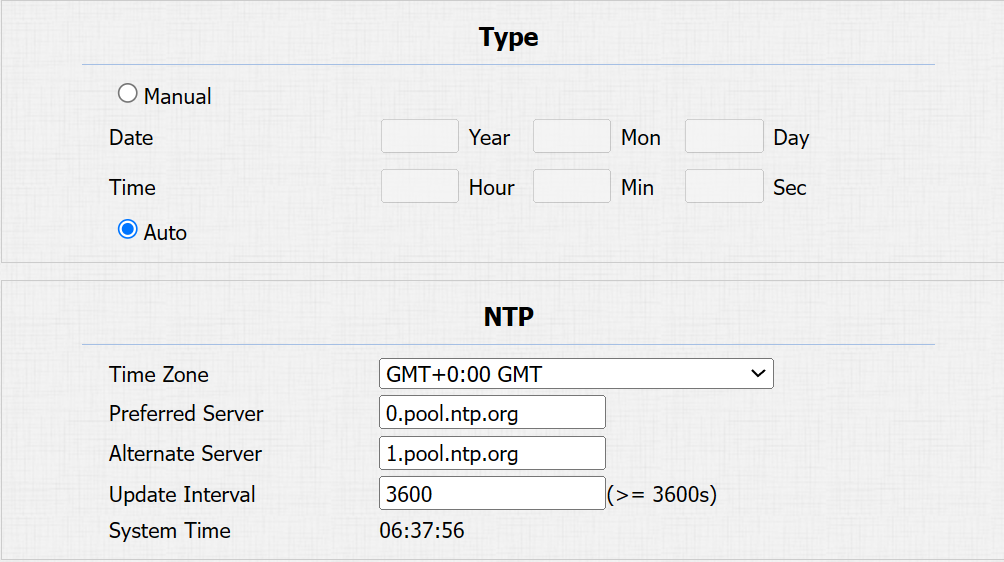
Type:
Manual: Disable the NTP server, and enter the time and date manually.
Auto: Enable the NTP server and set up the relevant parameters in the NTP section.
Time Zone: Select the time zone.
Preferred/Alternate Server: The NTP server address. The alternate server will take effect when the primary server is invalid.
Update Interval: The time interval between two consecutive NTP requests.
System Time: Display the current time obtained by the device.