Language
You can switch the device's web language in the upper-right corner.
The device web supports the following languages:
English, Simplified Chinese, Traditional Chinese, Spanish, Italian, Dutch, French, German, and Korean.
Time
The time settings on the web interface allow you to configure the NTP server address for automatic time and date synchronization. Once a time zone is selected, the device will notify the NTP server of the chosen time zone, enabling it to synchronize the time zone settings on your device.
To set it up, go to Setting > Time interface.
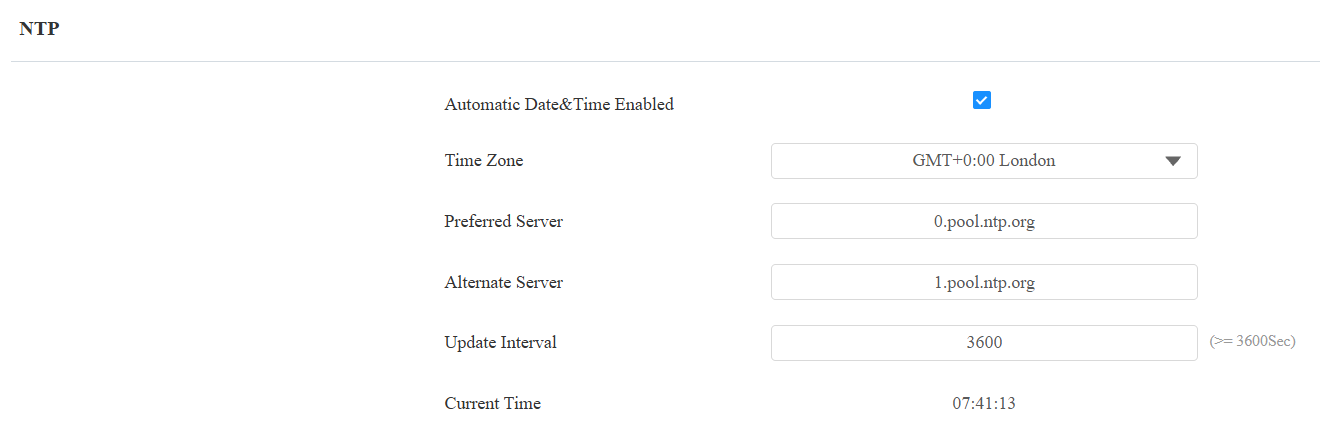
Automatic Date&Time Enabled: The automatic date is switched on by default, which allows the date & time to be automatically set up and synchronized with the default time zone and the Network Time Protocol(NTP) server. You can also set it up manually by switching off the automatic date and entering the time and date.
Preferred Server: Enter the primary NTP server address for updating the time. The default NTP server address is 0.pool.ntp.org.
Alternate Server: Enter the backup NTP server address when the primary one fails.
Update Interval: Set the time update interval. For example, if you set it to 3600 seconds, the device will send a request to the NTP server for a time update every 3600 seconds.
Current Time: Display the current device time.