LED Fill Light
LED fill light is mainly designed to reinforce the light for facial recognition at night or in a dark environment, you can configure the LED light on the web interface.
You can navigate to Device > LED Setting > LED Fill Light.
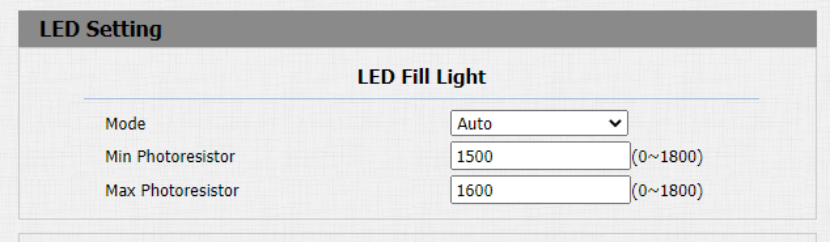
Parameter Set-up:
-
Mode: select “Auto” if you want the LED light to be turned off automatically according to the setting. Select “Always OFF” to turn off the LED light. LED mode is set “Auto” by default.
-
Min/Max Photoresistor: set the minimum and maximum photoresistor value based on the current actual photo-resistor value detected to control the ON-OFF of the LED light. You can set the maximum photoresistor value for the LED to be turned on and the minimum value for it to be turned off. While the default Minimum and maximum photoresistor value are from “0” minimum to “1800” maximum respectively.
Indicator Light
LED display adjustment is used to indicate the light changes of the call button in 5 statuses: normal (idle), offline, calling, talking, and receiving a call. The LED status allows users to verify the current mode of the device.
To set up on device web Device > LED Setting > Light of the Button interface.
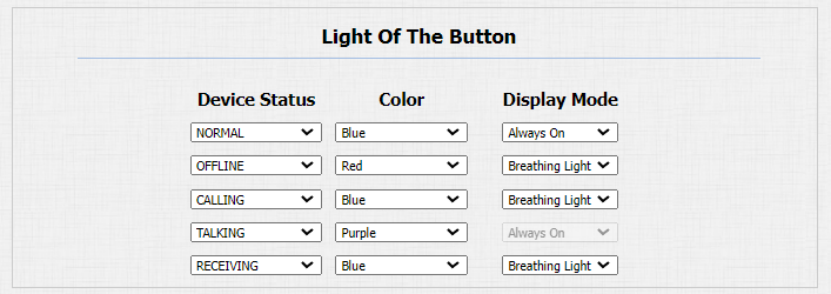
Parameters Set-up:
- State: there are five states: Normal, Offline, Calling, Talking and Receiving.
- LED Color: it can support three colors: Red, Purple, Blue.
- LED Display Mode: to set up the different blink frequencies.
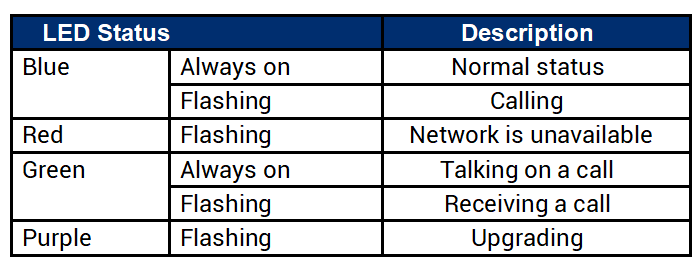
- The Status and Color of item cannot be changed.
- The LED of upgrading mode cannot be adjusted.
White Light
LED White Light is used to reinforce the lighting in the dark environment. You can set the white light function properly on the device web interface. Path: Device > LED Setting > White Light.

Parameters Set Up:
- Mode: set the white light value from 1-3, and the default white light value is 1. The greater value it is, the brighter the light will be.