Call Logs
To check calls—including dial-out, received, and missed calls—within a specific period, you can view the call log on the device's web interface. If needed, you can also export the call log from the device.
Check the call log on the web Status > Call Log interface. The device supports up to 600 call logs, which can be exported in CSV format.
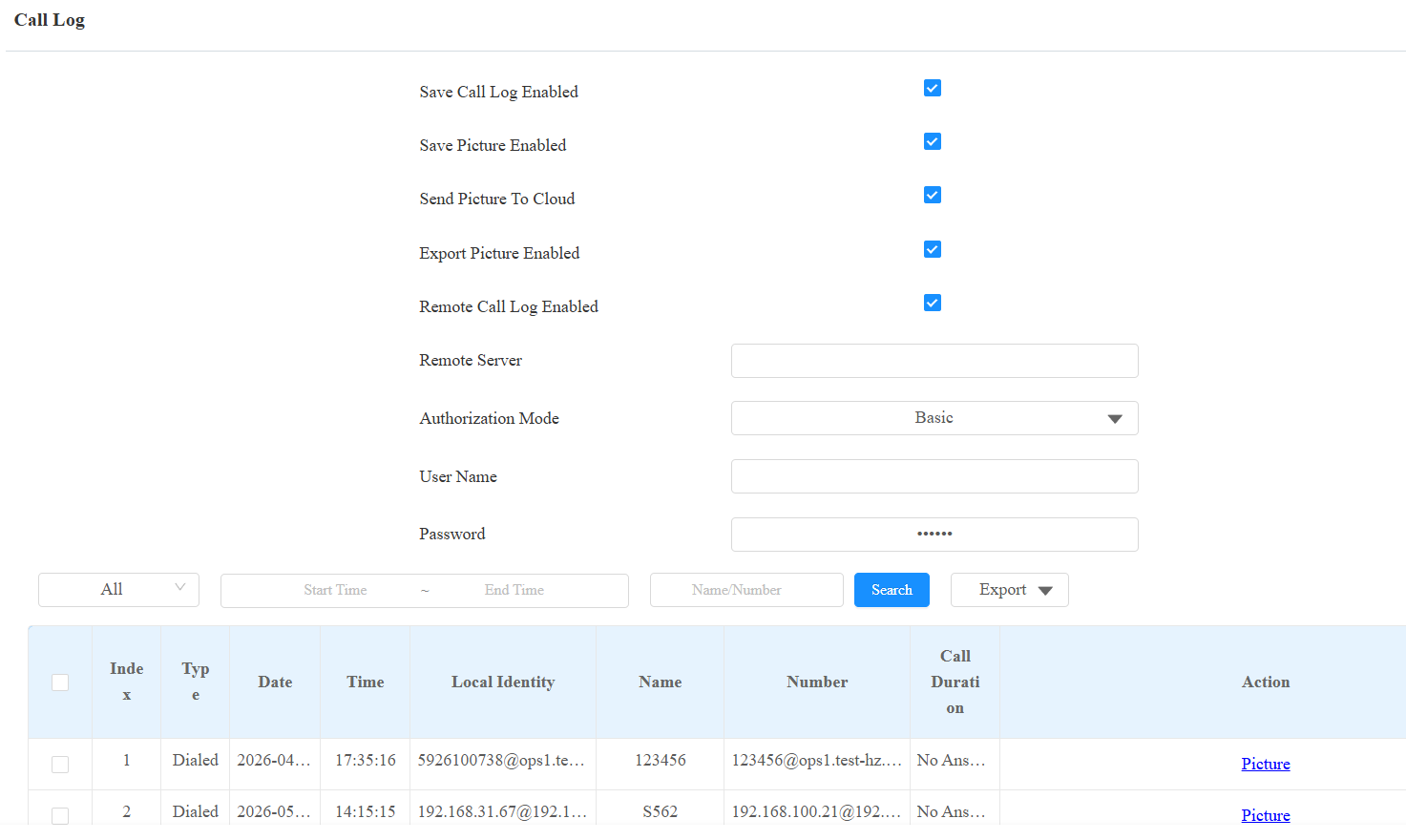
Save Picture Enabled: When enabled, the device will capture pictures of calls, and you can click Picture in the Action column to view the screenshot.
Send Picture to Cloud: Set whether to upload the images to the SmartPlus Cloud. It is enabled by default.
Export Picture Enabled: When enabled, you can export call logs with images.
Remote Call Log Enabled: Disabled by default. When enabled, the device can send call records in real time to the designated remote server.
Remote Server: The URL or IP address of the server. URLs must begin with
http://,https://, orftp://. The following characters are not permitted:&,%,',=,!,$,?, Chinese characters, or consecutive special characters such as--or@@.Authorization Mode: Specify the authentication method used when connecting to the remote server.
None: No authentication. The connection is unencrypted. Username and Password fields are hidden.
Basic(default): HTTP Basic authentication. Username and Password fields are displayed and required.
Digest: HTTP Digest authentication. Username and Password fields are displayed and required.
Username: The username credential used for authentication. Applies when Authentication Mode is set to Basic or Digest.
Password: The password credential used for authentication. Applies when Authentication Mode is set to Basic or Digest.
Call History: Four types of call history are available: All, Dialed, Received, and Missed.
Time: The specific time of the call logs you want to search, check, or export.
Name/Number: Search the call log by name or by SIP or IP number.
Door Logs
To search and review various types of door access history, simply check the door logs on the device's web interface.
Check the door log on the web Status > Access Log interface. Door logs can be exported in XML or CSV format.
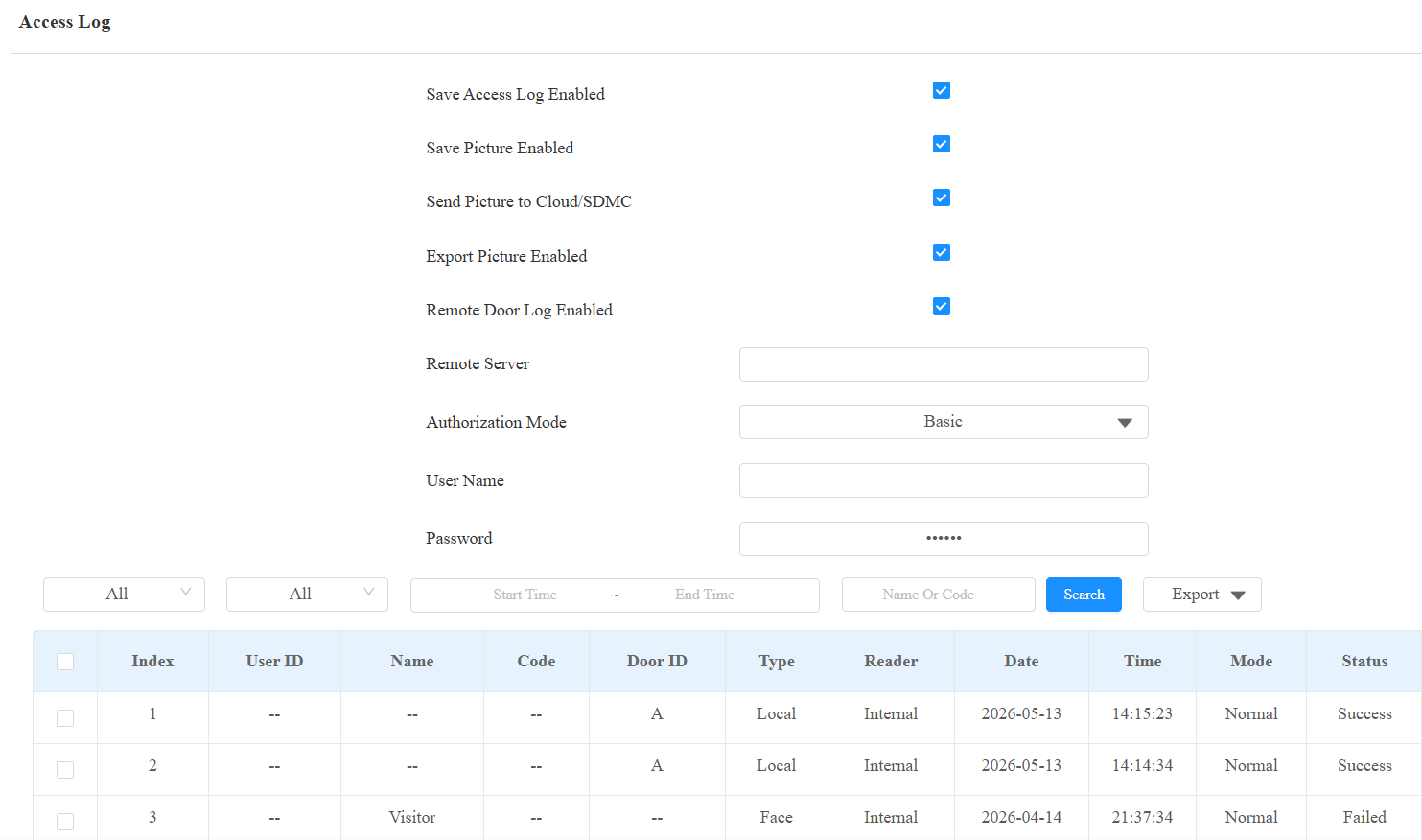
Send Picture to Cloud/SDMC: Set whether to upload the images to the SmartPlus Cloud or SDMC. It is enabled by default.
Export Picture Enabled: When enabled, you can export door logs with images.
Remote Door Log Enabled: Disabled by default. When enabled, the device can send access records in real time to the designated remote server.
Remote Server: The URL or IP address of the server. URLs must begin with
http://,https://, orftp://. The following characters are not permitted:&,%,',=,!,$,?, Chinese characters, or consecutive special characters such as--or@@.Authorization Mode: Specify the authentication method used when connecting to the remote server.
None: No authentication. The connection is unencrypted. Username and Password fields are hidden.
Basic(default): HTTP Basic authentication. Username and Password fields are displayed and required.
Digest: HTTP Digest authentication. Username and Password fields are displayed and required.
Username: The username credential used for authentication. Applies when Authentication Mode is set to Basic or Digest.
Password: The password credential used for authentication. Applies when Authentication Mode is set to Basic or Digest.
All: Three types of access logs are available: All, Success, and Failed.
Time: The specific time of the call logs you want to search, check, or export.
Name/Code: Search the door log by the name or by the PIN code.
Action: Click Picture to view the captured image.
The supported number of door logs stored and exported varies by image resolution.
Resolution | Maximum Number of Stored Door Logs | Maximum Number of Exported Door Logs with 1.6G Export Capacity. |
|---|---|---|
Null, Save Picture is disabled. | 14,000 | 137,000 |
QCIF | 14,000 | 137,000 |
QVGA | 14,000 | 50,300 |
CIF | 14,000 | 37,700 |
VGA | 14,000 | 14,800 |
4CIF | 10,000 | 10,800 |
720P | 5,000 | 5,400 |
1080P | 2,500 | 2,700 |
Event Logs
The event logs record the key events such as the status change of input, relay, tamper alarm, etc. This helps track the status and changes of the device.
You can check the event logs on the Status > Event Log interface. The device supports up to 100,000 logs, which can be exported in CSV format.
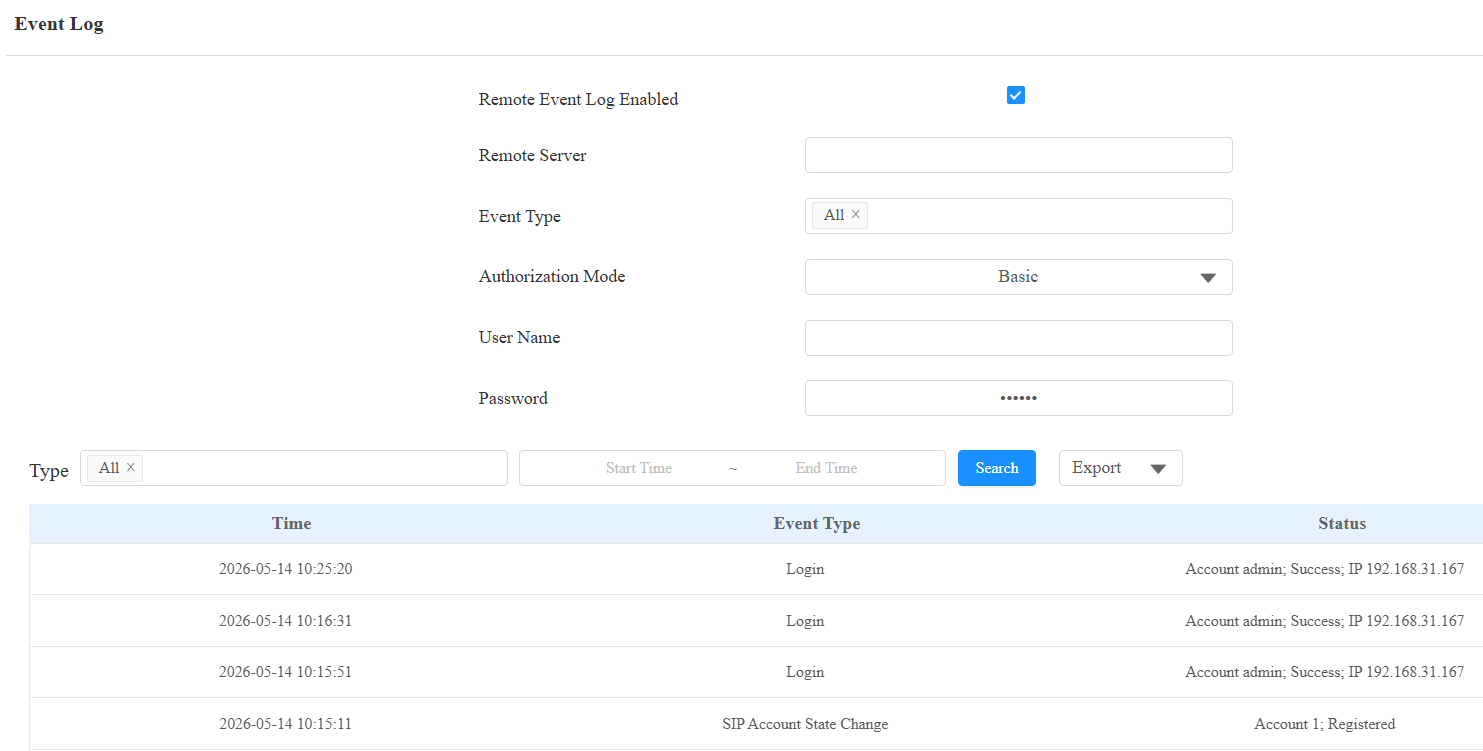
Remote Event Log Enabled: Disabled by default. When enabled, the device can send access records in real time to the designated remote server.
Remote Server: The URL or IP address of the server. URLs must begin with
http://,https://, orftp://. The following characters are not permitted:&,%,',=,!,$,?, Chinese characters, or consecutive special characters such as--or@@.Event Type: Select the event types to report to the remote server.
Authorization Mode: Specify the authentication method used when connecting to the remote server.
None: No authentication. The connection is unencrypted. Username and Password fields are hidden.
Basic(default): HTTP Basic authentication. Username and Password fields are displayed and required.
Digest: HTTP Digest authentication. Username and Password fields are displayed and required.
Username: The username credential used for authentication. Applies when Authentication Mode is set to Basic or Digest.
Password: The password credential used for authentication. Applies when Authentication Mode is set to Basic or Digest.