Configuration on the Smart Access Cloud
When the Akuvox device is deployed on the Smart Access Cloud and used in a new commercial project(created after Oct.15, 2024), you can set up input(s) on the cloud.
Note
Installers have permission to add and edit devices, while property managers can only modify devices’ settings.
The following device models with specific firmware versions or higher support synchronizing input settings from the cloud:
Model
Version
Model
Version
R29
29.30.10.404
R28V2
228.30.10.231
R25 Series
25.30.10.117
R20
320.30.11.30
X915V2
2915.30.10.420
X916
916.30.10.508
X912
912.30.11.107
X910
2910.30.11.28
E16V2
216.30.10.208
S535
535.30.11.8
S539
539.30.10.507
A08
108.30.11.8
A01/A02
101.30.10.206
A03
103.30.10.204
A05
205.30.11.114
A094
92.30.10.205
A095
95.30.10.110
E16V3
416.30.11.206
E12V2
312.30.11.106
WR01
1401.30.11.221
S532
532.30.10.336
E18
18.30.11.136
A15
1115.30.10.407
Take an installer account as an example.
Log in to the cloud with your account.
Navigate to the target project and click Devices on the left column.
Click New to add a device or click
 to modify a device’s settings.
Select the relay to be triggered by pressing the exit button.
Select the input that is connected to the button.
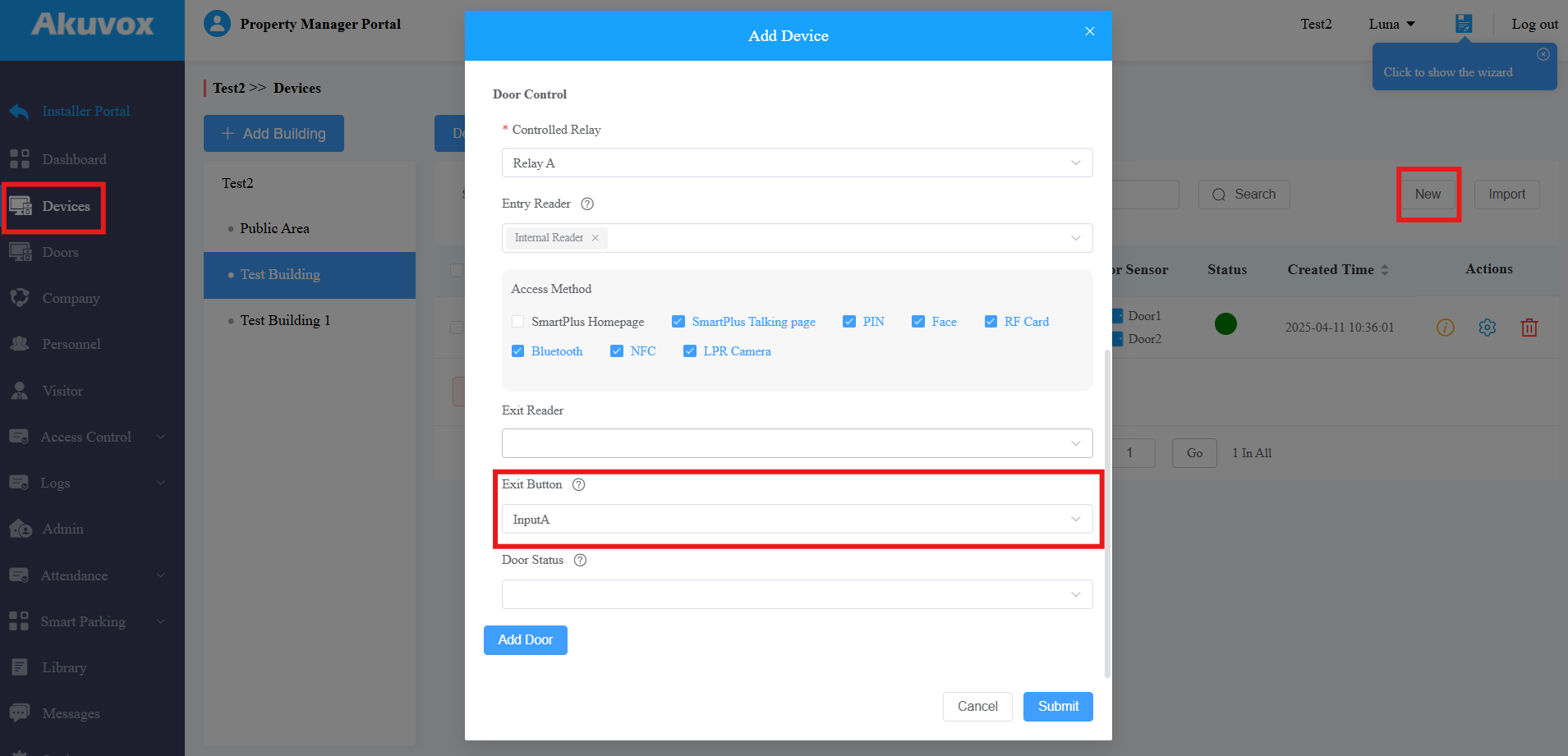
Click Submit.