Reboot
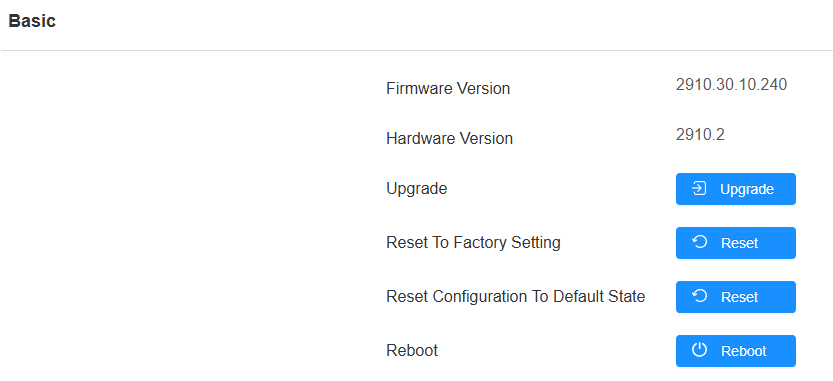
If you want to restart the device system, you can operate it on the device web. Moreover, you can set up a schedule for the device to be restarted.
Navigate to the System > Upgrade interface.
To set up the schedule, go to the System > Auto Provisioning interface.

Reset
The device provides two reset options:
Reset to Factory Setting: Reset all data to the factory default.
Reset Configuration to Default State: Retain the user data, such as the RF cards, face data, schedules, and call logs.
Reset the device on the web System > Upgrade interface.
Tip
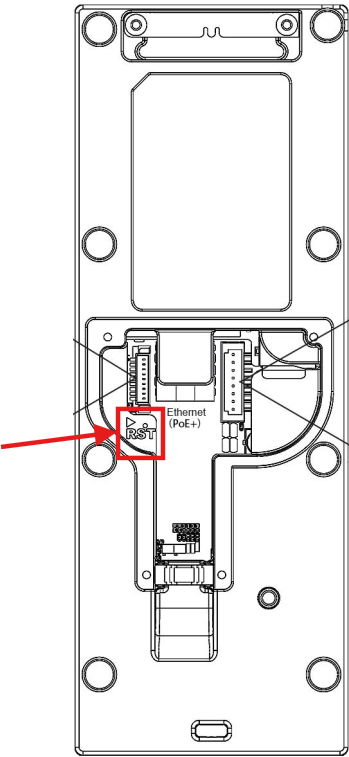
The device also support resetting via a physical button on its back.
Remove its back cover, insert a PIN into the hole and hold it for about 3 seconds.
The backlight of the card reader area and fill light will light up, and the device goes into factory reset and reboot.