The local contact information is used to initiate SIP or IP calls to users. Moreover, the contact list functions as a whitelist, allowing only listed numbers to open doors via DTMF during calls. The door phone can store up to 1,000 contacts.
You can search, create, edit, and delete the contacts.
Set it up on the Directory > Directory Setting interface.
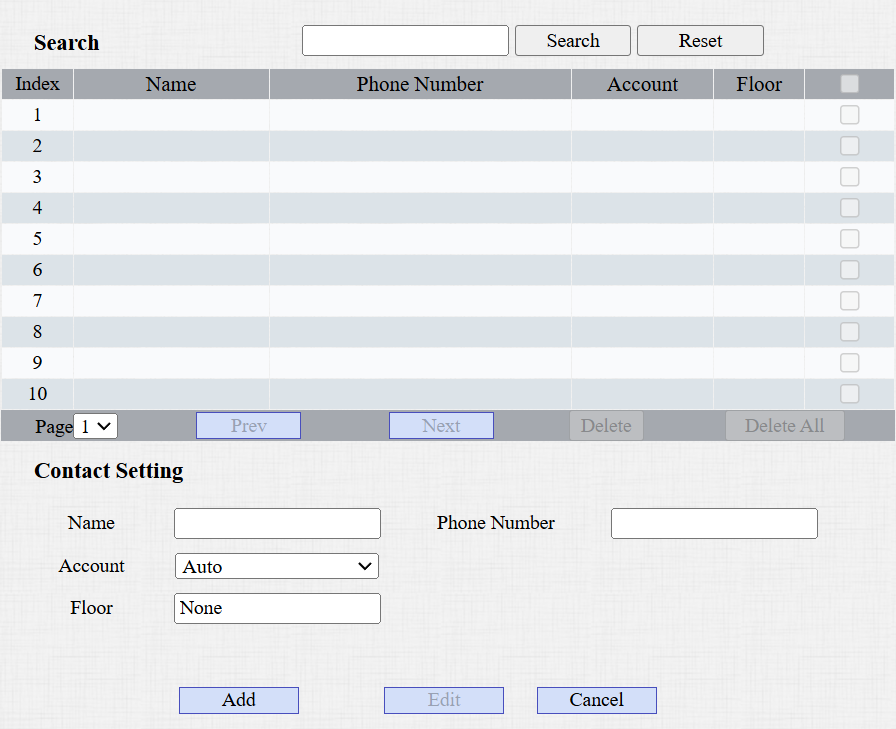
Name: Name the contact.
Phone Number: The phone number of the contact. It supports IP addresses and SIP numbers.
Account: Select the account to receive the call from the contact.
Floor: Specify the accessible floor(s) to the contact via the elevator.
Cloud Call Permission Control
This option displays when the device is connected to the SmartPlus Cloud. It decides whether to link the SmartPlus user’s permissions to open doors and make calls.
Enable/disable it on the Directory > Directory Setting interface. It is enabled by default.

For example, when users are not authorized to open doors during a specific time and the Cloud Call Permission Control feature is enabled, their SmartPlus App and/or indoor monitors will not receive calls from the door phone.
If this feature is disabled, even if users cannot open doors, they can receive calls.