Integration via Wiegand
The access control terminal can be integrated with third-party devices via Wiegand.
To set it up, go to Device > Wiegand interface.
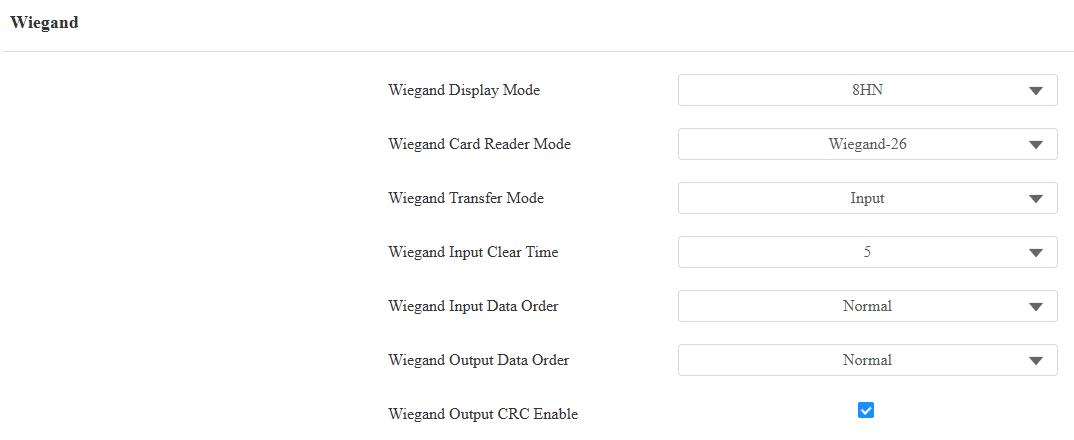
Wiegand Display Mode: Select the Wiegand card code format from the provided options: 8H10D, 6H3D5D, 6H8D, 8HN, 8HR, RAW, 8HR10D, and 6H3D5D-R.
Wiegand Card Reader Mode: The transmission format should be identical between the access control terminal and the third-party device. The device supports Wiegand 64 output mode. To enable this format, configure the card type as Wiegand 66 and disable CRC Verification.
Wiegand Transfer Mode:
Input: The device serves as a receiver.
Output: The device serves as a sender.
Wiegand Input Clear Time: When the interval of entering passwords exceeds the time. All entered passwords will be cleared.
Wiegand Input Data Order: Set the Wiegand input data sequence between Normal and Reversed. If you select Reversed, then the input card number will be reversed.
Wiegand Output Data Order: Determine the sequence of the card number.
Normal: The card number is displayed as received.
Reversed: The order of the card number is reversed.
ID Card Output Raw Bytes: This option is available when Wiegand Transfer Mode is Output. Select the output bytes of ID cards between 3 and 4 bytes.
Wiegand Output CRC Enable: It is enabled by default for Wiegand data inspection. Disabling it may lead to integration failure with third-party devices.
Wiegand Out Verification: This feature is for checking the card validity when Output mode is selected.
Card Entered Action: HTTP command to be triggered when users swipe a card to open the door.
Note
Click here to view more information on Wiegand settings including:
Akuvox devices work as Wiegand input/output;
Wiegand Card Reader Connection.
Integration via HTTP API
HTTP API is designed to achieve a network-based integration between the third-party device and the Akuvox intercom device.
To set it up, go to Setting > HTTP API interface.
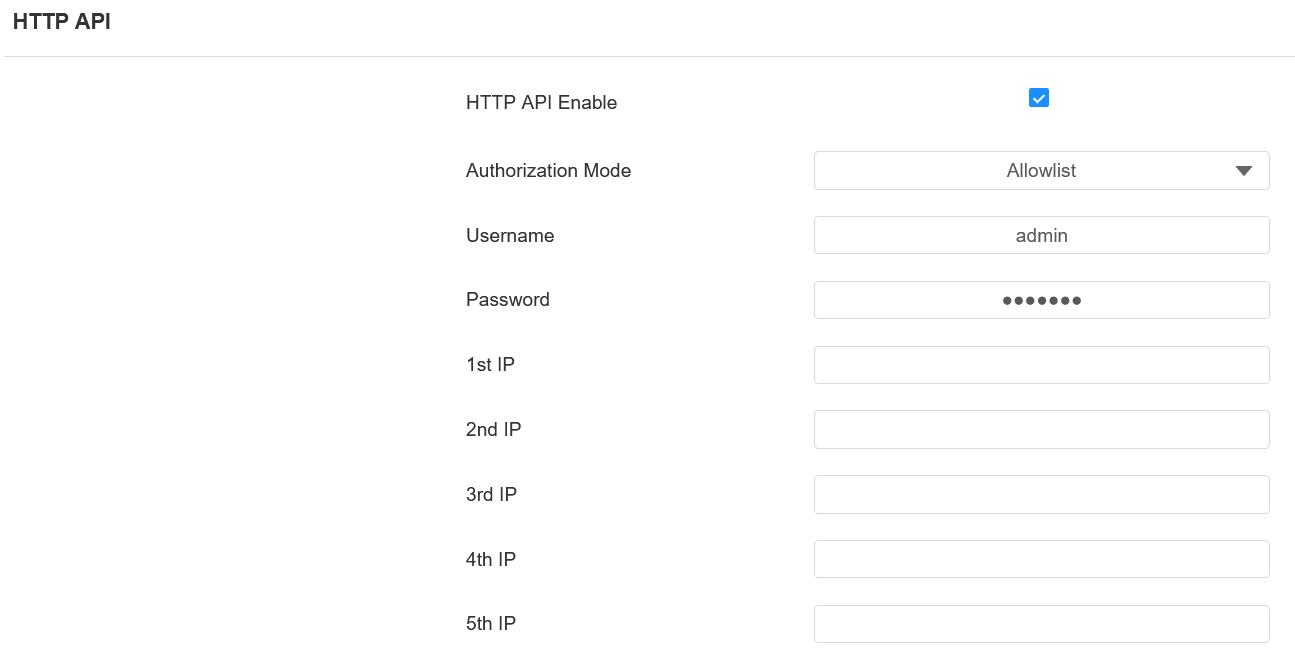
Enabled: Enable or disable the HTTP API function for third-party integration. If the function is disabled, any request to initiate the integration will be denied and return HTTP 403 forbidden status.
Authorization Mode: Select among the following options: None, Allowlist, Basic, Digest, and Token for authorization type, which will be explained in detail in the following chart.
Username: Enter the user name when Basic or Digest authorization mode is selected. The default username is admin.
Password: Enter the password when Basic or Digest authorization mode is selected. The default password is admin.
1st IP-5th IP: Enter the IP address of the third-party device when the Allowlist authorization is selected for the integration.
Please refer to the following description for the Authentication mode:
Authorization Mode | Description |
|---|---|
None | No authentication is required. This mode is intended for testing only and is not recommended in production environments. |
Allowlist | Authenticates requests based on the source IP address. Add the IP address of the third-party device to the allowlist before sending requests. Recommended for trusted LAN environments. |
Basic | Authenticates requests using a username and password. The credentials must be Base64-encoded and included in the Authorization header. |
Digest | Authenticates requests using HTTP Digest authentication. Only the MD5 algorithm is supported. |
Token | Reserved for Akuvox internal development and testing. |
Third-Party Integration
The device supports reading PIN codes and card codes and transmitting them to a third-party server. The generation and validation of the codes are handled on the third-party server.
To set it up, go to Access Control > Relay > Third Party Integration interface.
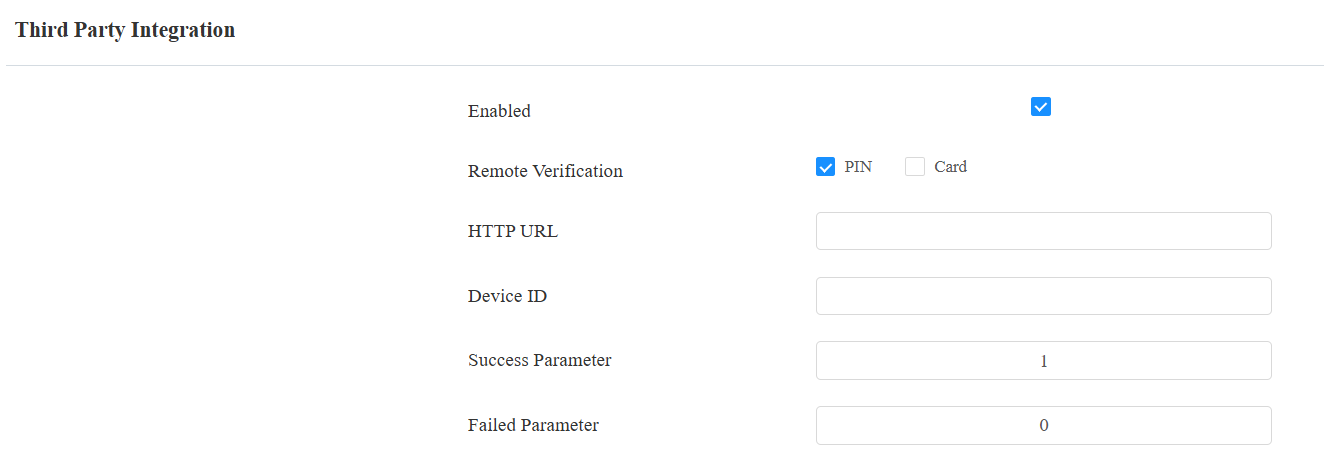
Remote Verification: Check the access method to be verified by the third-party server.
HTTP URL: Enter the HTTP command format provided by the third-party service provider. After entering the PIN code or swiping the card, the HTTP command will carry the dynamic information automatically before it is sent to the server for verification. See the example: http://{Server IP}:8090/api/visitor/scan?codeKey={Card}/{PINCode}&deviceId={DeviceID}. For example, if users open doors with a PIN, the URL will be http://192.168.35.123:8090/api/visitor/scan?codeKey={Card}/123456&deviceId=1.
Device ID: As part of the HTTP URL, it is provided by the service provider of the third-party server.
Success Parameter: Receiving this value indicates that opening the door succeeds.
Failed Parameter: Receiving this value indicates that opening the door fails.
Note
To transmit PIN values, the device firmware version should be 101.30.10.128 or higher.
To support Success and Failed Parameters, the device firmware version should be 101.30.11.124 or higher.
Power Output Control
The device can serve as a power supply for the external relays. Click here to view the power output requirements and the wiring example.
To set it up, go to Access Control > Relay interface.

12v Power Output Enabled:
Always: The device can provide continuous power to the third-party device.
Security Relay A: The device can work with the security relay.