The following rules will be necessary to ensure seamless communication among Akuvox products.
Make sure your IT department allows those ports and domains, including Internet access, if the product is registered in the Akuvox SmartPlus cloud service.
These rules should be enabled for both inbound and outbound directions.
Ø Those ports MUST be allowed to access when the firewall is enabled.
(Note: Connections with port range should all be enabled.)
TCP 20/21 | FTP file transfer |
TCP 80 | WEB client and HTTP commands |
TCP 443 | HTTPS connections |
TCP 554 | RTSP video streaming |
TCP/UDP 5070 | SIP telephony for UDP and TCP |
TCP 5071 | SIP telephony for TLS (optional) |
TCP 8501 | Cloud connection |
TCP 8080 | RPS HTTP connections |
TCP 8091 | HTTPS connections for devices downloading config files |
TCP 9999 | Cloud gateway |
TCP 1300~1999 | Remote access for troubleshooting |
TCP 8600 | HTTPS connection for devices in high security mode |
TCP 8601 | RTSP, effective for the iOS app |
TCP 8602 | RTSP TLS |
TCP 8603 | SIP TLS for high-version devices |
TCP 8604 | For downloading configuration files via HTTPS TLS for high-version devices |
TCP 8605 | For uploading screenshots via HTTPS TLS for high-version |
TCP 8606 | Video storage playback |
TCP 8607 | Smart lock MQTT SSL |
TCP 8608-8630 | Reserved ports |
TCP 8483 | Maintenance ports |
TCP 9004-9199 | FTP Passive Mode file transfer |
UDP 10000~65535 | RTP streaming interface |
UDP 35000~65535 | SIP streaming |
Ø These domains MUST be allowed to access when the firewall is enabled.
Allow related servers on the list. Please replace xcloud with your actual cloud location, like ecloud and ucloud.
Domains | Services |
| TCP link service |
| Video preview service |
| RPS service |
| Remote access service |
| SIP service |
| Long connection service for smart locks |
| Audio and Video service |
| Maintenance service |
| HTTP access service |
| Gateway service |
| FTP service |
| Image upload service |
| Web service |
| Device file configuration service |
| Payment service |
Ø The domain MUST be allowed to access when the firewall is enabled:
Allow the domain name akuvox.com, which means all Akuvox SmartPlus Cloud-related services are allowed to access the network.
To verify the connection with the cloud, please enter http://test.akuvox.com:9999/ in the web browser on the same network to see if the configuration is ok. If the hint is as follows, the configuration is ok.
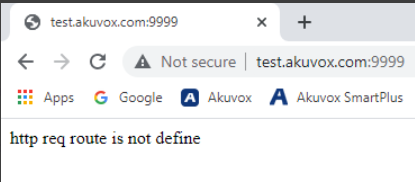
To verify whether the RPS works normally, please enter https://rps.akuvox.com/v3.2/redirect?user= in a web browser on the same network to see if the configuration is ok. If the value returns as follows, the RPS works fine.

NOTE: Different routers and firewalls may have different rules, so rules may also be .akuvox.com, *.akuvox.com, or akuvox.