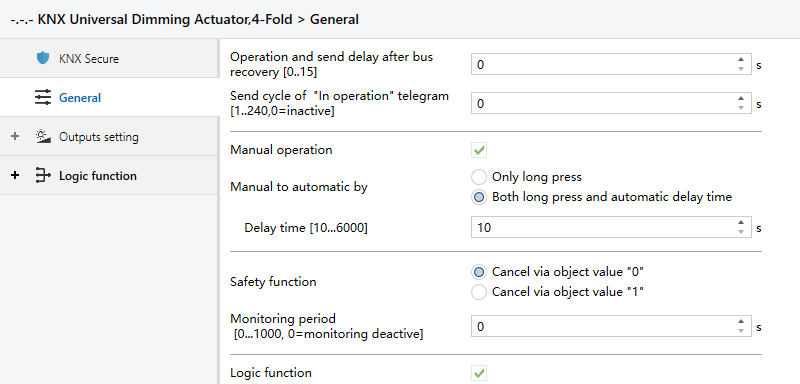
Fig.5.2 "General setting" Interface
Operation and Send delay after Bus Recovery [0..15]
Sets the delay time to send to bus after the device bus recovery.
Options: 0..15 s
The setting dose not contain the device initialization time, and bus telegrams received during delay time will be recorded.
Send cycle of "In Operation" Telegram [1..240,0=inactive]
Sets the time interval when cyclically send telegrams through the bus to indicate this device in normal operation. When set to "0", the object "In operation" will not send a telegram. If the setting is not "0", the object "In operation" will send a telegram according to the setting period time with logic "1" to the bus. Options: 0…240 s (0= inactive)
As to reduce the bus load as much as possible, the maximum time interval should be selected according to actual application requirement.
Manual operation
Sets whether to enable manual operation, which is mainly convenient for engineers to debug or check the lamps, when enabled, you can manually switch and dim each output channel.
The definition of function priority: Manual > Forced > Safety > other functions, after exiting higher priority, the next priority action needs to be executed. When during manual operation, the telegrams from bus will be ignored and not executed, but the statuses of low priority (Forced/Safety) will be recorded in the background, and they will be executed after exiting manual operation.
NOTE:
Manual operation is enabled by default in case of no database; after download, enable manual or not depends on the parameter.
The following parameters are visible when the manual operation is enabled:
Manual to automatic by
This parameter is for setting the behaviour when exit manual operation.
Options:
Only long press
Both long press and automatic delay time
Delay time [10...6000]
This parameter is visible when ”Both long press and automatic delay time” is selected by previous parameter. Set the delay time for exiting manual operation automatically, and timing from the last button operation.
Options: 10....6000 s
Safety function
Sets the object value of safety status cancellation for whole device, while receiving the reversed value is to enter safety status.
Options:
Cancel via object value "0"
Cancel via object value "1"
When enter safety status, execute the configured behaviour of the channel if its safety function is enabled, more details are defined in the channel.
Monitoring period [0...1000, 0=monitoring deactive]
Sets the period to monitor the telegram of safety object.
Options: 0...1000 s
If the period is greater than 0, the telegram to cancel safety status was not received during the monitoring period, enter the safety status. Exit this status and reset the monitoring period when a cancellation telegram is received. It is also possible to enter the safety status directly by receiving the reversed value defined by the previous parameter.
If the period is set as 0, enter the safety status directly by receiving the reversed value defined by the previous parameter, and receiving cancellation value is to exit the status.
Logic function
Sets page of logic function interface is visible after this parameter enabled.