The LED parameter interface (Figure 5.3.1) is used to configure LED functions.
Each button is equipped with one LED status indicator, and each LED can be configured independently. The following explains the parameters using one LED as an example.
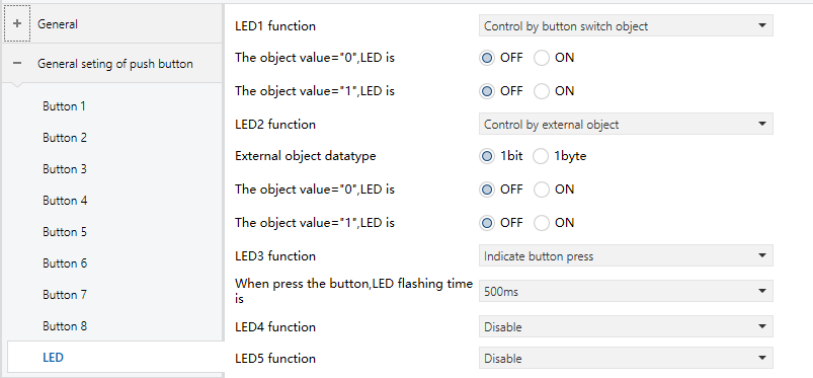
Figure 5.3.1 "LED" Interface
LED X function
Defines the LED indication mode.
Options:
Disable
Control by button switch object: The LED indicates the status of the button’s switch object. For switch functions, the indication is determined by the Switch object. For dimming functions, the indication is determined by Short operation, Switch. Other functions do not affect the LED status.
Control by external object: The LED is controlled independently by an external object and is not affected by button functions or settings.
Indicate button press: The LED flashes once for a specified duration when the button is operated.
The following parameters are visible based on the option selected in the LED X Function.
❖ External object data type
Visible only when LED X function is set to Control by external object.
Defines the data type of the LED status object.
Options:
1bit
1byte
❖ The object value = "0/1", LED is
Visible when LED X function is set to Control by button switch object or Control by external object (1bit).
The LED indication is determined by the received object value (0 or 1) or based on the switch object.
Options:
OFF
ON
❖ Threshold value is
Visible when LED X function is set to Control by external object (1byte).
Defines the threshold value for LED indication.
Options: 1…255
❖ If object value < threshold value, LED is
Visible when LED X function is set to Control by external object with 1byte.
Defines the LED status when the received value is lower than the threshold.
Options:
OFF
ON
❖ If object value = threshold value, LED is
Visible when LED X function is set to Control by external object (1byte).
Defines the LED status when the received value equals the threshold.
Options:
OFF
ON
❖ If object value > threshold value, LED is
Visible when LED X function is set to Control by external object (1byte).
Defines the LED status when the received value is higher than the threshold.
Options:
OFF
ON
❖ When press the button, LED flashing time is
Visible when LED X function is set to Indicate button press.
Defines the LED flashing duration when the button is operated.
Options:
500ms
1s
2s
3s