5.4.1 Location Setting
The Location Setting interface, as shown in Figure 5.4.1, allows enabling or disabling individual floors and assigning floor names.
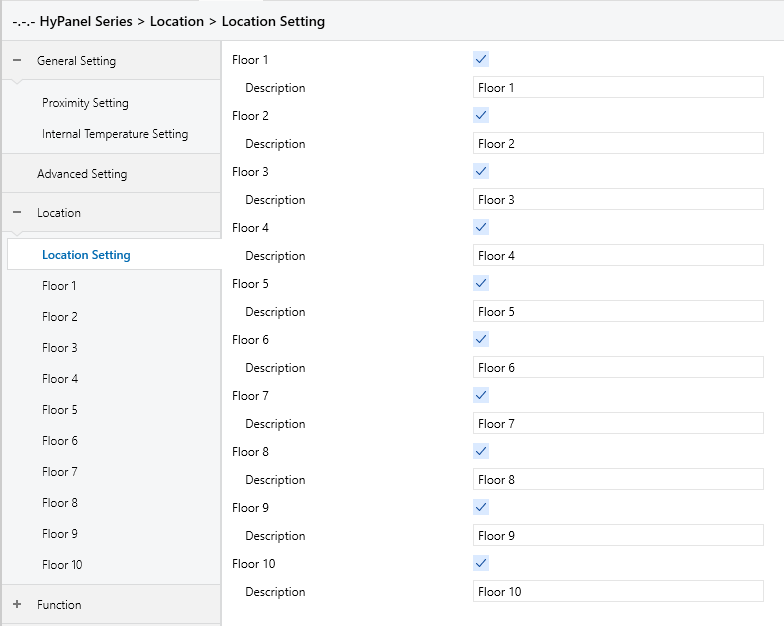
Figure 5.4.1 “Location Setting” Interface
Floor x, x=1…10
Enables or disables Floor x. When enabled, the HyPanel will generate a corresponding floor.
By default, Floor 1 is enabled; Floors 2-10 are disabled.
Description
Sets the name of the floor. Supports up to 31 characters, with a display limit of 10 Chinese characters.
5.4.2 Floor x
The Floor x setting interface (Figure 5.4.2) allows users to enable or disable rooms and set room names. Each floor can support up to 10 rooms, and up to 10 floors are supported in total.
The configuration method is identical across all floors; Floor 1 is used here as an example.
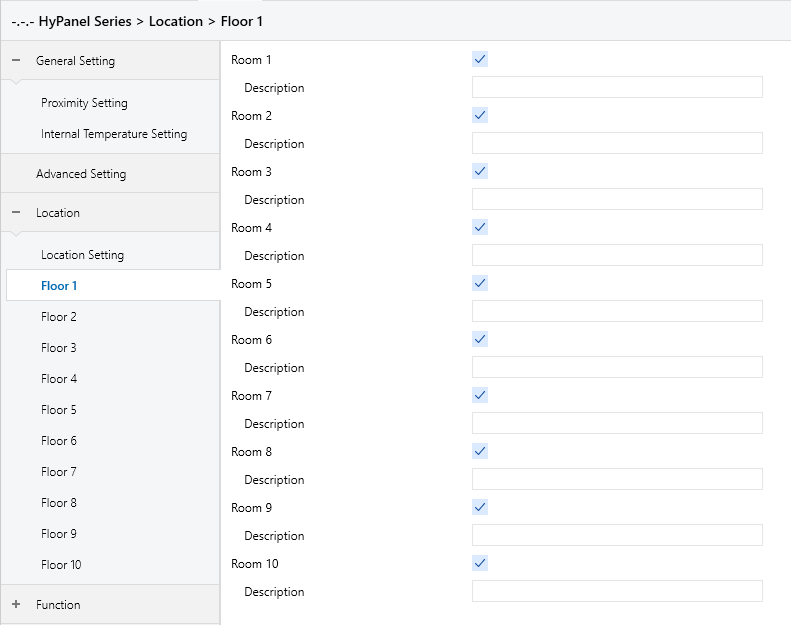
Figure 5.4.1 “Floor x” Interface
Room x,x=1…10
Enables or disables Room x. When enabled, the Hypanel will generate a corresponding room under the specified floor.
By default, Room 1 is enabled; Rooms 2-10 are disabled.
Description
Sets the name of the floor. Supports up to 31 characters, with a display limit of 10 Chinese characters.