NOTE:
This function is only supported in database versions 2.0 or above and DCA versions 2.0.0.1 or above.

Fig.5.8 “Motion sensor setting” Interface
Parameter “Number of movement detectors”
This parameter sets the number of movement detectors, up to 8 movement detectors for per output channel. Additionally, each movement detector can link to a brightness sensor.
Options:
None
1
2
...
8

5.8.1 Parameter Window ”Motion sensor X”(X=1~8)
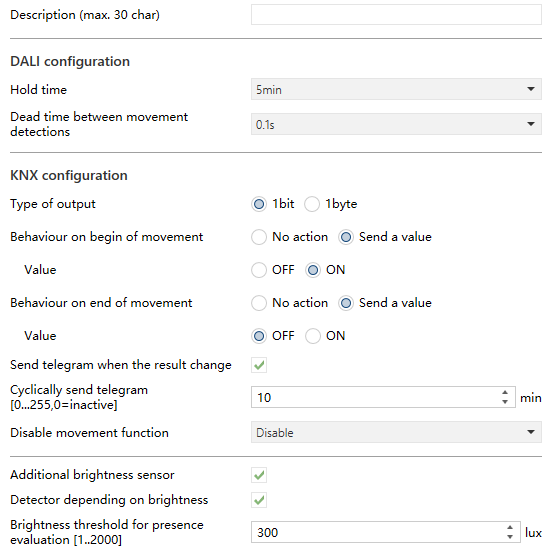
Fig.5.8.1 “Motion sensor X” Interface
Parameter “Description (max.30 char)”
This parameter is used to input the sensor name (up to 30 characters).
DALI configuration
Parameter “Hold time”
This parameter defines the hold time for presence detection. After this period, the presence status will switch to unoccupied - meaning that if no movement is detected within this time, the area is assumed to be empty.
Options:
1s
1min
...
35min
40min
Parameter “Dead time between movement detections”
This parameter defines the dead time between movement detections. The detector will only respond to a new movement after this time has passed since the previous movement ended.
Options:
None
0.1s
0.2s
0.5s
1s
2s
KNX Configuration
Parameter “Type of output”
This parameter sets the type of output.
Options:
1bit
1byte
- Parameter “Object datatype”
This parameter sets the 1byte object datatype of output.
Options:
1byte percentage value
1byte unsigned value
Scene number
- Parameter “Behaviour on begin of movement”
- Parameter “Behaviour on end of movement”
These two parameter set whether send a value when behaviour on begin or end of movement.
Options:
No action
Send a value
- Parameter “Value”
This parameter sets the output value when behaviour on begin or end of movement. Options are displayed according to the object datatype.
For 1bit, options including:
OFF
ON
For 1byte percentage value, options including:
0%
1%
...
100%
For 1byte unsigned value, options including: 0..255
For scene number, options including:
Scene NO.1
Scene NO.2
...
Scene NO.64
- Parameter “Send telegram when the result change”
This parameter sets whether send a telegram when the result of movement detection change.
- Parameter “Cyclically send telegram [0...255,0=inactive]”
This parameter sets the time for cyclically sending the result of movement detection to the bus.
Options: 0..255 min
- Parameter “Disable movement function”
This parameter sets whether enable the disable movement function.
Options:
Disable
Disable=1/Enable=0
Disable=0/Enable=1
Parameter “Additional brightness sensor”
This parameter sets whether to enable additional brightness sensor.
Parameter “Detector depending on brightness”
This parameter is visible when previous parameter is selected to enable. Used to set whether the presence control depending on brightness. When enabled, a following parameter is visible.
Parameter “Brightness threshold for presence evaluation [1..2000]”
This parameter is visible when previous parameter is selected to enable. Used to set the brightness threshold for evaluating begin of presence.
Options: 1..2000 lux
The detector will trigger the presence state only if the ambient brightness is below this threshold and motion is detected.
5.8.2 Parameter Window ”Brightness sensor”
This parameter window is visible when additional brightness sensor is is selected to enable.
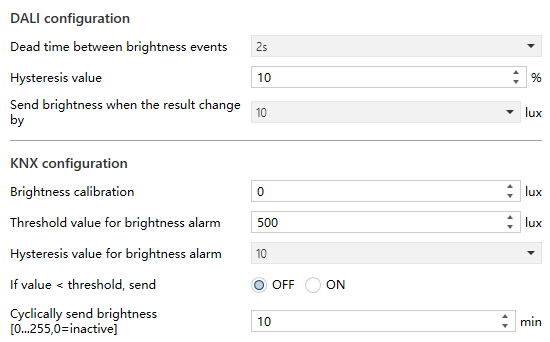
Fig.5.8.2 “Brightness sensor” Interface
DALI Configuration
Parameter “Dead time between brightness events”
This parameter sets dead time between brightness events, that is, the sensor will respond after this setting time since the end of last brightness detection.
Options:
None
1s
2s
...
10s
- Parameter “Hysteresis value”
This parameter sets hysteresis value of brightness sensor.
Options: 0...25 %
- Parameter “Send brightness when the result change by”
This parameter sets when brightness turns to a certain value send the current brightness value to the bus.
Options:
1 lux
2 lux
....
225 lux
250 lux
KNX Configuration
Parameter “Brightness calibration”
This parameter sets the brightness calibration value.
Options: -500...500 lux
- Parameter “Threshold value for brightness alarm”
This parameter sets the threshold value for brightness alarm.
Options: 5...2000 lux
- Parameter “Hysteresis value for brightness alarm”
This parameter sets the hysteresis value for brightness alarm.
Options:
1 lux
2 lux
....
225 lux
250 lux
- Parameter “If value < threshold, send”
This parameter sets the out value when brightness value is lower than the value (Threshold value for brightness alarm- Hysteresis value for brightness alarm).
Options:
OFF
ON
- Parameter “Cyclically send brightness [0...255,0=inactive]”
This parameter sets the time for cyclically sending the the brightness detection value to the bus to the bus.
Options: 0..255 min