6.2.1 “Basic Function”
Switch

Dimming
RGB lighting
RGBW lighting

colour temperature control
Value sender

Scene control

Shade

Shift register

Multiple operation


Delay mode
Object Function | Communication Object Name | Type | Flags | DPT | |
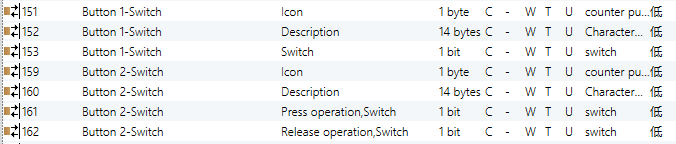
151 | Icon | Button 1 - {{Switching}} | 1 byte | C,W,T,U | 5.010 counter pulses(0..255) |
152 | Description | Button 1 - {{Switching}} | 14 bytes | C,W,T,U | 16.001 Character String |
153 | Switch | Button 1 - {{Switching}} | 1 bit | C,W,T,U | 1.001 switch |
161 | Press operation, Switch | Button 1 - {{Switching}} | 1 bit | C,W,T,U | 1.001 switch |
162 | Release operation, Switch | Button 1 - {{Switching}} | 1 bit | C,W,T,U | 1.001 switch |
These communication objects are used to trigger switching operations. Depending on the parameter settings, short/long press and press/release can either share one object or use separate objects. When shared, only the “Switch” object appears. If separated, “Press/Release”appears if short and long presses are not differentiated, and short/Long appears when short and long presses are distinguished. - Telegram values 0: Off 1: On The object name (in parentheses) changes according to the text entered in the Description (max 30 characters) field. If left blank, the default name will be “Btn 1 - ...”. The same also applies to the following sections. | |||||
161 | Short operation, Switch | Button 1 - {{Dimming}} | 1 bit | C,W,T,U | 1.001 switch |
162 | Long operation, Switch | Button 1 - {{Dimming}} | 4 bit | C,W,T | 3.007 dimming control |
These two objects are used for switching/dimming operations and distinguish between short and long press. Obj.161: Used to trigger switch operations. - Telegram values: 0: Off 1: On | |||||
Obj.162: Used to trigger a relative dimming operation. - Telegram values: 1~7: Dim down. The higher the value within this range, the smaller the dimming step. “1” means maximum dimming step down, “7” means minimum dimming step down, and “0” means stopping dimming. 9~15: Dim up. The higher the value, the smaller the dimming step. “9” means maximum dimming step up, “15” means minimum dimming step up, and “8” means stopping dimming. | |||||
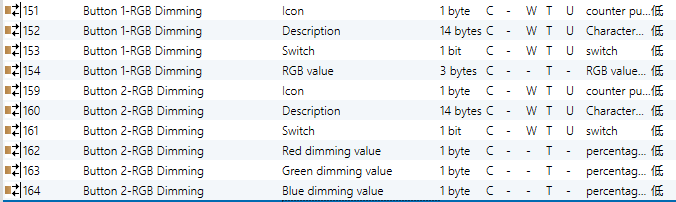
154 | RGB value | Button 1 - {{RGB Dimming}} | 3 bytes | C,T | 232.600 RGB value 3x(0..255) |
162 | Red dimming value | Button 2 - {{RGB Dimming}} | 1 byte | C,T | 5.001 percentage(0..100%) |
163 | Green Dimming value | Button 2 - {{RGB Dimming}} | 1 byte | C,T | 5.001 percentage(0..100%) |
164 | Blue Dimming value | Button 2 - {{RGB Dimming}} | 1 byte | C,T | 5.001 percentage(0..100%) |
Obj.154: Perform RGB dimming via a 3-byte object. Obj.162-164: Perform RGB dimming via three 1-byte objects. | |||||
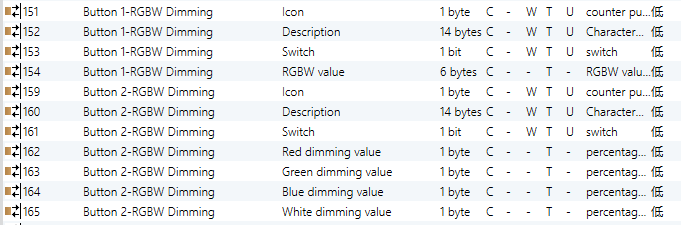
154 | RGB value | Button 1 - {{RGBW Dimming}} | 6 bytes | C,T | 251.600 RGBW value 4x(0..100%) |
162 | Red dimming value | Button 2 - {{RGBW Dimming}} | 1 byte | C,T | 5.001 percentage(0..100%) |
163 | Green Dimming value | Button 2 - {{RGBW Dimming}} | 1 byte | C,T | 5.001 percentage(0..100%) |
164 | Blue Dimming value | Button 2 - {{RGBW Dimming}} | 1 byte | C,T | 5.001 percentage(0..100%) |
165 | White Dimming value | Button 2 - {{RGBW Dimming}} | 1 byte | C,T | 5.001 percentage(0..100%) |
Obj.154: Perform RGBW dimming via a 6-byte object. Obj.162-165: Perform RGBW dimming via four 1-byte objects. | |||||
154 | Brightness | Button 1 - {{colour temperature control}} | 1 byte | C,T | 5.001 percentage(0..100%) |
155 | colour temperature | Button 1 - {{colour temperature control}} | 2 bytes | C,T | 7.600 absolute colour temperature |
Obj.154: Used to control brightness. Obj.155: Used to control colour temperature. | |||||
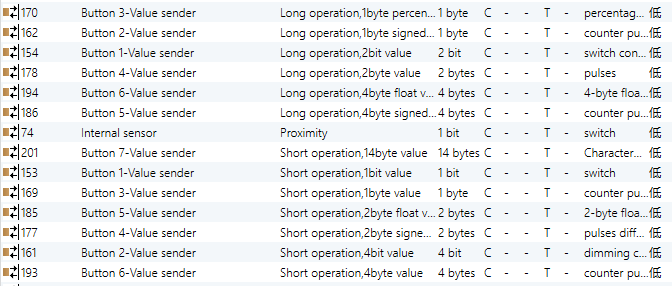
154 -201 | Short operation,1bit value 2bit value 4bit value 1byte signed value 1byte unsigned value 1byte percentage 2byte signed value 2byte unsigned value 2byte float value 4byte signed value 4byte unsigned value 4byte float value 14byte string | Button 6 - {{Value sender}} | 1bit 2bit 4bit 1byte 2byte 4byte 14byte | C,T | 1.001 switch 2.001 switch control 3.007 dimming control 6.010 counter pulses(-128..127) 5.010 counter pulses(0..255) 5.001 percentage(0..100%) 8.001 pulses difference 7.001 pulses 9.x float value 13.001 counter pulses(signed) 12.001 counter pulses(unsigned) 14.x float value 16.001 Character String |
154 -201 | Long operation,1bit value 2bit value 4bit value 1byte signed value 1byte unsigned value 1byte percentage 2byte signed value 2byte unsigned value 2byte float value 4byte signed value 4byte unsigned value 4byte float value 14byte string | Button 6 - {{Value sender}} | 1bit 2bit 4bit 1byte 2byte 4byte 14byte | C,T | 1.001 switch 2.001 switch control 3.007 dimming control 6.010 counter pulses(-128..127) 5.010 counter pulses(0..255) 5.001 percentage(0..100%) 8.001 pulses difference 7.001 pulses 9.x float value 13.001 counter pulses(signed) 12.001 counter pulses(unsigned) 14.x float value 16.001 Character String |
These two communication objects are used to send fixed values to the bus, distinguishing between short and long press operations. The value range to be sent is determined by the selected data type, which is configured via parameters. | |||||
153 | Short operation,scene | Button 1 - {{Scene control}} | 1byte | C, T | 18.001 scene control |
154 | Long operation,scene | Button 1 - {{Scene control}} | 1byte | C, T | 18.001 scene control |
These communication objects are used to send an 8-bit command to recall or store a scene. According to parameter settings, short and long press can either share one object or use separate objects. If shared, only the “Scene” object is visible; if separated, “Short/Long” object appears and distinguish between short and long operations. The parameter setting range is 1-64, but the actual value sent via the communication object is 0-63. For example, if the parameter is set to scene 1, the object sends a scene telegram with value 0. | |||||
169 | Up/Down, Blind | Button 3 - {{Blind}} | 1bit | C, W, T | 1.008 up/down |
170 | Stop/Adjust, Blind | Button 3 - {{Blind}} | 1bit | C, W, T | 1.007 step |
These two communication objects are used to control shades open, close, and stop actions. Descriptions are as follows: Obj.169: Send a telegram of controlling shades close/open actions to the bus. - Telegram values: 1: Close the shades downward 0: Open the shades upward Obj.170: Send a telegram of stopping shades movement to the bus. - Telegram values: 1: Stop | |||||
169 | Register value | Button 3 - {{Shift register}} | 1byte | C, W, T | 5.010 counter pulses |
This communication object is used to send the value of the shift register. | |||||
169 -172 | Object-On/Off Object-Up/Down Object-SceneControl Object-Percentage Object-Unsigned value | Button 3 - {{Multiple operation}} | 1bit 1bit 1byte 1byte 1byte | C,W,T C,W,T C,T C,T C,T | 1.001 switch 1.008 up/down 18.001 scene control 5.001 percentage(0..100%) 5.010 counter pulses |
This communication object is used for multiple operations, supporting activation of up to 4 operations simultaneously. With these objects, a single action can send 4 different types of values to the bus at once. The range of values to be sent is determined by the selected data type, which is configured via parameters. | |||||
169 170 177 | Short operation,on/off Dimming Unsigned value | Button 3 - {{Delay mode}} | 1bit 4bit 1byte | C,T | 1.001 switch 3.007 dimming 5.010 counter pulses |
169 170 177 | Long operation,on/off Dimming Unsigned value | Button 3 - {{Delay mode}} | 1bit 4bit 1byte | C,T | 1.001 switch 3.007 dimming 5.010 counter pulses |
These two communication objects are used to send delayed mode values to the bus, with separate handling for short and long press operations. The range of values sent is determined by the data type selected in the parameter settings. | |||||