6.3.1 Basic Function

Switch Function

Lighting Function
 Relative dimming Function
 Brightness dimming Function
 Relative+Brightness dimming Function
 Brightness+Colour Temperature_2byte Function

Brightness+Colour Temperature_1byte Function
 Brightness+Colour Temperature_Directly(..)&Brightness+Colour Temperature Function
 Brightness+Colour Temperature_Directly(..)&Warm/cool white brightness Function
 Shade position Function
 Roller blind position Function
 Venetian blind position and slat Function
 Venetian Curtain position and slat Function
 Shade step/move Function
 Roller blind step/move Function
 Value send Function
 Scene control Function
 External Device(From bus)_1bit Function
 External Device(From bus)_1byte Function
 External Device(From bus)_2byte Function
 External Device(From bus)_4byte Function
 External Device(From bus)_14byte Function
 External Device(Non-KNX)_1bit Function
 External Device(Non-KNX)_1byte Function
 External Device(Non-KNX)_2byte Function
 External Device(Non-KNX)_4byte Function
 External Device(Non-KNX)_14byte Function
Figure 6.3.1 Communication Objects of Basic Function
No. | Object function | Name | Type | Flags | DPT | ||
168 | switch | Functionx-y switch | 1bit | C, T | 1.001 switch | ||
This communication object is used to send on/off telegrams to the bus to control the on/off state of the light. - Telegram values 1: On 0: Off | |||||||
169 | Switch Status | Functionx-y switch | 1bit | C,W,T,U | 1.001 switch | ||
This communication object is used to receive the on/off status responses from other bus devices, such as dimmers and switches. | |||||||
182 | Relative dimming | Functionx-y RelativeDimmer | 4 bit | C,W,T | 3.007 dimming control | ||
This communication object is used to send relative dimming telegrams to the bus, including telegrams of dimming up/down/stopping dimming. | |||||||
183 | Brightness Status | Functionx-y RelativeDimmer | 1byte | C,W,T,U | 5.001 percentage(0..100%) | ||
This communication object is used to receive the brightness status responses from dimmers. - Range: 0 ... 100%. | |||||||
188 | Brightness dimming | Functionx-y BrightnessDimmer | 1byte | C,T | 5.001 percentage(0..100%) | ||
This communication object is used to send dimming telegrams to the bus, transmitting brightness values. - Range: 0 ... 100%. | |||||||
201 | Colour temperature value | Functionx-y BrightnessCTDimmer | 2bytes | C,T | 7.600 absolute colour temperature | ||
203 | Colour temperature,status | Functionx-y BrightnessCTDimmer | 2bytes | C,W,T,U | 7.600 absolute colour temperature | ||
These two communication objects are used for color temperature adjustment of single-color or dual-color lights. - Telegram values 2000…7000 K Obj.201: Send telegrams for color temperature control to the bus under Brightness + Absolute Color Temperature Value control. Obj.203: Receive telegrams for color temperature control from the bus under Brightness + Absolute Color Temperature Value, Brightness + Relative Color Temperature Value, or Direct Control (Brightness Value + Color Temperature Value). | |||||||
201 | Relative percentage colour temperature | Functionx-y BrightnessCTDimmer | 1byte | C,T | 5.001 percentage(0..100%) | ||
This communication object is used for sending color temperature control telegrams to the bus under Brightness + Relative Color Temperature Value control for single-color/dual-color lights. | |||||||
200 | Cool white brightness | Functionx-y BrightnessCTDimmer | 1byte | C,T | 5.001 percentage(0..100%) | ||
202 | Cool white brightness,status | Functionx-y BrightnessCTDimmer | 1byte | C,T | 5.001 percentage(0..100%) | ||
These two communication objects are used for Cool White brightness control of dual-color lights under Direct Control. - Telegram values 0…100% Obj.200: Send telegrams for Cool White dimming to the bus under Direct Control, i.e., sending the Cool White brightness value. Obj.202: Receive feedback telegrams of Cool White brightness status from the dimmer under Direct Control (Warm/Cool White Brightness). | |||||||
201 | Warm white brightness | Functionx-y BrightnessCTDimmer | 1byte | C,T | 5.001 percentage(0..100%) | ||
203 | Warm white brightness,status | Functionx-y BrightnessCTDimmer | 1byte | C,T | 5.001 percentage(0..100%) | ||
These two communication objects are used for Warm White brightness control of dual-color lights under Direct Control. - Telegram values 0…100% Obj.201: Send telegrams for Warm White dimming to the bus under Direct Control, i.e., sending the Warm White brightness value. Obj.203: Receive feedback telegrams of Warm White brightness status from the dimmer under Direct Control (Warm/Cool White Brightness). | |||||||
204 | Open/Close | Functionx-y Shade | 1bit | C,W, T | 1.009 open/close | ||
205 | Stop | Functionx-y Shade | 1bit | C, T | 1.007 step | ||
206 | Shade position | Functionx-y Shade | 1byte | C,T | 5.001 percentage(0..100%) | ||
207 | Shade position,status | Functionx-y Shade | 1byte | C,W,T,U | 5.001 percentage(0..100%) | ||
Open/Close Blind: Used for opening/closing curtains. Object descriptions: Obj. 204: Send telegrams of control the opening/closing of curtains to the bus. - Telegram values 1: Close 0: Open Obj.205: Send telegrams of stopping the movement of curtains to the bus. - Telegram values 0/1: Stop Obj.206: Send telegrams of controlling the position of curtains to the bus. - Telegram values 0 ... 100% Obj.207: Send telegrams of receiving curtain actuator responses regarding curtain position status from the bus. - Telegram values 0 ... 100% | |||||||
210 | Up/Down | Functionx-y Blind | 1bit | C,W, T | 1.008 up/down | ||
211 | Stop | Functionx-y Blind | 1bit | C, T | 1.007 step | ||
212 | Blind position | Functionx-y Blind | 1byte | C,T | 5.001 percentage(0..100%) | ||
213 | Blind position,status | Functionx-y Blind | 1byte | C,W,T,U | 5.001 percentage(0..100%) | ||
Roller Blind (without slat): Applicable for roller blinds without slats. Object descriptions: Obj.1: Send telegrams of controlling the up and down of the roller blind to the bus. - Telegram values 1: Down 0: Up Obj.205, Obj.206 and Obj.207: Same as above. | |||||||
216 | Up/Down | Functionx-y VenetianBlind | 1bit | C, W,T | 1.008 up/down | ||
217 | Stop/Slat adj. | Functionx-y VenetianBlind | 1bit | C, T | 1.007 step | ||
218 | Blind position | Functionx-y VenetianBlind | 1byte | C,T | 5.001 percentage(0..100%) | ||
219 | Blind position,status | Functionx-y VenetianBlind | 1byte | C,W,T,U | 5.001 percentage(0..100%) | ||
220 | Slat position | Functionx-y VenetianBlind | 1byte | C,T | 5.001 percentage(0..100%) | ||
221 | Slat position,status | Functionx-y VenetianBlind | 1byte | C,W,T,U | 5.001 percentage(0..100%) | ||
Venetian blind position and slat: Applicable for blinds with slats for angle adjustment, supporting opening, closing, stopping, position and angle adjustment, as well as position and angle status feedback. Object descriptions: Obj. 216, Obj. 218 and Obj. 219: Same as above. Obj. 217: Send telegrams of stopping the movement of blinds or adjusting the slat angle to the bus. - Telegram values 1: Stop/Downward angle 0: Stop/Upward angle Obj. 220: Send telegrams of controlling the position of curtains to the bus. - Telegram values 0 ... 100% Obj. 221: Send telegrams of receiving curtain actuator responses regarding curtain position status from the bus. - Telegram values 0 ... 100% | |||||||
222 | Open/Close | Functionx-y VenetianCurtain | 1bit | C, W,T | 1.008 up/down | ||
223 | Stop/Slat adj. | Functionx-y VenetianCurtain | 1bit | C, T | 1.007 step | ||
224 | Curtain position | Functionx-y VenetianCurtain | 1byte | C,T | 5.001 percentage(0..100%) | ||
225 | Curtain position,status | Functionx-y VenetianCurtain | 1byte | C,W,T,U | 5.001 percentage(0..100%) | ||
226 | Slat position | Functionx-y VenetianCurtain | 1byte | C,T | 5.001 percentage(0..100%) | ||
227 | Slat position,status | Functionx-y VenetianCurtain | 1byte | C,W,T,U | 5.001 percentage(0..100%) | ||
Venetian curtain position and slat: Applicable for curtains with slats for angle adjustment, supporting opening, closing, stopping, position and angle adjustment, as well as position and angle status feedback. Object descriptions: Obj. 223, Obj. 226 and Obj. 227: Same as above. Obj. 222: Send telegrams of opening/closing the curtains to the bus. - Telegram values 1: Close 0: Open Obj. 224: Send telegrams of controlling the position of curtains to the bus. - Telegram values 0 ... 100% Obj. 225: Send telegrams of receiving curtain actuator responses regarding curtain position status from the bus. - Telegram values 0 ... 100% | |||||||
228 | Open/Close | Functionx-y ShadeStep | 1bit | C,W, T | 1.009 open/close | ||
229 | Stop | Functionx-y ShadeStep | 1bit | C,T | 1.007 step | ||
230 | Travel Value | Functionx-y ShadeStep | 4bit | C,W,T | 3.008 blind control | ||
Shade step/move: Applicable for stepping and moving shades, supporting opening, closing and step adjustment. Obj.228 and Obj.229: Same as above. Obj.230: Send telegrams controlling the step movement of shades tracks to the bus. The step value sent is determined by the value set in “Step Value”. | |||||||
234 | Up/Down | Functionx-y BlindStep | 1bit | C,W,T | 1.008 up/down | ||
235 | Stop | Functionx-y BlindStep | 1bit | C, T | 1.007 step | ||
236 | Travel Value | Functionx-y BlindStep | 4bit | C,W,T | 3.008 blind control | ||
Roller blind step/move: Applicable for stepping and moving blinds, supporting opening, closing and step adjustment. Obj.234, Obj.235 and Obj.236: Same as above. | |||||||
240 | Send 1bit/2bit/4bit/1byte signed/1byte unsigned/1byte percentage/2byte signed/2byte unsigned/2byte float/4byte signed/4byte unsigned/4byte float value | Functionx-y Value | 1bit 2bit 4bit 1byte 2byte 4byte | C,T | 1.001 switch 2.001 switch control 3.007 dimming control 6.010 counter pulses(-128..127) 5.010 counter pulses(0..255) 5.001 percentage(0..100%) 8.001 pulses difference 7.001 pulses 9.x float value 13.001 counter pulses(signed) 12.001 counter pulses(unsigned) 14.x float value | ||
This communication object is used to send the preset output value by a short press. The object type and value range are determined by the data type set in the parameters. | |||||||
241 | Send 1bit/2bit/4bit/1byte signed/1byte unsigned/1byte percentage/2byte signed/2byte unsigned/2byte float/4byte signed/4byte unsigned/4byte float value, long | Functionx-y Value | 1bit 2bit 4bit 1byte 2byte 4byte | C,T | 1.001 switch 2.001 switch control 3.007 dimming control 6.010 counter pulses(-128..127) 5.010 counter pulses(0..255) 5.001 percentage(0..100%) 8.001 pulses difference 7.001 pulses 9.x float value 13.001 counter pulses(signed) 12.001 counter pulses(unsigned) 14.x float value | ||
This communication object is used to send the preset output value by a long press. The object type and value range are determined by the data type set in the parameters. | |||||||
246 | Recall/storage scene No. | Functionx-y Scene | 1byte | C, T | 18.001 scene control | ||
This communication object is used to send telegrams for scene recall or scene saving. When the highest bit is 1, it indicates scene saving; when the highest bit is 0, it indicates scene recall. A short press on the icon recalls the scene, while a long press saves the scene. | |||||||
252 | Switch Status Custom | Functionx-y External Device(From bus) | 1bit | C,W,T,U | 1.001 switch | ||
This communication object is used by External Device (From bus) to synchronize the sensor status on the bus to the HyPanel system. When Object type is set to 1bit and External Device is set to Door & Window Sensor, Smoke Sensor, CO Sensor, Gas Sensor, Motion Sensor, Flood Sensor, SOS Emergency Button, or Occupancy Sensor, this communication object is displayed as Switch Status. When Object type is 1bit and External Device is Custom, this communication object is displayed as Custom. | |||||||
252 | 1byte Percentage,in 1byte Signed,in 1byte Unsigned,in 1byte Errorcode,in Custom | Functionx-y External Device(From bus) | 1byte | C,W,T,U | 5.001 percentage(0..100%) 6.010 counter pulses(-128..127) 5.010 counter pulses(0..255) 6.010 counter pulses(-128..127) 6.010 counter pulses(-128..127) | ||
This communication object is used by External Device (From bus) to synchronize the sensor status on the bus to the HyPanel system. When Object type is set to 1byte, the corresponding group objects will be displayed after selecting the external device type. | |||||||
252 | Temperature,in Humidity,in CO2,in VOC,in PM2.5,in PM10,in Brightness,in Windspeed,in Voltage(V),in Voltage(mV),in Current(A),in Current(mA),in Power W,in Power kW,in Error code Custom | Functionx-y External Device(From bus) | 2byte | C,W,T,U | 9.001 temperature(℃) 9.007 humidity(%) 9.008 parts/million(ppm) 9.030 concentration(ug/m3) 9.030 concentration(ug/m3) 9.030 concentration(ug/m3) 9.004 lux(Lux) 9.005 speed(m/s) 9.020 voltage (mV) 9.020 voltage (mV) 9.021 current (mA) 9.021 current (mA) 9.024 power(kW) 9.024 power(kW) 8.001 pulses difference 8.001 pulses difference | ||
This communication object is used by External Device (From bus) to synchronize the sensor status on the bus to the HyPanel system. When Object type is set to 2bytes, the corresponding group objects will be displayed after selecting the external device type. | |||||||
252 | Power W,in Power kW,in Custom | Functionx-y External Device(From bus) | 4byte | C,W,T,U | 14.056 power (W) 14.056 power (W) 13.001 counter pulses(signed) | ||
This communication object is used by External Device (From bus) to synchronize the sensor status on the bus to the HyPanel system. When Object type is set to 4bytes, the corresponding group objects will be displayed after selecting the external device type. | |||||||
252 | Error text Custom | Functionx-y External Device(From bus) | 14byte | C,W,T,U | 16.001 character string (ISO 8859-1) 16.001 character string (ISO 8859-1) | ||
This communication object is used by External Device (From bus) to synchronize the sensor status on the bus to the HyPanel system. When Object type is set to 14bytes, the corresponding group objects will be displayed after selecting the external device type. | |||||||
258 | Switch Custom | Functionx-y External Device(Non-KNX) | 14byte | C,T | 1.001 switch | ||
This communication object is used by External Device (From bus) to bind sensors within the HyPanel system to this device. When the panel sensor status changes, it can be synchronized to the bus. When Object type is 1bit and External Device is set to Door & Window Sensor, Smoke Sensor, CO Sensor, Gas Sensor, Motion Sensor, Flood Sensor, SOS Emergency Button, or Occupancy Sensor, this communication object is displayed as Switch. When Object type is 1bit and External Device is Custom, this communication object is displayed as Custom. | |||||||
258 | 1byte Percentage 1byte Signed 1byte Unsigned 1byte Errorcode Custom | Functionx-y External Device(Non-KNX) | 14byte | C,T | 5.001 percentage(0..100%) 6.010 counter pulses(-128..127) 5.010 counter pulses(0..255) 6.010 counter pulses(-128..127) 6.010 counter pulses(-128..127) | ||
This communication object is used by External Device (From bus) to bind sensors within the HyPanel system to this device. When the panel sensor status changes, it can be synchronized to the bus. | |||||||
258 | Temperature Humidity CO2 VOC PM2.5 PM10 Brightness Windspeed Voltage(V) Voltage(mV) Current(A) Current(mA) Power W Power kW Error code Custom | Functionx-y External Device(Non-KNX) | 14byte | C,T | 9.001 temperature(℃) 9.007 humidity(%) 9.008 parts/million(ppm) 9.030 concentration(ug/m3) 9.030 concentration(ug/m3) 9.030 concentration(ug/m3) 9.004 lux(Lux) 9.005 speed(m/s) 9.020 voltage (mV) 9.020 voltage (mV) 9.021 current (mA) 9.021 current (mA) 9.024 power(kW) 9.024 power(kW) 8.001 pulses difference 8.001 pulses difference | ||
This communication object is used by External Device (From bus) to bind sensors within the HyPanel system to this device. When the panel sensor status changes, it can be synchronized to the bus. When Object type is set to 2bytes, the corresponding group objects will be displayed after selecting the external device type. | |||||||
258 | Power W,in Power kW,in Custom | Functionx-y External Device(Non-KNX) | 14byte | C,T | 14.056 power (W) 14.056 power (W) 13.001 counter pulses(signed) | ||
This communication object is used by External Device (From bus) to bind sensors within the HyPanel system to this device. When the panel sensor status changes, it can be synchronized to the bus. When Object type is set to 4bytes, the corresponding group objects will be displayed after selecting the external device type. | |||||||
258 | Error text Custom | Functionx-y External Device(Non-KNX) | 14byte | C,T | 16.001 character string (ISO 8859-1) 16.001 character string (ISO 8859-1) | ||
This communication object is used by External Device (From bus) to bind sensors within the HyPanel system to this device. When the panel sensor status changes, it can be synchronized to the bus. When Object type is set to 14bytes, the corresponding group objects will be displayed after selecting the external device type. | |||||||
Table 6.3.1 Basic Function Communication Object
6.3.2 HVAC
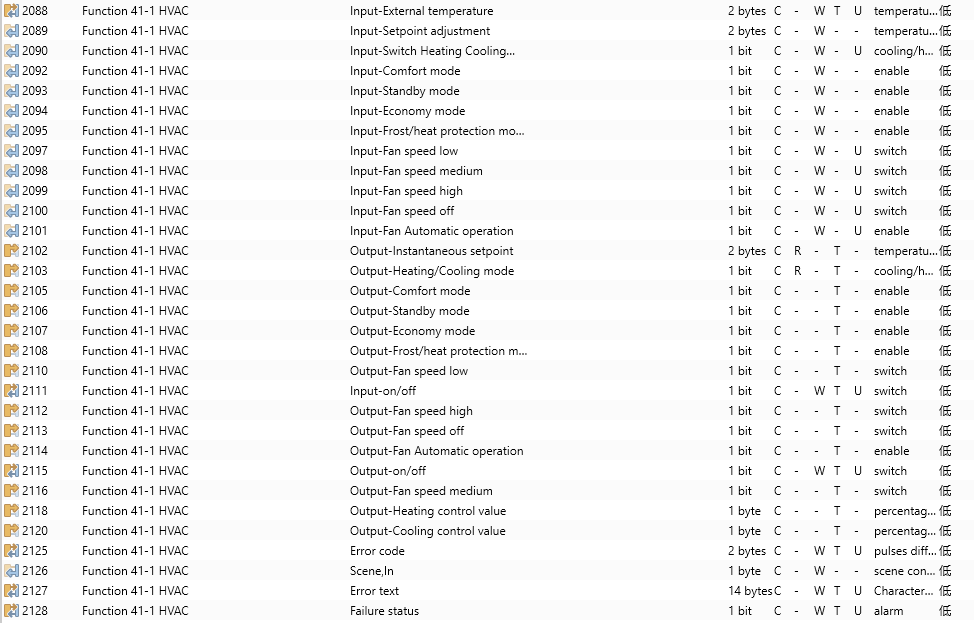








Figure 6.3.2 HVAC Communication Object
No. | Object function | Name | Type | Flags | DPT | ||||
2088 | Input-External temperature | Functionx-y HVAC | 2byte | C,W,T,U | 9.001 temperature(℃) | ||||
This communication object is used to receive temperature measurement values from temperature sensors on the bus. - Range: -50 ~ 99.8°C | |||||||||
2089 | Input-Setpoint adjustment | Functionx-y HVAC | 2byte | C,W | 9.001 temperature (℃) | ||||
When the HVAC operation mode is disabled, this object is used to modify the baseline value of the set temperature. When the HVAC operation mode is enabled and the set temperature is set to be relative adjustment, this object is used to modify the baseline value of the set temperature. Specifically, it adjusts the temperature setting value of the Comfort mode, while the setting temperature of the Standby and the Economy modes change according to the relative change. In Protection mode, only the protection mode temperature is modified. When the HVAC operation mode is enabled and the set temperature is adjusted absolutely, this object is used to modify the set temperature value of the current operation mode. | |||||||||
2090 | Input-Switch Heating Cooling mode | Functionx-y HVAC | 1bit | C,W,U | 1.100 cooling/heating | ||||
This communication object is used to receive status feedback from heaters and coolers on the bus. The display on the screen will be updated according to the received telegram value. - Telegram values 1: Heating 0: Cooling | |||||||||
2091 | Input mode | Functionx-y HVAC | 1byte | C,W | 20.102 HVAC mode | ||||
2092 | Input-Comfort mode | Functionx-y HVAC | 1bit | C,W | 1.003 enable | ||||
2093 | Input-Standby mode | Functionx-y HVAC | 1bit | C,W | 1.003 enable | ||||
2094 | Input-Economy mode | Functionx-y HVAC | 1bit | C,W | 1.003 enable | ||||
2095 | Input-Frost/heat protection mode | Functionx-y HVAC | 1bit | C,W | 1.003 enable | ||||
The operation mode can receive status feedback through either four 1-bit objects (Objects 2092, 2093, 2094, 2095) or one 1-byte object (HVAC mode).
| |||||||||
2096 | Input-Fan speed | Functionx-y HVAC | 1byte | C,W ,U | 5.001 percentage(0..100%) | ||||
2123 | Input-Fan speed | Functionx-y HVAC | 1byte | C,W ,U | 5.100 fan stage(0..255) | ||||
2097 | Input-Fan speed low | Functionx-y HVAC | 1bit | C,W ,U | 1.001 switch | ||||
2098 | Input-Fan speed medium | Functionx-y HVAC | 1bit | C,W ,U | 1.001 switch | ||||
2099 | Input-Fan speed high | Functionx-y HVAC | 1bit | C,W ,U | 1.001 switch | ||||
2100 | Input-Fan speed off | Functionx-y HVAC | 1bit | C,W ,U | 1.001 switch | ||||
The fan speed can receive status feedback through either four 1-bit objects (Objects 2097, 2098, 2099, 2100) or one 1-byte object (Fan speed).
| |||||||||
2101 | Input-Fan Automatic operation | Functionx-y HVAC | 1bit | C,W,U | 1.003 enable | ||||
This object is used to receive status feedback from auto control of fan speed. - Telegram values 1: Auto mode 0: Exit auto mode | |||||||||
2102 | Output-Instantaneous setpoint | Functionx-y HVAC | 2bytes | C,R,T | 9.001 temperature(℃) | ||||
This object is used to send the set temperature value of the current operating mode to the bus. | |||||||||
2103 | Output-Heating/Cooling mode | Functionx-y HVAC | 1bit | C,R,T | 1.100 cooling/heating | ||||
This object is used to send telegrams of switching between heating and cooling functions to the bus. - Telegram values 1: Heating 0: Cooling | |||||||||
2104 | Output-HVAC mode | Functionx-y HVAC | 1byte | C,R,T | 20.102 DPT_HVAC Mode | ||||
2105 | Output-Comfort mode | Functionx-y HVAC | 1bit | C,T | 1.003enable | ||||
2106 | Output-Standby mode | Functionx-y HVAC | 1bit | C,T | 1.003enable | ||||
2107 | Output-Economy mode | Functionx-y HVAC | 1bit | C,T | 1.003enable | ||||
2108 | Output-Frost/Heat protection mode | Functionx-y HVAC | 1bit | C,T | 1.003enable | ||||
These communication objects are used to send telegrams of the operation mode to the bus.
| |||||||||
2121 | Output-Heating /cooling control value | Functionx-y HVAC | 1bit | C,T | 1.001 switch | ||||
2122 | Output-Heating /cooling control value | Functionx-y HVAC | 1byte | C,T | 5.001 percentage(0..100%) | ||||
2117 | Output-Heating control value | Functionx-y HVAC | 1bit | C,T | 1.001 switch | ||||
2118 | Output-Heating control value | Functionx-y HVAC | 1byte | C,T | 5.001 percentage(0..100%) | ||||
2119 | Output-Cooling control value | Functionx-y HVAC | 1bit | C,T | 1.001 switch | ||||
2120 | Output-Cooling control value | Functionx-y HVAC | 1byte | C,T | 5.001 percentage(0..100%) | ||||
This object sends control values of heating or cooling functions to regulate the HVAC valve, thereby adjusting the indoor temperature. - Telegram values Switch on/off use - 2-point control: On/off Switch PWM - use PI control: On/off Continuous control - use PI control: 0 ... 100% | |||||||||
2109 | Output-Fan speed | Functionx-y HVAC | 1byte | C,W ,U | 5.001 percentage(0..100%) | ||||
2124 | Output-Fan speed | Functionx-y HVAC | 1byte | C,W ,U | 5.100 fan stage(0..255) | ||||
2110 | Output-Fan speed low | Functionx-y HVAC | 1bit | C,W ,U | 1.001 switch | ||||
2116 | Output-Fan speed medium | Functionx-y HVAC | 1bit | C,W ,U | 1.001 switch | ||||
2112 | Output-Fan speed high | Functionx-y HVAC | 1bit | C,W ,U | 1.001 switch | ||||
2113 | Output-Fan speed off | Functionx-y HVAC | 1bit | C,W ,U | 1.001 switch | ||||
These communication objects are used to send control telegrams for fan speed to the bus.
| |||||||||
2114 | Output-Fan Automatic operation | Functionx-y HVAC | 1bit | C,T | 1.003 enable | ||||
This communication object is used to send auto control telegrams for fan speed to the bus. - Telegram values 1: Auto mode 0: Exit auto mode | |||||||||
2111 | Input-on/off | Functionx-y HVAC | 1bit | C,W,T,U | 1.001 switch | ||||
2115 | Output-on/off | Functionx-y HVAC | 1bit | C,W,T,U | 1.001 switch | ||||
This object is used to control the HVAC (Heating, Ventilation, and Air Conditioning) function of the device. When turning off the HVAC, corresponding controls are deactivated. | |||||||||
2126 | Scene,in | Functionx-y HVAC | 1byte | C,W | 18.001 scene control | ||||
This communication object is visible when the Scene function is enabled. It is used to recall scenes via the bus. | |||||||||
2125 | Error code | Functionx-y HVAC | 2bytes | C,W | 8.001 pulses difference | ||||
2127 | Error text | Functionx-y HVAC | 14bytes | C,W | 16.001 character string (ISO 8859-1) | ||||
2128 | Failure status | Functionx-y HVAC | 1bit | C,W | 1.005 alarm | ||||
When the Error code function is enabled, the three communication objects become visible. They are used to display error codes of different data types: | |||||||||
Table 6.3.2 HVAC Function Communication Object Table
6.3.3 Air conditioner
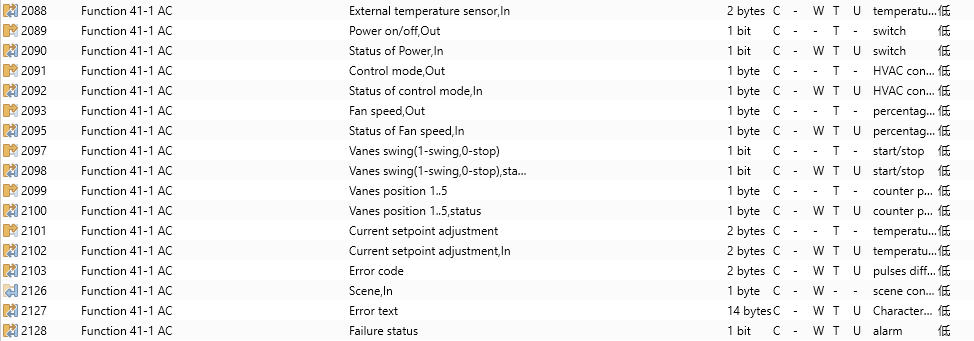


Figure 6.3.3 Air conditioner Object
No. | Object function | Name | Type | Flags | DPT | ||
2088 | External temperature sensor, In | Functionx-y AC | 2bytes | C,W,T,U | 9.001 temperature(℃) | ||
This communication object is used to receive temperature measurement values from the indoor temperature sensor on the bus and display the indoor temperature on the screen.。 | |||||||
2089 | Power on/off,Out | Functionx-y AC | 1bit | C,T | 1.001 switch | ||
Power on/off: Send air conditioner power switch telegrams. | |||||||
2090 | Status of Power,In | Functionx-y AC | 1bit | C,W,T,U | 1.001 switch | ||
This object is visible in Gateway mode and is used to receive feedback of power switch status. | |||||||
2091 | Control mode,Out | Functionx-y AC | 1byte | C,T | 20.105 HAVC control mode | ||
This object is visible in Gateway mode when the mode type is 1byte. It is used to send control telegrams for various modes. | |||||||
2092 | Status of control mode,In | Functionx-y AC | 1byte | C,W,T,U | 20.105 HAVC control mode | ||
This object is visible in Gateway mode when the mode type is 1byte. It is used to receive feedback telegrams for various modes. | |||||||
2093 | Fan speed,Out | Functionx-y AC | 1byte | C,T | 5.001 percentage(0..100%) | ||
2095 | Status of Fan speed,In | Functionx-y AC | 1byte | C,W,T,U | 5.001 percentage(0..100%) | ||
2094 | Fan speed,Out | Functionx-y AC | 1byte | C,T | 5.100 fan stage(0..255) | ||
2096 | Status of Fan speed,In | Functionx-y AC | 1byte | C,W,T,U | 5.100 fan stage(0..255) | ||
| |||||||
2097 | Vanes swing (1-swing,0-stop) | Functionx-y AC | 1bit | C,W,T,U | 1.010 start/stop | ||
Visible when the swing function is enabled. This communication object is used to send telegrams controlling the vanes swing (oscillation) to the bus. | |||||||
2098 | Vanes swing (1-swing,0-stop), status | Functionx-y AC | 1bit | C,W,T,U | 1.010 start/stop | ||
Visible when the swing function is enabled. This communication object is used to receive the swing status of the vanes from the bus. - Telegram values: 1: Swinging 0: Fixed | |||||||
2099 | Vanes position 1..5 | Functionx-y AC | 1byte | C,W,T,U | 5.010 counter pulses(0..255) | ||
Visible when the vanes position function is enabled. This communication object is used to send control telegrams for vanes fixed positions 1 to 5 to the bus. | |||||||
2100 | Vanes position 1..5, status | Functionx-y AC | 1byte | C,W,T,U | 5.010 counter pulses(0..255) | ||
Visible when the vanes position function is enabled. This communication object is used to receive status feedback for vanes fixed positions 1 to 5 from the bus. | |||||||
2101 | Current setpoint adjustment | Functionx-y AC | 1byte 2byte | C,T | 5.010 counter pulses(0..255) 9.001 temperature(℃) | ||
This communication object is used to adjust the setpoint temperature value and send telegram values to the bus.
| |||||||
2102 | Current setpoint adjustment,in | Functionx-y AC | 1byte 2byte | C,W,T,U | 5.010 counter pulses(0..255) 9.001 temperature(℃) | ||
This communication object is used to receive the current setpoint temperature value from the bus and display it on the panel.
| |||||||
2126 | Scene,in | Functionx-y HVAC | 1byte | C,W | 18.001 scene control | ||
Visible when the scene function is enabled. This communication object is used to call a scene via the bus. | |||||||
2103 | Error code | Functionx-y HVAC | 2bytes | C,W | 8.001 pulses difference | ||
2127 | Error text | Functionx-y HVAC | 14bytes | C,W | 16.001 character string (ISO 8859-1) | ||
2128 | Failure status | Functionx-y HVAC | 1bit | C,W | 1.005 alarm | ||
When the error code function is enabled, three communication objects will become visible. These are used to display error codes of different data types. | |||||||
Table 6.3.3 Air conditioner Communication Object Table
6.3.4 Audio control
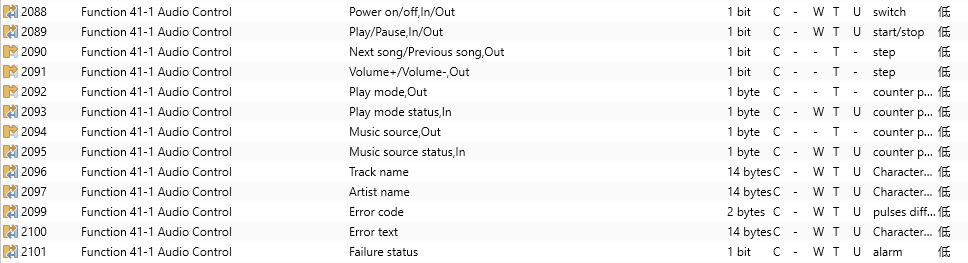
Figure 6.3.4 Audio control Communication Objects
No | Object function | Name | Type | Flags | DPT |
2088 | Power on/off,In/Out | Functionx-y HVAC Audio Control | 1bit | C,W,T,U | 1.001 switch |
This object is used to send telegrams of turning the background music on or off to the bus, controlling the state of the background music module. It can also receive the switch status feedback from the bus. - Telegram values 1: On 0: Off | |||||
2089 | Play/Pause,In/Out | Functionx-y HVAC Audio Control | 1bit | C,W,T,U | 1.010 start/stop |
This object controls playback (play/pause) in the background music module and receives status feedback. - Telegram values 1: Play 0: Pause | |||||
2090 | Next song/Previous song,Out | Functionx-y HVAC Audio Control | 1bit | C,T | 1.007 step |
This object is used to switch between songs, either to play the next track or the previous one. - Telegram values 1: Next track 0: Previous track | |||||
164 | Volume+/Volume-,Out | Functionx-y HVAC Audio Control | 1bit | C,T | 1.007 step |
This object is used to adjust the volume of the background music module. - Telegram values 1: Volume up 0: Volume down | |||||
2092 | Play mode,Out | Functionx-y HVAC Audio Control | 1byte | C,T | 5.010 counter pluses(0..255) |
This object is used to send control telegrams of the background music playback mode. The telegrams are predefined by parameters. | |||||
2093 | Play mode status,In | Functionx-y HVAC Audio Control | 1byte | C,W,T,U | 5.010 counter pluses(0..255) |
This object is used to receive status feedback telegrams for the background music playback mode. Only telegrams specified by parameters will update the display status on the screen. | |||||
2094 | Music source,Out | Functionx-y HVAC Audio Control | 1byte | C,T | 5.010 counter pluses(0..255) |
This object is used to send telegrams for selecting the background music audio source. Different audio source telegrams are predefined by parameters. | |||||
2095 | Music source status,in | Functionx-y HVAC Audio Control | 1byte | C,T | 5.010 counter pluses(0..255) |
This object is used to receive status feedback telegrams for the background music playback mode. Only telegrams specified by parameters will update the display status on the screen. | |||||
2096 | Track name | Functionx-y HVAC Audio Control | 14bytes | C,W,T,U | 16.001 character string (ISO 8859-1) |
This communication object is used to receive the track name via the bus and display it on the screen. | |||||
2097 | Album name | Functionx-y HVAC Audio Control | 14bytes | C,W,T,U | 16.001 character string (ISO 8859-1) |
This communication object is used to receive the album name via the bus and display it on the screen. | |||||
2098 | Artist name | Functionx-y HVAC Audio Control | 14bytes | C,W,T,U | 16.001 character string (ISO 8859-1) |
This communication object is used to receive the artist name via the bus and display it on the screen. | |||||
2099 | Error code | Functionx-y HVAC | 2bytes | C,W | 8.001 pulses difference |
2100 | Error text | Functionx-y HVAC | 14bytes | C,W | 16.001 character string (ISO 8859-1) |
2101 | Failure status | Functionx-y HVAC | 1bit | C,W | 1.005 alarm |
When the error code function is enabled, three communication objects will become visible. These are used to display error codes of different data types. | |||||
Table 6.3.4 Audio control function Communication Object Table
6.3.5 Color control type
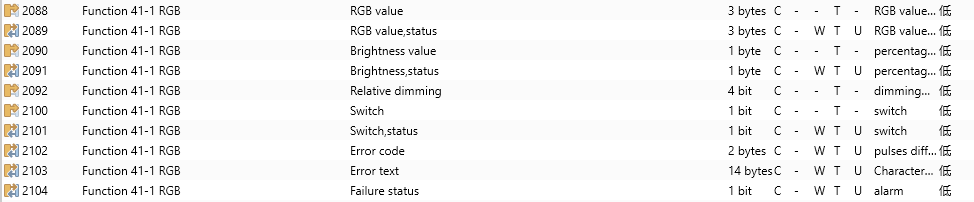
RGB_1*3byte
 RGB_3*1byte
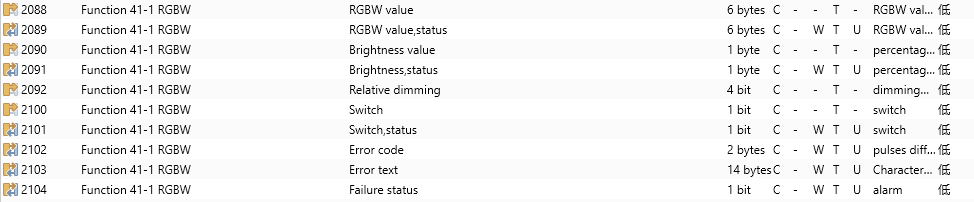 RGBW_1*6byte
 RGBW_4*1byte
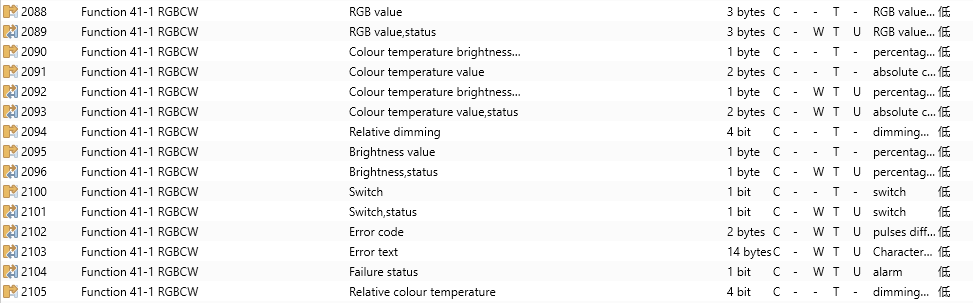 RGBCW_1*3byte_Brightness+2byte absolute value
 RGBCW_1*3byte_Brightness+1byte relative percentage value
 RGBCW_1x3byte_Directly(..) &Brightness+Colour Temperature
 RGBCW_1x3byte_Directly(..) &Warm/Cool white brightness
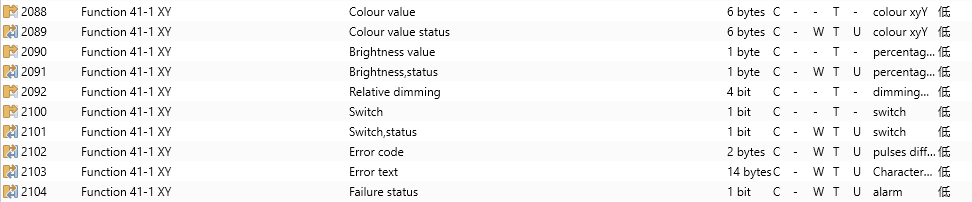 XY Color_Combined Object
 XY Color_Independent Object
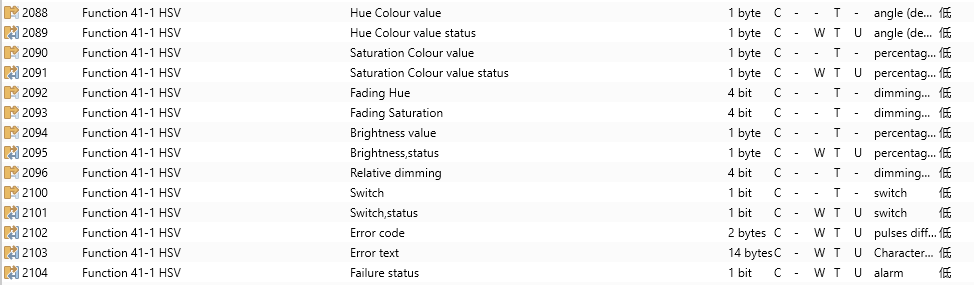 HSV Color
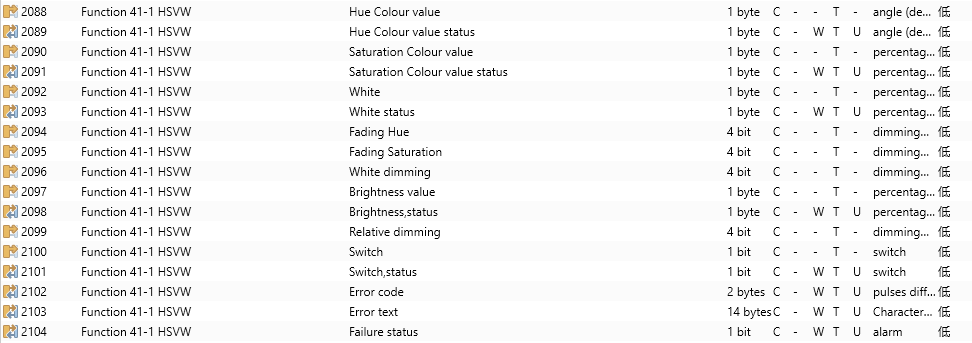 HSVW Color
Figure 6.3.5 Color control type Communication Objects
No. | Object function | Name | Type | Flags | DPT | ||||||||||||||||||||||||
2088 | RGB value | Function x-y RGB | 3byte | C,T | RGB value 3x(0..255) | ||||||||||||||||||||||||
2089 | RGB value,status | Function x-y RGB | 3byte | C,W,T,U | RGB value 3x(0..255) | ||||||||||||||||||||||||
This object is visible when the RGB object type is selected as 1x3byte. It sends the brightness values of the RGB three-color light and can also receive brightness feedback. The encoding of the 3-byte RGB dimming object data type is U8 U8 U8, with the details as follows:
R: Red dimming value G: Green dimming value B: Blue dimming value | |||||||||||||||||||||||||||||
2088 | Red value | Function x-y RGB | 1byte | C,T | 5.001 percentage(0..100%) | ||||||||||||||||||||||||
2091 | Red value,status | Function x-y RGB | 1byte | C,W,T,U | 5.001 percentage(0..100%) | ||||||||||||||||||||||||
Obj.2088: This object is used to send the brightness value of the R (red) channel to the bus, and receive brightness feedback. - Telegram values: 0 ... 100% Obj.2091: This communication object is used to receive the brightness feedback of the R (red) channel from the bus. - Telegram values: 0 ... 100% | |||||||||||||||||||||||||||||
2089 | Green value | Function x-y RGB | 1byte | C,T | 5.001 percentage(0..100%) | ||||||||||||||||||||||||
2092 | Green value,status | Function x-y RGB | 1byte | C,W,T,U | 5.001 percentage(0..100%) | ||||||||||||||||||||||||
Obj.2089: This object is used to send the brightness value of the G (green) channel to the bus, and receive brightness feedback. - Telegram values: 0 ... 100% Obj.2092: This communication object is used to receive the brightness feedback of the G (green) channel from the bus. - Telegram values: 0 ... 100% | |||||||||||||||||||||||||||||
2090 | Blue value | Function x-y RGB | 1byte | C,T | 5.001 percentage(0..100%) | ||||||||||||||||||||||||
2093 | Blue value,status | Function x-y RGB | 1byte | C,W,T,U | 5.001 percentage(0..100%) | ||||||||||||||||||||||||
Obj.2090: This object is used to send the brightness value of the B (Blue) channel to the bus, and receive brightness feedback. - Telegram values: 0 ... 100% Obj.2093: This communication object is used to receive the brightness feedback of the B (Blue) channel from the bus. - Telegram values: 0 ... 100% | |||||||||||||||||||||||||||||
2088 | RGBW value | Function x-y RGBW | 6byte | C,T | 251.600 RGB value 4x(0..255) | ||||||||||||||||||||||||
2089 | RGBW value,status | Function x-y RGBW | 6byte | C,W, T,U | 251.600 RGB value 4x(0..255) | ||||||||||||||||||||||||
This object is visible when the RGBW object type is selected as 1x6byte. It send brightness control telegrams for RGBW four-color lights to the bus. Obj.2088: It is used to send the brightness values of the RGBW four-color light to the bus. Obj.2089: It is used to receive the brightness values of the RGBW four-color light from the bus. The encoding of the 6-byte RGBW dimming object data type is U8 U8 U8 U8 R8 R4 B4, with the details as follows:
| |||||||||||||||||||||||||||||
2091 | White value | Function x-y RGBW | 1byte | C,T | 5.001 percentage(0..100%) | ||||||||||||||||||||||||
2095 | White value,status | Function x-y RGBW | 1byte | C,W,T,U | 5.001 percentage(0..100%) | ||||||||||||||||||||||||
Obj.2091: This object is used to send the brightness value of the W (white) channel to the bus, and receive brightness feedback. - Telegram values: 0 ... 100% Obj.2095: This communication object is used to receive the brightness feedback of the W (white) channel from the bus. - Telegram values: 0 ... 100% | |||||||||||||||||||||||||||||
2091 | Colour temperature value | Function x-y RGBCW | 2bytes | C,T | 7.600 absolute colour temperature | ||||||||||||||||||||||||
2093 | Colour temperature value,status | Function x-y RGBCW | 2bytes | C,W,T,U | 7.600 absolute colour temperature | ||||||||||||||||||||||||
These two communication objects are used for color temperature adjustment of single-color or dual-color lights. - Telegram values: 2000...7000 K Obj.2091: Send color temperature control telegrams to the bus under Brightness + Absolute Color Temperature Value control mode. Obj.2093: Receive color temperature control telegrams from the bus under Brightness + Absolute Color Temperature Value, Brightness + Relative Color Temperature Value, or Direct Control (Brightness + Color Temperature Value) modes. | |||||||||||||||||||||||||||||
2091 | Colour temperature brightness value | Function x-y RGBCW | 2bytes | C,T | 5.001 percentage(0..100%) | ||||||||||||||||||||||||
2093 | Colour temperature brightness value,status | Function x-y RGBCW | 2bytes | C,W,T,U | 5.001 percentage(0..100%) | ||||||||||||||||||||||||
These two communication objects are used for color temperature brightness adjustment of single-color or dual-color lights. - Telegram values: 0...100% Obj.2091: Send color temperature brightness control telegrams to the bus under Brightness + Absolute Color Temperature Value, Brightness + Relative Color Temperature Value, or Direct Control (Brightness + Color Temperature Value) modes. Obj.2093: receive color temperature brightness control telegrams from the bus under the same modes. | |||||||||||||||||||||||||||||
2091 | Relative percentage colour temperature | Function x-y RGBCW | 1byte | C,T | 5.001 percentage(0..100%) | ||||||||||||||||||||||||
2093 | Relative percentage colour temperature,status | Function x-y RGBCW | 1byte | C,W,T,U | 5.001 percentage(0..100%) | ||||||||||||||||||||||||
These two communication objects are used for relative color temperature brightness adjustment of single-color or dual-color lights. - Telegram values: 0...100% Obj.2091: Send relative color temperature control telegrams to the bus in Brightness + Relative Value mode. Obj.2093: Receive relative color temperature control telegrams from the bus in Brightness + Relative Value mode. | |||||||||||||||||||||||||||||
2091 | Cool white brightness | Function x-y RGBCW | 1byte | C,T | 5.001 percentage(0..100%) | ||||||||||||||||||||||||
2093 | Cool white brightness,status | Function x-y RGBCW | 1byte | C,W,T,U | 5.001 percentage(0..100%) | ||||||||||||||||||||||||
These two communication objects are used for cool white brightness control of dual-color lights under Direct Control. - Telegram values: 0…100% Obj.2091: Used in Direct Control to send cool white dimming telegrams to the bus (i.e., the cool white brightness value). Obj.2093: Used in Direct Control (Warm/Cool white brightness) to receive dimmer feedback of the cool white brightness status. | |||||||||||||||||||||||||||||
2090 | Warm white brightness | Function x-y RGBCW | 1byte | C,T | 5.001 percentage(0..100%) | ||||||||||||||||||||||||
2092 | Warm white brightness,status | Function x-y RGBCW | 1byte | C,W,T,U | 5.001 percentage(0..100%) | ||||||||||||||||||||||||
These two communication objects are used for warm white brightness control of dual‑color lights under Direct Control. Telegram values: 0…100% Obj.2090: Send warm white dimming telegrams to the bus in Direct control mode. Obj.2092: Receive warm white brightness feedback from the dimmer in Direct control (Warm/Cool White Brightness) mode. | |||||||||||||||||||||||||||||
2088 | Colour value | Function x-y XY | 6bytes | C,T | 242.600 colourxyY | ||||||||||||||||||||||||
2089 | Colour value,status | Function x-y XY | 6bytes | C,W,T,U | 242.600 colourxyY | ||||||||||||||||||||||||
These two communication objects are used for color control of XY lamps under XY combined parameter control. Obj.2088: Send XY color control telegrams to the bus in XY combined control mode. Obj.2089: Receive XY color value feedback from the dimmer in XY combined control mode. | |||||||||||||||||||||||||||||
2088 | X Colour value | Function x-y XY | 2bytes | C,T | 7.001 pulses | ||||||||||||||||||||||||
2089 | X Color value,status | Function x-y XY | 2bytes | C,W,T,U | 7.001 pulses | ||||||||||||||||||||||||
These two communication objects are used for X‑coordinate control of XY lamps under XY individual parameter control. Obj.2088: Send the X coordinate value for XY color control to the bus in XY individual control mode. Obj.2089: Receive the X coordinate value feedback from the dimmer. | |||||||||||||||||||||||||||||
2090 | Y Colour value | Function x-y XY | 2bytes | C,T | 7.001 pulses | ||||||||||||||||||||||||
2091 | Y Colour value,status | Function x-y XY | 2bytes | C,W,T,U | 7.001 pulses | ||||||||||||||||||||||||
These two communication objects are used for Y‑coordinate control of XY lamps under XY individual parameter control. Obj.2090: Send the Y coordinate value for XY color control to the bus in XY individual control mode. Obj.2091: Receive the Y coordinate value feedback from the dimmer. | |||||||||||||||||||||||||||||
2088 | Hue Colour value | Function x-y HSV | 1byte | C,T | 5.003 angle(degrees) | ||||||||||||||||||||||||
2089 | Hue Colour value,status | Function x-y HSV | 1byte | C,W,T,U | 5.003 angle(degrees) | ||||||||||||||||||||||||
These two communication objects are used for Hue control of HSV & HSVW lamps. Obj.2088: Used for controlling the color (e.g., red, blue, green, etc.), under HSV or HSWV control. Obj.2089: Receive the color response from the dimmer, under HSV or HSWV control. Hue is typically represented in degrees from 0 to 360: 0°= Red, 120°= Green, 240°= Blue. | |||||||||||||||||||||||||||||
2090 | Saturation Colour value | Function x-y HSV | 1byte | C,T | 5.001 percentage(0..100%) | ||||||||||||||||||||||||
2091 | Saturation Colour value,status | Function x-y HSV | 1byte | C,W,T,U | 5.001 percentage(0..100%) | ||||||||||||||||||||||||
These two communication objects are used for Saturation control of HSV & HSVW lamps. Telegram values: 0…100% Obj.2090: Control the purity of the color under HSV or HSWV control. Obj.2091: Receive the color purity response from the dimmer under HSV or HSWV control. - Range: 0 to 100% 0 indicates gray (no color) and 100% indicates full saturation (pure color). | |||||||||||||||||||||||||||||
2092 | Fading Hue | Function x-y HSV | 4bit | C,T | 3.007 dimming control | ||||||||||||||||||||||||
2093 | Fading Saturation | Function x-y HSV | 4bit | C,T | 3.007 dimming control | ||||||||||||||||||||||||
These two communication objects are used for relative dimming control of Hue and Saturation for HSV & HSVW lamps. Obj.2092: Used for relative dimming control of hue under HSV or HSWV control. Obj.2093: Used for relative dimming control of saturation under HSV or HSWV control. | |||||||||||||||||||||||||||||
2092 | White | Function x-y HSVW | 1byte | C,T | 5.001 percentage(0..100%) | ||||||||||||||||||||||||
2093 | White status | Function x-y HSVW | 1byte | C,W,T,U | 5.001 percentage(0..100%) | ||||||||||||||||||||||||
2096 | White dimming | Function x-y HSVW | 4bit | C,T | 3.007 dimming control | ||||||||||||||||||||||||
Obj.2092: This communication object is visible when HSWV is selected and is used to send the control of the white value to the bus. - Telegram value: 0..100% Obj.2093: This communication object is visible when HSWV is selected and is used to receive the white value feedback. - Telegram value: 0..100% Obj.2096: This communication object is visible when HSWV is selected and is used to send relative white value control to the bus. | |||||||||||||||||||||||||||||
2100 | Switch | Function x-y RGB | 1bit | C,T | 1.001 switch | ||||||||||||||||||||||||
This communication object is used to send on/off messages to the bus to control the lighting's on/off status. - Telegram value: 1: On 0: Off | |||||||||||||||||||||||||||||
2101 | Switch Status | Function x-y RGB | 1bit | C,W,T,U | 1.001 switch | ||||||||||||||||||||||||
This communication object is used to receive the on/off status response from other bus devices. | |||||||||||||||||||||||||||||
2092 | Relative dimming | Function x-y RGB | 4bit | C,W,T | 3.007 dimming control | ||||||||||||||||||||||||
This communication object is used to send relative dimming telegrams to the bus, including increasing, decreasing, or stopping telegrams. | |||||||||||||||||||||||||||||
2090 | Brightness value | Function x-y RGB | 1byte | C,W,T,U | 5.001 percentage(0..100%) | ||||||||||||||||||||||||
This communication object is used to send dimming telegrams to the bus, specifically the brightness value. - Telegram value: 0...100% | |||||||||||||||||||||||||||||
2091 | Brightness,status | Function x-y RGB | 1byte | C,T | 5.001 percentage(0..100%) | ||||||||||||||||||||||||
This communication object is used to receive the lighting brightness status from the dimmer's response. - Telegram value: 0...100% | |||||||||||||||||||||||||||||
2102 | Error code | Function x-y RGB | 2bytes | C,W | 8.001 pulses difference | ||||||||||||||||||||||||
2103 | Error text | Function x-y RGB | 14bytes | C,W | 16.001 character string (ISO 8859-1) | ||||||||||||||||||||||||
2104 | Failure status | Function x-y RGB | 1bit | C,W | 1.005 alarm | ||||||||||||||||||||||||
When the error code function is enabled, these three communication objects become visible and are used to display error codes for different data types. | |||||||||||||||||||||||||||||
Table 6.3.5 Color control type Communication Object Table
6.3.6 Air Quality display





Figure 6.3.6 Air Quality display function Communication Object
No. | Object function | Name | Type | Flags | DPT | |||||||
2088 | Temperature,In | Functionx-y AirQuality{{Items 1}} | 2bytes | C,W,T,U | 9.001 temperature(℃) | |||||||
This communication object is used to receive temperature measurement values sent by the temperature sensor on the bus. - Range: -200…100 ℃ | ||||||||||||
2089 | Humidity,In | Functionx-y AirQuality{{Items 2}} | 2bytes | C,W,T,U | 9.007 humidity(%) | |||||||
This communication object is used to receive humidity measurement values sent by the humidity sensor on the bus. - Range: 0…100% | ||||||||||||
2090 | PM2.5,In | Functionx-y AirQuality{{Items 3}} | 2bytes | C,W,T,U | 9.030 concentration(ug/m3) 7.001 pulses | |||||||
This object is used to receive inputs of PM2.5 value and update the display with the value obtained from the bus. The unit is micrograms per cubic meter (ug/m3). The data type of the object is determined by the parameter settings. - Range: 0...500。 | ||||||||||||
2091 | PM10,In | Functionx-y AirQuality{{Items 4}} | 2bytes | C,W,T,U | 9.030 concentration(ug/m3) 7.001 pulses | |||||||
This object is used to receive inputs of PM10 value and update the display with the value obtained from the bus. The unit is ug/m3. The data type of the object is determined by the parameter settings. - Range: 0...600 | ||||||||||||
2088 | CO2,In | Functionx-y AirQuality{{Items 1}} | 2bytes | C,W,T,U | 9.008 parts/million(ppm) 7.001 pulses | |||||||
This communication object is used to receive CO2 values from the bus and update the display with the corresponding values. The unit is ppm. - Range: 0...5000 | ||||||||||||
2089 | VOC,In | Functionx-y AirQuality{{Items 2}} | 2bytes | C,W,T,U | 9.008 parts/million(ppm) 7.001 pulses 9.030 concentration(ug/m3) | |||||||
This communication object is used to receive VOC values sent from the VOC sensor on the bus. The unit is ug/m3. The data type of the object is determined by parameters. - Range: 0 ... 9.99 When the object data type is set to 7.001 pulses, it is scaled down by a factor of 1000 based on the data point type 7.001 pulses. For example, if the received value is 5000 (μg/m³), it would be displayed as 5.00 mg/m³. | ||||||||||||
2090 | AQI,In | Functionx-y AirQuality{{Items 3}} | 2bytes | C,W,T,U | 7.001 pulses | |||||||
This object is used to receive inputs of AQI value and update the display with the value obtained from the bus. - Range: 0 ... 500 | ||||||||||||
2091 | Brightness,In | Functionx-y AirQuality{{Items 4}} | 2bytes | C,W,T,U | 7.013 brightness(lux) 9.004 lux(Lux) | |||||||
This object receives input brightness values from the bus and updates the display accordingly. The unit is lux. The data type of the object is determined by parameters. - Range: 0 ... 5000 | ||||||||||||
2088 | Windspeed,in | Functionx-y AirQuality{{Items 1}} | 2bytes | C,W,T,U | 9.005 speed(m/s) 9.028 wind speed(km/h) | |||||||
This object receive the input of wind speed values from the bus and updates the display accordingly. - Range: 0 ... 50 m/s or 150km/h | ||||||||||||
2089 | Rain,in | Functionx-y AirQuality{{Items 2}} | 1bit | C,W,T,U | 1.001 switch | |||||||
This communication object is used to receive rain status telegrams from the bus and update the display on the panel. - Telegram values: 1: Rain 0: No rain | ||||||||||||
2092 | Error code | Functionx-y HVAC | 2bytes | C,W | 8.001 pulses difference | |||||||
2093 | Error text | Functionx-y HVAC | 14bytes | C,W | 16.001 character string (ISO 8859-1) | |||||||
2094 | Failure status | Functionx-y HVAC | 1bit | C,W | 1.005 alarm | |||||||
When the error code function is enabled, three communication objects will become visible. These are used to display error codes of different data types. | ||||||||||||
Table 6.3.6 Air Quality display function Communication Object Table
6.3.7 Floor heating


Figure 6.3.7 Floor heating function Communication Object
No. | Object function | Name | Type | Flags | DPT |
2088 | Floor heating-External temperature sensor, In | Function x-y FloorHeating | 2bytes | C,W,T,U | 9.001 temperature(℃) |
This object is visible when the temperature reference is set to an external sensor. It is used to receive temperature measurement values sent from a temperature sensor on the bus. -Range: -50 ... 99.8°C | |||||
2089 | Floor heating-Power on/off, In/Out | Function x-y FloorHeating | 1bit | C,W,T,U | 1.001 switch |
This object is used to send switch control telegrams for underfloor heating and receive control status feedback. -Telegram values 1: Underfloor heating control interface on, interface operable. 0: Underfloor heating control interface off, interface not operable.
| |||||
2090 | Floor heating-Heating on/off, In/Out | Function x-y FloorHeating | 1bit | C,W,T,U | 1.001 switch |
2091 | Floor heating-Heating control value, Out | Function x-y FloorHeating | 1byte | C,W,T,U | 5.001 percentage(0..100%) |
This object is used to send control values for floor heating, controlling the opening and closing of the underfloor heating valve. - Telegram values Heating on/off - 2-point control: On/off Heating PWM - use PI control: On/off Heating continuous control - use PI control: 0 ... 100% | |||||
2092 | Floor heating-Setpoint , In/Out | Function x-y Floor heating | 2bytes | C,W,T,U | 9.001 temperature(℃) |
This object is used to send temperature setting values to the bus and to receive feedback of the temperature setting values. - Range: 5 ... 40°C | |||||
2094 | Floor heating-Scene,in | Function x-y Floor heating | 1byte | C,W | 18.001 scene control |
Visible when scene function enabled, and used for bus sending scene. | |||||
2095 | Error code | Function x-y Floor heating | 2bytes | C,W | 8.001 pulses difference |
2127 | Error text | Function x-y Floor heating | 14bytes | C,W | 16.001 character string (ISO 8859-1) |
2128 | Failure status | Function x-y Floor heating | 1bit | C,W | 1.005 alarm |
When the error code function is enabled, these three communication objects become visible and are used to display error codes for different data types. | |||||
Table 6.3.7 Floor Heating function Communication Object Table
6.3.8 Ventilation System
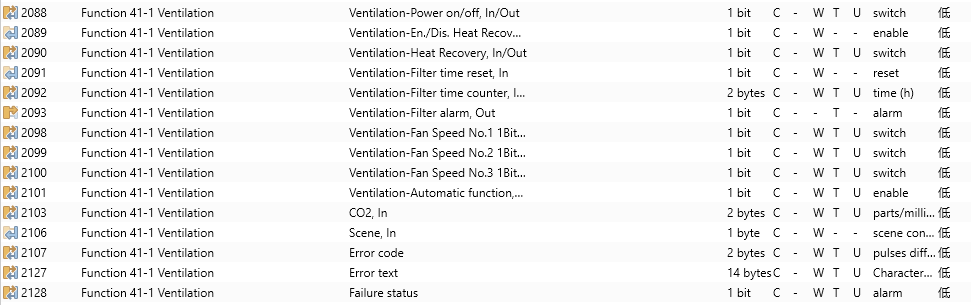











Figure 6.3.8 Ventilation System function Communication Object
No. | Object function | Name | Type | Flags | DPT | |||
2088 | Ventilation-Power on/off,In/Out | Function x-y Ventilation | 1bit | C,W,T,U | 1.001 switch | |||
This object is used to send power on/off telegrams for ventilation control and receive control status feedback. - Telegram values 1: Ventilation control interface on, interface operable 0: Ventilation control interface off, interface not operable | ||||||||
2089 | Ventilation-En./Dis. Heat Recovery,In | Function x-y Ventilation | 1bit | C,W | 1.003 enable | |||
This object is used to disable/enable the heat recovery function of the ventilation system. The specific values are defined by parameters. When disabled, the heat exchange is turned off and cannot be controlled. | ||||||||
2090 | Ventilation-Heat Recovery, In/Out | Function x-y Ventilation | 1bit | C,W,T,U | 1.001 switch | |||
This object is used to send control commands to turn on/off the heat recovery, and it can also receive status feedback values. -Telegram values 1: On 0: Off | ||||||||
2091 | Ventilation-Filter time reset, In | Function x-y Ventilation | 1bit | C,W | 1.015 reset | |||
This object is used to reset the filter time. After resetting, the duration of filter usage restarts counting. - Telegram values 1: Reset | ||||||||
2092 | Ventilation-Filter time counter, In/Out | Function x-y Ventilation | 2byte | C,W,T,U | 7.001 pluses | |||
This object is used to count the filter usage time in hours. Changes in the count value are transmitted to the bus, and this time can also be adjusted via the bus. | ||||||||
2093 | Ventilation-Filter alarm, Out | Function x-y Ventilation | 1bit | C,T | 1.005 alarm | |||
When the filter usage time exceeds the set value, this object triggers an alarm to remind the user to replace the filter. - Telegram values 1: Alarm | ||||||||
2094 | Fan speed, Out | Function x-y Ventilation | 1byte | C,T | 5.010 percentage(0..100%) | |||
2095 | Fan speed, Out | Function x-y Ventilation | 1byte | C,T | 5.100 fan stage (0..255) | |||
When the wind speed type is set to "1 byte," this object becomes visible. It sends control telegrams for the wind speed to the bus. The specific telegram values for each wind speed level are defined by parameters. | ||||||||
2096 | Status of Fan speed, In | Function x-y Ventilation | 1byte | C,W,T,U | 5.010 percentage(0..100%) | |||
2097 | Status of Fan speed, In | Function x-y Ventilation | 1byte | C,W,T,U | 5.100 fan stage (0..255) | |||
When the wind speed type is “1byte”, this object is visible. It receives feedback of the wind speed. The specific telegram values for each wind speed level are defined by parameters. | ||||||||
2098 | Ventilation-Fan Speed No.1 1Bit, In/Out | Function x-y Ventilation | 1bit | C,W,T,U | 1.001 switch | |||
2099 | Ventilation-Fan Speed No.2 1Bit, In/Out | Function x-y Ventilation | 1bit | C,W,T,U | 1.001 switch | |||
2100 | Ventilation-Fan Speed No.3 1Bit, In/Out | Function x-y Ventilation | 1bit | C,W,T,U | 1.001 switch | |||
When the wind speed type is 1”bit”, these three communication objects are visible. The wind speed is controlled by three objects simultaneously, with each wind speed level corresponding to specific telegram values defined by parameters. They can receive feedback, with feedback values needing to correspond to the parameter-defined values to update the display on the screen. | ||||||||
2101 | Ventilation-Automatic function, In/Out | Function x-y Ventilation | 1bit | C,W,T,U | 1.003 enable | |||
This object is used to enable the automatic operation function. By default, automatic operation is disabled after power recovery or programming. It can be disabled by turning off the device, manually adjusting the fan speed, or activating a scene. Specific values for enabling or disabling automatic operation are defined by parameters. | ||||||||
2103 2102 | CO2, In | Function x-y Ventilation | 2byte | C,W,T,U | 9.008 parts/million(ppm) 7.001 pulses | |||
This object is used to receive the input of CO2 values from the bus and update the display accordingly. The unit is ppm. - Range: 0 ... 4000 If the automatic operation control value is set to CO2, the ventilation system in automatic mode adjusts fan speed based on CO2 concentration. The object's data type is determined by parameters. | ||||||||
2105 2104 | PM2.5, In | Function x-y Ventilation | 2byte | C,W,T,U | 9.030 concentration(ug/m3) 7.001 pulses | |||
This object is used to receive the input of PM2.5 values from the bus, updating the display accordingly. The unit is ug/m3. - Range: 0 ... 999 If the control value for automatic operation is set to PM2.5, the ventilation system in automatic mode adjusts fan speed based on PM2.5 concentration. The object's data type is determined by parameters. | ||||||||
2103 2102 | PM10, In | Function x-y Ventilation | 2byte | C,W,T,U | 9.030 concentration(ug/m3) 7.001 pulses | |||
This object is used to receive the input of PM10 values from the bus, updating the display accordingly. The unit is ug/m3. - Range: 0 ... 999 If the control value for automatic operation is set to PM2.5, the ventilation system in automatic mode adjusts fan speed based on PM2.5 concentration. The object's data type is determined by parameters. | ||||||||
2102 | AQI, In | Function x-y Ventilation | 2byte | C,W,T,U | 7.001 pulses | |||
This object is used to receive the input of AQI values from the bus, updating the display accordingly. The unit is ug/m3. - Range: 0 ... 999 If the control value for automatic operation is set to AQI, the ventilation system in automatic mode adjusts fan speed based on AQI concentration. The object's data type is determined by parameters. | ||||||||
2103 2102 | VOC, In | Function x-y Ventilation | 2byte | C,W,T,U | 9.008 parts/million(ppm) 7.001 pulses | |||
This object is used to receive the input of VOC values from the bus, updating the display accordingly. The unit is ppm. - Range: 0 ... 4000 If the control value for automatic operation is set to VOC, the ventilation system in automatic mode adjusts fan speed based on VOC concentration. The object's data type is determined by parameters. | ||||||||
2102 | Others, In | Function x-y Ventilation | 2byte | C,W,T,U | 7.001 pulses | |||
This object is used to receive the input of Other sensor from the bus, updating the display accordingly. - Range: 0 ...65535 If the control value for automatic operation is set to Other, the ventilation system in automatic mode adjusts fan speed based on Other concentration. The object's data type is determined by parameters. | ||||||||
2106 | Scene,in | Function x-y Ventilation | 1byte | C,W | 18.001 scene control | |||
Visible when scene function enabled, and used for bus sending scene. | ||||||||
2107 | Error code | Function x-y Ventilation | 2bytes | C,W | 8.001 pulses difference | |||
2127 | Error text | Function x-y Ventilation | 14bytes | C,W | 16.001 character string (ISO 8859-1) | |||
2128 | Failure status | Function x-y Ventilation | 1bit | C,W | 1.005 alarm | |||
When the error code function is enabled, three communication objects will become visible. These are used to display error codes of different data types. | ||||||||
Table 6.3.8 Ventilation System function Communication Object Table
6.3.9 Energy Metering display



Figure 6.3.9 Energy metering display function Communication Object
No. | Object function | Name | Type | Flags | DPT |
2088 | Current in mA(DPT 7.012) | Function x-y {{Energy Meter 1}} | 2bytes | C,W,T,U | 7.012 current (mA) |
This object is used to receive the current value from the bus and update it on the display. - Display range: 0 ~ 65535 mA, with a resolution of 1 mA. | |||||
2089 | Voltage in mV(DPT 9.020) | Function x-y {{Energy Meter 2}} | 2bytes | C,W,T,U | 9.020 voltage (mV) |
This object is used to receive the voltage value from the bus and update it on the display. - Display range: -670760 ~ 670760mV, with a resolution of 0.01mV. | |||||
2090 | Current in mA(DPT 9.021) | Function x-y {{Energy Meter 3}} | 2bytes | C,W,T,U | 9.021 current (mA) |
This object is used to receive the current value from the bus and update it on the display. - Display range: -670760 ~ 670760 mA, with a resolution of 0.01 mA. | |||||
2091 | Power in kW(DPT 9.024) | Function x-y {{Energy Meter 4}} | 2bytes | C,W,T,U | 9.024 power (kW) |
This object is used to receive the power value from the bus and update it on the display. - Display range: -670760 ~ 670760kW, with a resolution of 0.01kW. | |||||
2088 | Active energy in Wh(DPT 13.010) | Function x-y {{Energy Meter 1}} | 4bytes | C,W,T,U | 13.010 active energy (Wh) |
This object is used to receive the energy value from the bus and update it on the display. - Display range: -2147483648 ~ 2147483647Wh, with a resolution of 1Wh. | |||||
2089 | Active energy in kWh(DPT 13.013) | Function x-y {{Energy Meter 2}} | 4bytes | C,W,T,U | 13.013 active energy (kWh) |
This object is used to receive the energy value from the bus and update it on the display. - Display range: -2147483648 ~ 2147483647kWh, with a resolution of 1kWh. | |||||
2090 | Current in A(DPT 14.019) | Function x-y {{Energy Meter 3}} | 4bytes | C,W,T,U | 14.019 electric current (A) |
This object is used to receive the current value from the bus and update it on the display. - Display range: -99999999.9 ~ 99999999.9A , with a resolution of 0. 1A | |||||
2091 | Voltage in V(DPT 14.027) | Function x-y {{Energy Meter 4}} | 4bytes | C,W,T,U | 14.027 electric potential (V) |
This object is used to receive the voltage value from the bus and update it on the display. - Display range: -670760 ~ 670760mV, with a resolution of 0.01mV. | |||||
2088 | Power in W(DPT 14.056) | Function x-y {{Energy Meter 1}} | 4bytes | C,W,T,U | 14.056 power (W) |
This object is used to receive the power value from the bus and update it on the display. - Display range: -99999999.9 ~ 99999999.9W, with a resolution of 0. 1W. | |||||
2092 | Error code | Function x-y Ventilation | 2bytes | C,W | 8.001 pulses difference |
2093 | Error text | Function x-y Ventilation | 14bytes | C,W | 16.001 character string (ISO 8859-1) |
2094 | Failure status | Function x-y Ventilation | 1bit | C,W | 1.005 alarm |
When the error code function is enabled, three communication objects will become visible. These are used to display error codes of different data types. | |||||
Table 6.3.9 Energy Metering display function Communication Object Table
6.3.10 Advanced Switch
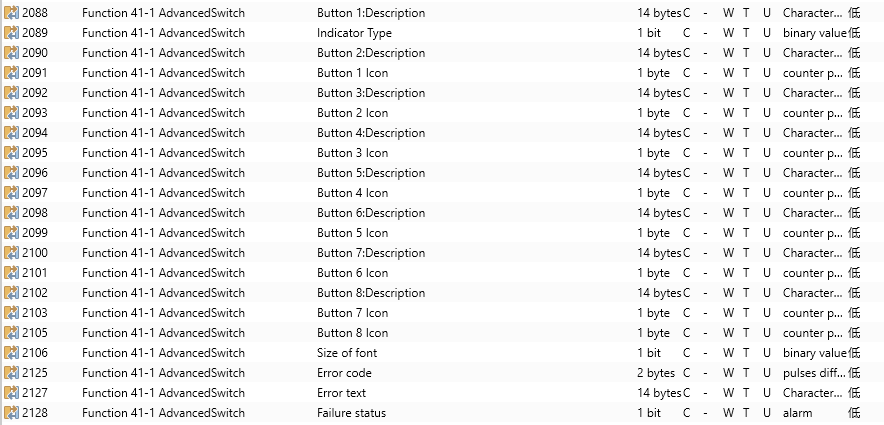
Figure 6.3.10 Advanced Switch display function Communication Object
No. | Object function | Name | Type | Flags | DPT | ||
2089 | Indicator Type | Function x-y Advanced Switch | 1bit | C,W,T,U | 1.006 binary value | ||
This communication object is used to receive and control the key display type. | |||||||
2106 | Size of font | Function x-y Advanced Switch | 1bit | C,W,T,U | 1.006 binary value | ||
This communication object is used to receive and control the font size when the key display type is set to Text. | |||||||
2088 | Button x:Description | Function x-y Advanced Switch | 14bytes | C,W,T,U | 16.001 character string (ISO 8859-1) | ||
This communication object is used to receive and control the name when the key is set to Text. | |||||||
2091 | Button x Icon | Function x-y Advanced Switch | 1byte | C,W,T,U | 5.010 counter pulses(0..255) | ||
This communication object is used to receive and control the icon when the key is set to Icon. | |||||||
2092 | Error code | Function x-y Advanced Switch | 2bytes | C,W | 8.001 pulses difference | ||
2093 | Error text | Function x-y Advanced Switch | 14bytes | C,W | 16.001 character string (ISO 8859-1) | ||
2094 | Failure status | Function x-y Advanced Switch | 1bit | C,W | 1.005 alarm | ||
When the error code function is enabled, three communication objects will become visible. These are used to display error codes of different data types. | |||||||
Table 6.3.10 Advanced Switch display function Communication Object Table