يمكنك تكوين وترقية الجهاز عبر واجهة الويب باستخدام التوفير التلقائي لمرة واحدة أو المجدول مع ملفات التكوين. هذا يلغي الحاجة إلى إعداد الإعدادات يدويا، مما يوفر عليك الوقت والجهد.
Provisioning Principle
التوفير التلقائي هو ميزة تستخدم لتكوين أو ترقية الأجهزة دفعة عبر خوادم طرف ثالث. البروتوكولات التي تستخدمها أجهزة Akuvox للوصول إلى عنوان عنوان خادم الطرف الثالث الذي يخزن ملفات التكوين والبرمجيات الثابتة، والتي ستستخدم بعد ذلك لتحديث البرنامج الثابت والمعلمات المقابلة على الجهاز.
يرجى الاطلاع على مخطط التدفق أدناه:
.png)
Configuration Files for Auto-provisioning
ملفات التكوين الخاصة بالتوفير التلقائي تأتي بصيغتين: ملفات التكوين العامة وملفات التكوين القائمة على MAC.
الاختلافات:
توفير التكوين العام:
يتم تخزين ملف تكوين عام على الخادم، مما يسمح لجميع الأجهزة ذات الصلة بتنزيل نفس الملف لتحديث المعلمات.
إعداد الإعدادات المعتمد على MAC:
ملفات التكوين المبنية على MAC محددة بالأجهزة الفردية، ويتم تحديدها من خلال عناوين MAC الفريدة الخاصة بها. الملفات المسماة بعنوان MAC للجهاز سيتم مطابقتها تلقائيا قبل تحميلها للتزويد.
ملاحظة
يجب أن تكون ملفات التكوين بصيغة CFG.
يختلف اسم ملف التكوين العام لتوفير الدفعات حسب الطراز.
ملف التكوين القائم على MAC مسمى نسبة إلى عنوان MAC الخاص به.
ستصل الأجهزة أولا إلى ملفات التكوين العامة قبل الملفات المبنية على MAC إذا كان النوعان متوفرين.
يمكنك النقر هنا لرؤية التنسيق التفصيلي والخطوات.
AutoP Schedule
يوفر لك Akuvox طرق AutoP مختلفة تمكن الجهاز من إجراء الإعداد لنفسه وفقا للجدول الزمني.
Set it up on the System > Auto Provisioning interface.
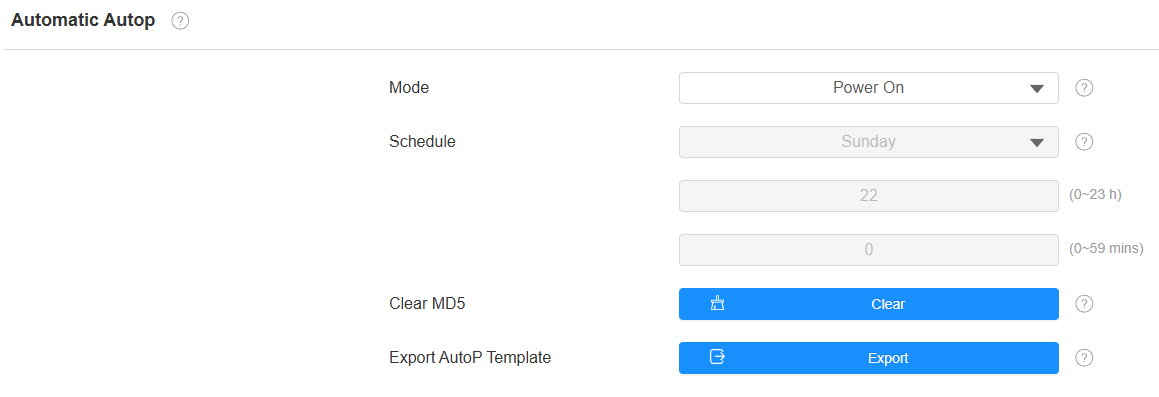
Mode:
Power On: Allow the device to perform Autop every time it boots up.
Repeatedly: Allow the device to perform Autop according to the schedule.
Power On + Repeatedly: Combine Power On and Repeatedly modes, allowing the device to perform Autop every time it boots up or according to the schedule.
Hourly Repeat: Allow the device to perform Autop every hour.
Schedule: When Power On + Repeatedly mode is selected, you can select the specific day and time for the Autop.
Clear MD5: Used to compare the existing autop file with the autop file on the server; if the files are the same, then the provisioning will be stopped, thus avoiding unnecessary auto-provisioning.
Static Provisioning
يمكنك إعداد رابط خادم محدد يدويا لتحميل البرنامج الثابت أو ملف الإعدادات. إذا تم إعداد جدول التوفير التلقائي، سيقوم الجهاز بإجراء الإعداد التلقائي في وقت محدد وفقا لجدول التوفير التلقائي الذي قمت بإعداده. بالإضافة إلى ذلك، فإن TFTP وFTP وHTTP وHTTPS هي البروتوكولات التي يمكن استخدامها لترقية البرنامج الثابت للجهاز وتكوينه.
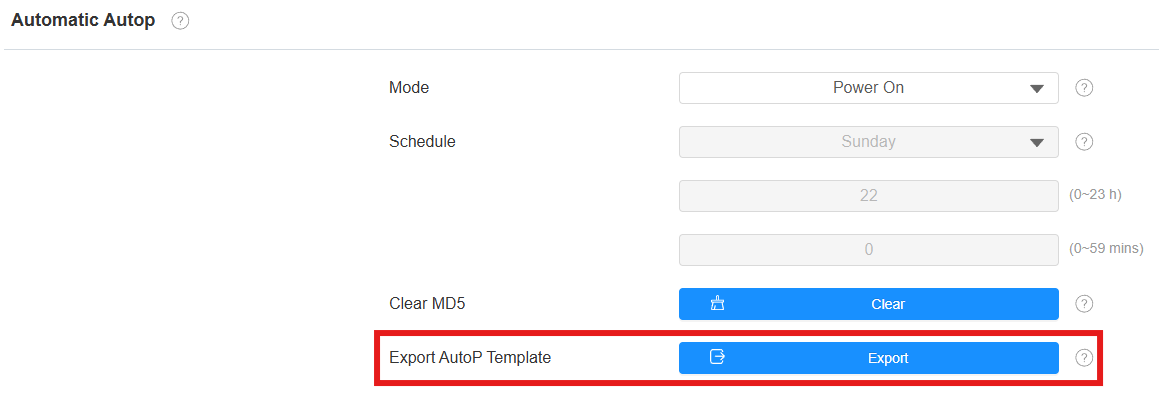
Download the Autop template on the System > Auto Provisioning > Automatic Autop interface.
Set the Autop server on System > Auto Provisioning > Manual AutoP interface.
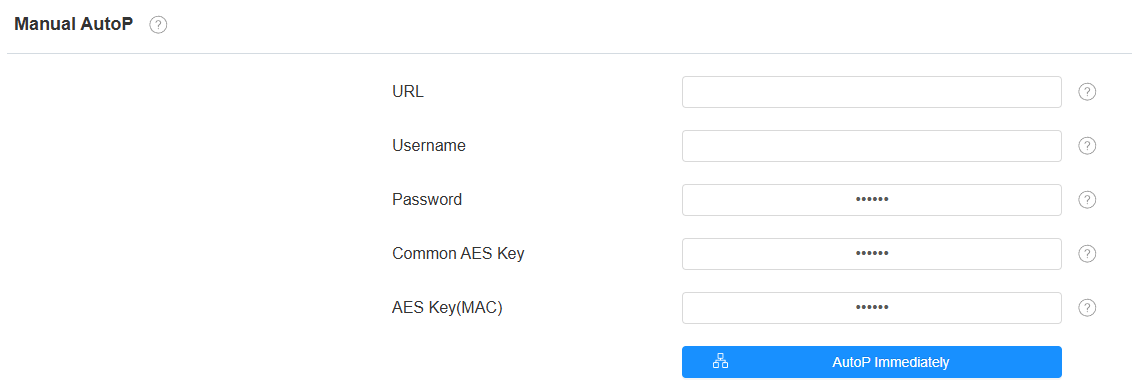
URL: The TFTP, HTTP, HTTPS, or FTP server address for provisioning.
User Name: Set up a username if the server needs a username to be accessed.
Password: Set up a password if the server needs a password to be accessed.
Common AES Key: Set up AES code for the intercom to decipher the general Auto Provisioning configuration file.
AES Key(MAC): Set up the AES code for the intercom to decipher the MAC-based auto-provisioning configuration file.
Note
AES, as one type of encryption, should be configured only when the config file is encrypted with AES.
Server Address Format:
TFTP: tftp://192.168.0.19/
FTP: ftp://192.168.0.19/(allows anonymous login)
ftp://username:password@192.168.0.19/(requires a user name and password)
HTTP: http://192.168.0.19/(use the default port 80)
http://192.168.0.19:8080/(use other ports, such as 8080)
HTTPS: https://192.168.0.19/(use the default port 443)
Tip
Akuvox does not provide a user-specified server. Please prepare the TFTP/FTP/HTTP/HTTPS server by yourself.
PNP Configuration
التوصيل والتشغيل (PNP) هو مزيج من دعم الأجهزة والبرمجيات يمكن نظام الحاسوب من التعرف على تغييرات تكوين الأجهزة والتكيف معها مع تدخل قليل أو معدوم من المستخدم.
انقر هنا لمشاهدة فيديو الإعدادات.
Enable/disable it on the System > Auto Provisioning > PNP Option interface.
