Audio Codec Configuration
The door phone supports three types of codec (PCMU, PCMA, and G722) for encoding and decoding the audio data during the call session. Each type of codec varies in terms of sound quality. You can select the specific codec with different bandwidths and sample rates flexibly according to the actual network environment.
To configure the audio codec, navigate to the web Account > Advanced interface.
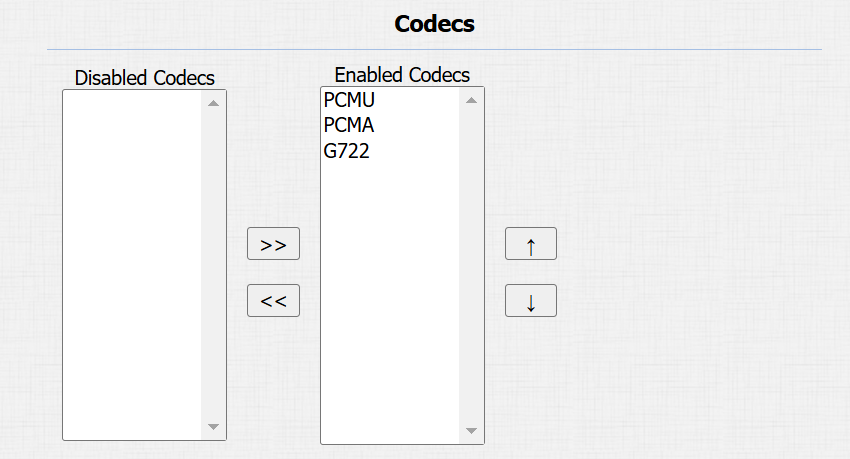
Please refer to the bandwidth consumption and sample rate for the three codec types below:
Codec Type | Bandwidth Consumption | Sample Rate |
|---|---|---|
PCMA | 64 kbit/s | 8kHZ |
PCMU | 64 kbit/s | 8kHZ |
G722 | 64 kbit/s | 16kHZ |
Video Codec Configuration
The door phone supports the H264 codec that provides better video quality at a much lower bit rate with different video quality and payload.
Note
Since E21A does not have the camera, it does not support camera-related functions.
To configure the video codec, navigate to the web Account > Advanced interface.
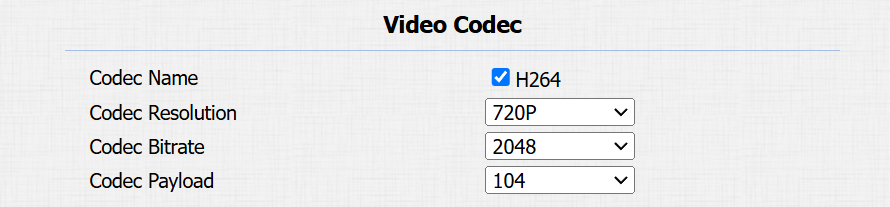
Codec Name: Check to enable the H264 video codec format for the door phone video stream.
Codec Resolution: Select the resolution from the provided options. The default code resolution is 720P.
CodecBitrate: The video stream bitrate ranges from 128 to 2048 kbps. The greater the bitrate, the more data transmitted every second and the clearer the video will be. The default code bitrate is 2048.
Codec Payload: The payload ranges from 90 to 119 for configuring audio/video configuration files. The default is 104.
Video Codec for IP Direct Calls
You can select the IP call video quality by selecting the proper codec resolution according to the network condition.
To set it up, navigate to the Device > Call Feature > Direct IP interface.

Video Resolution: Select the resolution from the provided options. The default is 720P.
Video Bitrate: The video stream bitrate ranges from 128 to 2048 kbps. The default bitrate is 2048.
Video Payload: The payload ranges from 90 to 119 for configuring audio/video configuration files. The default is 104.