This section describes the basic instructions for the start-up operation of the E33 lift control.
Requirements
To deploy the EC33 lift control for the lift control application, make sure that:
You have powered up the EC33.
You have networked the EC33.
You have connected the EC33 to the lift control panel.
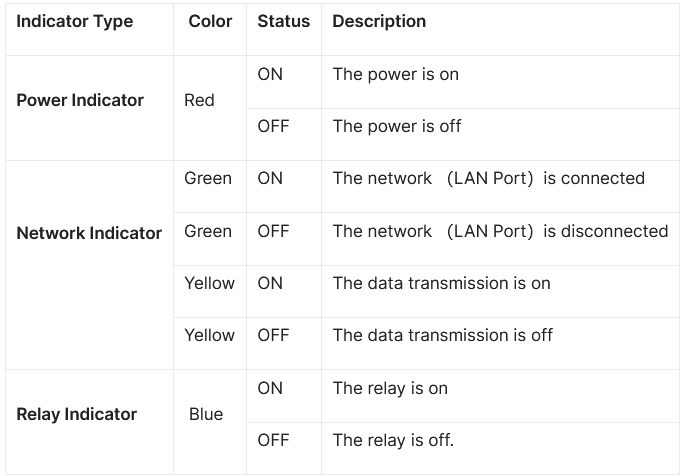
Indicators
The following table describes the status of different indicators:
Log in to Web Interface
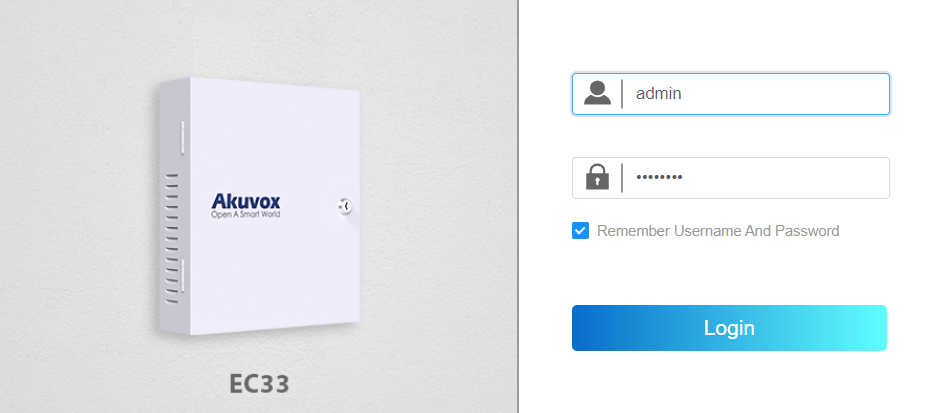
You can log into the EC33 web interface to set up and manage device configurations. Open a browser, enter the EC33's IP address, and log in using the default username and password (both are admin).
To find the IP address, press the IP announcement button on the circuit board or use the Akuvox IP Scanner.
Note
Download IP scanner:
https://knowledge.akuvox.com/docs/akuvox-ip-scanner?highlight=IPSee the detailed guide:
https://knowledge.akuvox.com/v1/docs/en/how-to-obtain-ip-address-via-ip-scanner?highlight=IP%20ScannerGoogle Chrome browser is strongly recommended.
Your computer should be on the same local network as the device.