Call Auto-answer
Auto-answer feature allows the device to automatically pick up incoming calls without any manual intervention. You can also customize this feature by setting the time duration for auto-answering and choosing the communication mode between audio and video.
To enable the Auto Answer feature, go to Account > Advanced > Call interface.
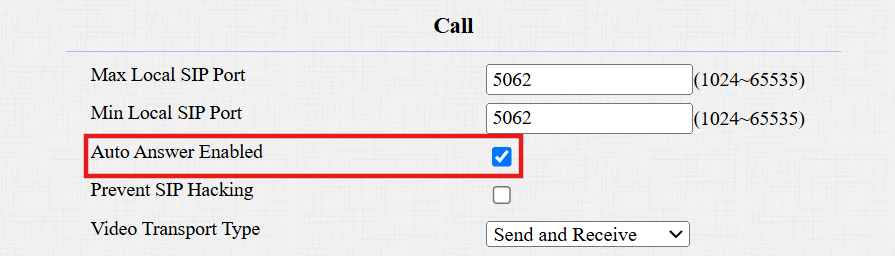
To set it up, navigate to Intercom > Call Feature > Auto Answer interface.

Auto Answer Delay: Set the time interval for the call to be automatically picked up after ringing. For example, if you set the delay time to 5 seconds, the door phone will answer the call automatically after 5 seconds.
Mode: Determine whether to auto-answer the call as a video or audio call.
Sequence Call
Sequence Call is a feature that allows you to dial a group of numbers in a predefined order until one of them answers. This feature is supported by Akuvox SmartPlus, which provides a set of sequence call numbers for the application. Please click here for the detailed configuration.
You can also configure the local sequence call number. Go to Intercom > Basic > Manager Dial interface.
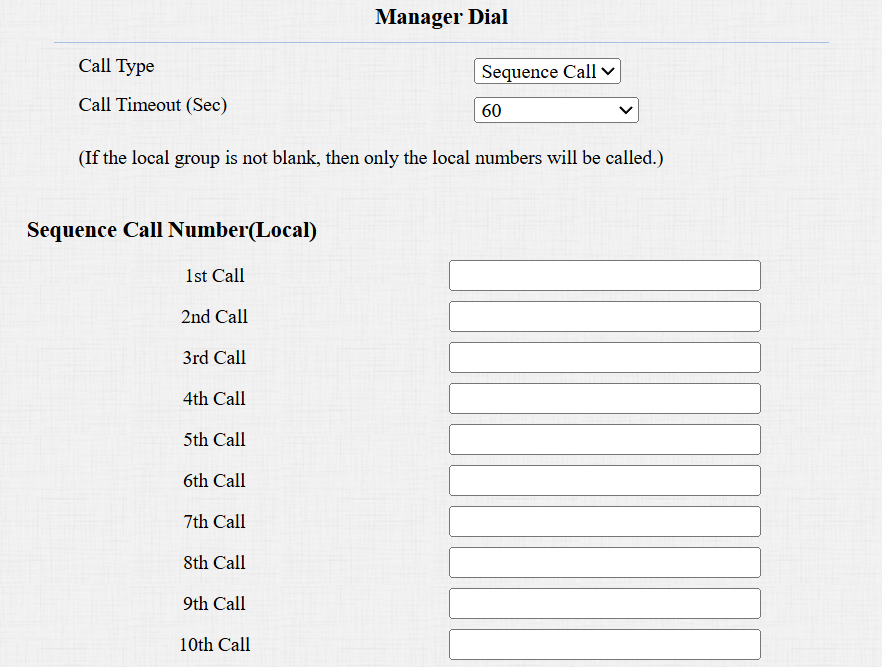
Call Type: Select Sequence Call.
Call Timeout(Sec): Determine the duration before calling the next number when the previous call is not answered.
Sequence Call Number(Local): Enter the target IP/SIP numbers.
Note
When the device is connected to SmartPlus Cloud, the local Sequence Call option will be unavailable.
Group Call
This feature allows users to call a group of contacts by a single press. The device supports local and SmartPlus-featured group calls. To learn about the detailed configuration, please click here.
To set up local group call numbers, go to Intercom > Basic > Manager Dial interface.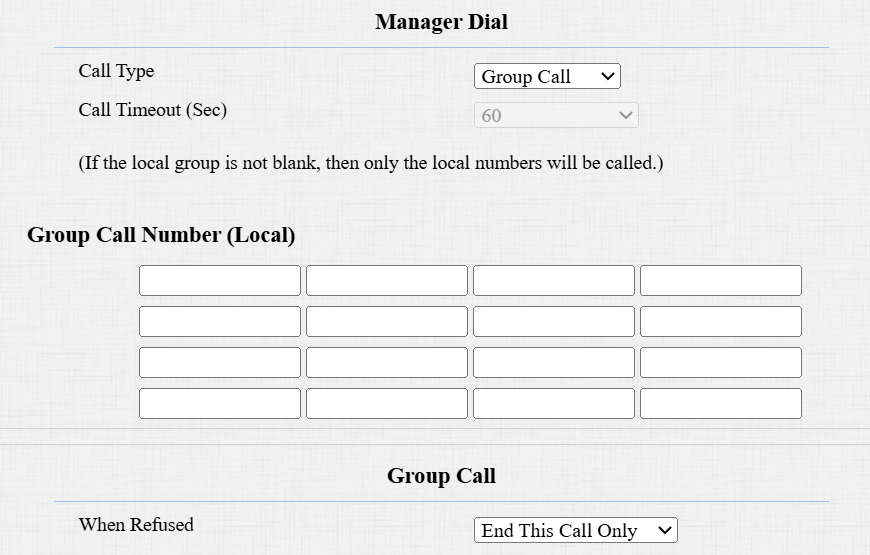
Call Type: Select Group Call.
Group Call Number(Local): Enter the target IP/SIP numbers.
When Refused:
End This Call Only: The device will continue to call the next number.
End All Calls: The device will stop calling.
Do Not Disturb
The Do Not Disturb(DND) feature prevents unwanted incoming SIP calls, ensuring uninterrupted focus. It also allows you to set a code to be sent to the SIP server when rejecting a call.
Set it up on the Intercom > Call Feature interface.

Return Code When DND: Specify the code sent to the caller via the SIP server when rejecting an incoming call in DND mode.
Push To Hang Up
Users can hang up the call on the door phone by pressing the push button. To enable the feature, navigate to Intercom > Basic > Push To Hang Up interface.

Multicast
Multicast is a one-to-many communication within a range. The door phone can act as a listener and receive audio from the broadcasting source.
To set it up, go to Intercom > Multicast interface.
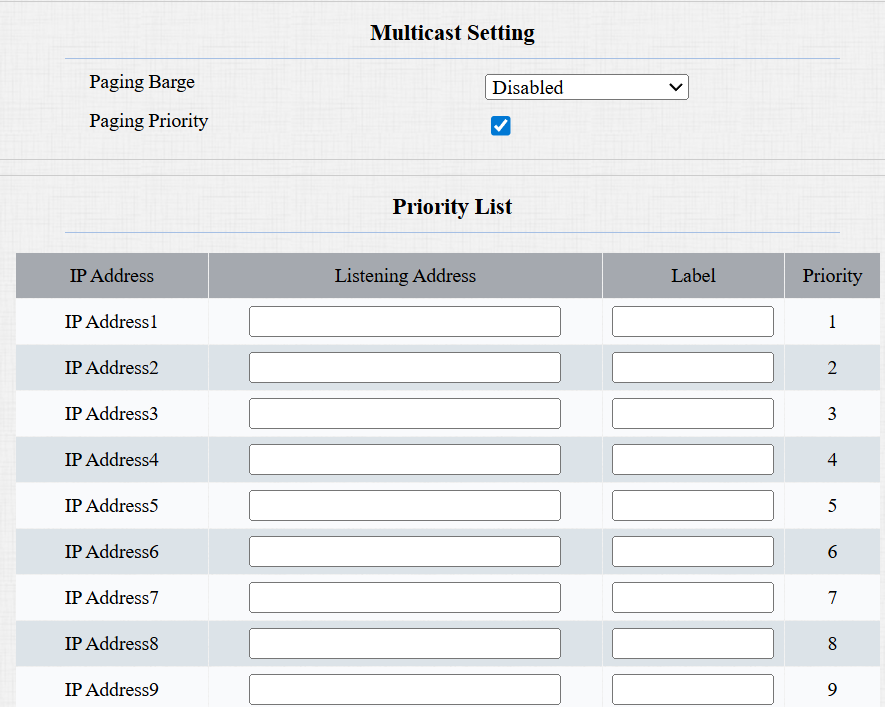
Paging Barge: Determine how many multicast groups have higher priority than SIP calls. If disabled, SIP calls will have higher priority.
Paging Priority: Decide whether to make multicast in order of priority.
Listening Address: Enter the IP address. The listen address should be the same as the multicast address. The listening port and the multicast port cannot be the same for each IP address. Multicast IP address is from 224.0.0.0 to 239.255.255.255.
Note
Please contact Akuvox tech team for valid multicast address.
Label: Name the multicast group.
Maximum Call Duration
The device allows you to set up the call time duration for receiving the call from the calling device, as the caller side might forget to hang up the intercom device. When the call time duration is reached, the device will terminate the call automatically.
To set up call time duration, navigate to the web Intercom > Call Feature > Max Call Time interface.

Max SIP/IP Call Time: Specify the maximum duration of all calls. The door phone will end the call automatically when the time limit is reached.
Note
The max call time is affected by the SIP server’s max call time when users make SIP calls. The max call time should not exceed the call duration of SIP server.
Maximum Dial Duration
Maximum Dial Duration is the time limit for incoming and/or outgoing calls on the device. If configured, the device will automatically terminate the call if no one answers the call within the preset time, whether it is incoming or outgoing.
To set it up, navigate to Intercom > Call Feature > Max Dial Time interface.

Dial SIP/IP Dial In Time: Specify the maximum duration of an incoming call. The door phone will automatically end the incoming call if it is not answered within the preset time.
Dial SIP/IP Dial Out Time: Specify the maximum duration of an outgoing call. The door phone will automatically end the call it dialed out if there is no answer from the recipient within the preset time.
Note
The max dial time is affected by the SIP server’s max dial time when users make SIP calls. The max call time should not exceed the dial duration of SIP server.
Hang Up After Open Door
This feature automatically ends the call once the door is released, allowing for the seamless reception of subsequent calls.
Set it up on the Intercom > Call Feature interface.

Type: Specify the door-opening method. If this specific method is used to release the door during a call, the door phone will end the call when the preset hang-up time is reached.
Time Out: Specify the hang-up time limit. The door phone will automatically terminate the call when the specific time is reached after the door is opened.
Chime Bell Setting
The device can be connected to a chime bell via its relay ports. The chimebell sounds by pressing the push button and triggering the relay during a call.
To set it up, go to Access Control > Relay > Output To Chime Bell interface.

Execute Relay: Select None to disable the function; select Relay to turn it on.