akubela HyPanel devices support simultaneous wired and wireless network connections. This is useful in projects where:
The LAN handles local intercom communication with public door phones.
The WAN (Internet) provides access for device control, mobile apps, and cloud services.
Network Topology
(HyPanel PS51 and door phone X915 are used as examples in this topology.)
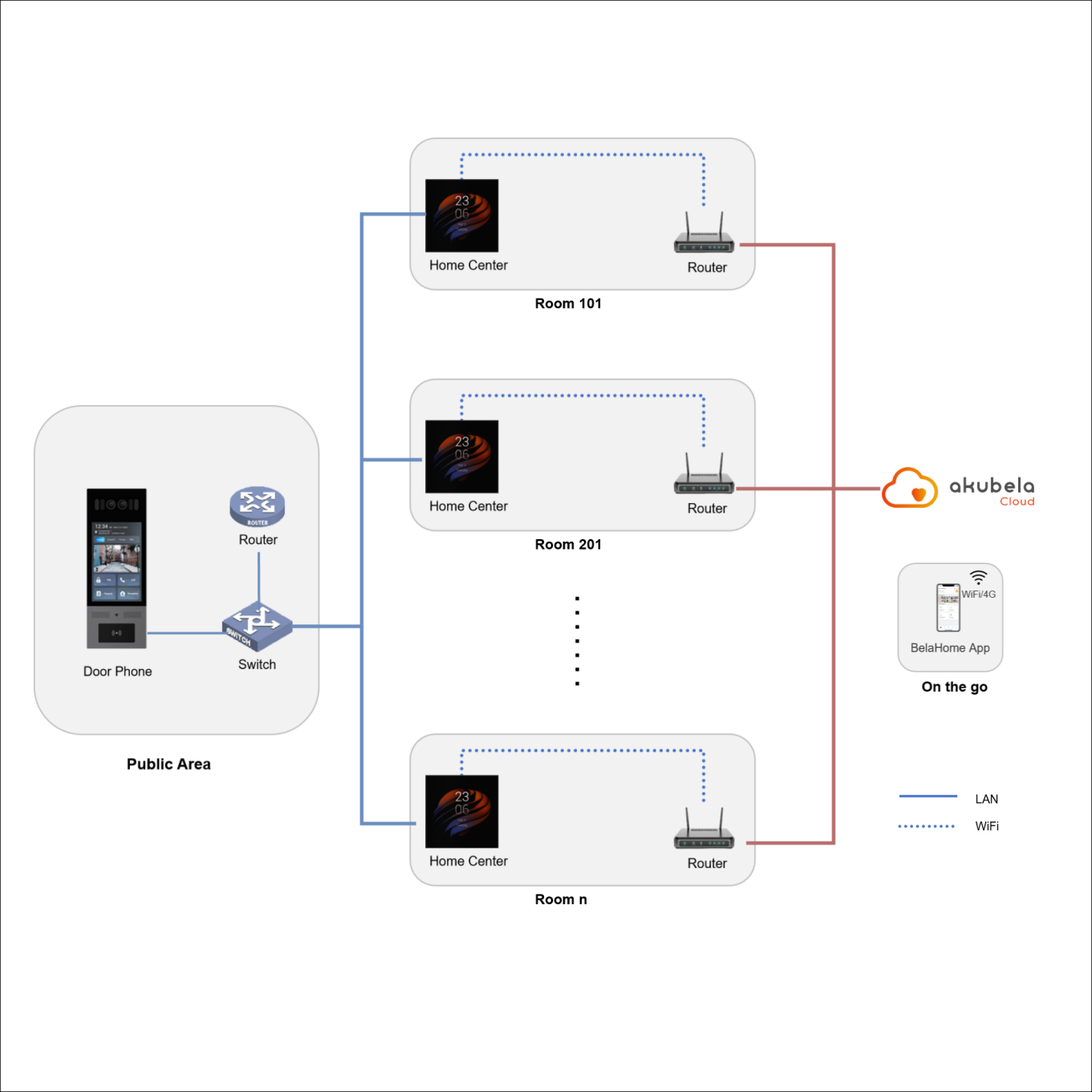
The door phone and the HyPanel communicate over the local area network (LAN) using local IP addresses.
The HyPanel and the BelaHome app communicate over the Internet via the akubela Cloud.
The BelaHome app controls smart home devices over the Internet via the akubela Cloud.
Before Getting Started
Supported HyPanel models and firmware versions:
Model | Firmware |
HyPanel Supreme
| 1001.1.39.125 and later |
HyPanel Ultra
| 281.1.39.128 and later |
HyPanel Pro
| 71.1.39.137 and later |
HyPanel Lux Piano
| 61.1.39.406 and later |
HyPanel
| 51.1.39.139 and later |
HyPanel Plus
| 52.1.39.116 and later |
HyPanel KeyPlus
| 53.1.39.119 and later |
HyPanel Lite
| 41.1.36.64 and later |
HyPanel Elite 7 (PG42) | 42.1.38.21 and later |
HyPanel Elite 10
| 159.1.39.151 and later |
SmartPanel Elite 10 (PH58) | 119.1.39.305 and later |
SmartPanel (X933H) | 933.1.39.304 and later |
Network Interface Specifications:
Device | Wi-Fi | Ethernet |
All supported HyPanel Supreme (PHX1) | WiFi6, 2.4GHz/5GHz | 10/100Mbps adaptive |
All supported HyPanel Ultra (PH81) | WiFi6, 2.4GHz/5GHz | 10/100Mbps adaptive |
All supported HyPanel Pro (PG71) | IEEE 802.11 b/g/n/ac, 2.4GHz/5GHz | 10/100Mbps adaptive |
All supported HyPanel Lux Piano (RT61) | IEEE 802.11 b/g/n,2.4GHz/5GHz | 10/100Mbps adaptive |
All supported HyPanel (PS51) | IEEE 802.11 b/g/n, 2.4GHz/5GHz | 10/100Mbps adaptive |
HyPanel Plus:
| IEEE 802.11 b/g/n, 2.4GHz/5GHz | 10/100Mbps adaptive |
HyPanel Plus(V2):
| WiFi 6, IEEE 802.11a/b/g/n/ac/ax | 10/100Mbps adaptive |
All supported HyPanel KeyPlus (KS53) | WiFi6, IEEE 802.11a/b/g/n/ac/ax | 10/100Mbps adaptive |
All supported HyPanel Lite (KS41) | IEEE 802.11 b/g/n, 2.4GHz | 10/100Mbps adaptive |
HyPanel Elite 7 (PG42) | IEEE 802.11 b/g/n/ax, 2.4GHz | 10/100Mbps adaptive |
All supported HyPanel Elite 10 (PH59) | WiFi6, IEEE 802.11a/b/g/n/ac/ax | 10/100Mbps adaptive |
SmartPanel Elite 10 (PH58) | IEEE 802.11 b/g/n, 2.4GHz | 10/100Mbps adaptive |
SmartPanel (X933H) | IEEE 802.11 b/g/n, 2.4GHz | 10/100Mbps adaptive |
Configuration
NOTE:
Ethernet and Wi-Fi must be in different network segments.
TIP:
During initial setup, you can configure either wired or wireless network first. The second network can be configured afterward.
Configure Wired Network(LAN)
The wired connection is recommended for local communication with the intercom devices.
Swipe down from the top edge of any screen, and tap
 > Ethernet.
Choose Static IP or DHCP:
Static IP(Recommended): Disable DHCP, then enter IP Address, Sub-net Mask, Gateway, Preferred DNS Server, and Alternate DNS Server manually.
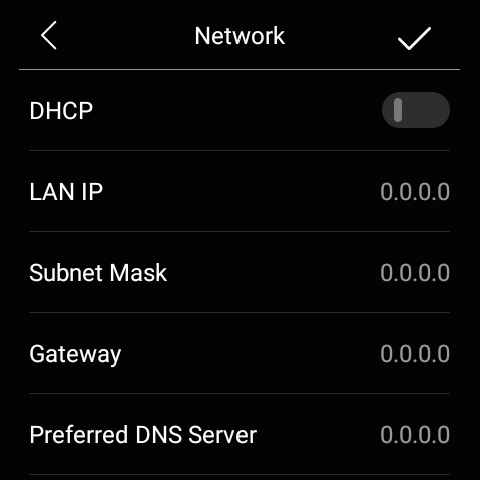
DHCP: Enable DHCP. The system automatically assigns an IP address.

Configure Wireless Network (WAN)
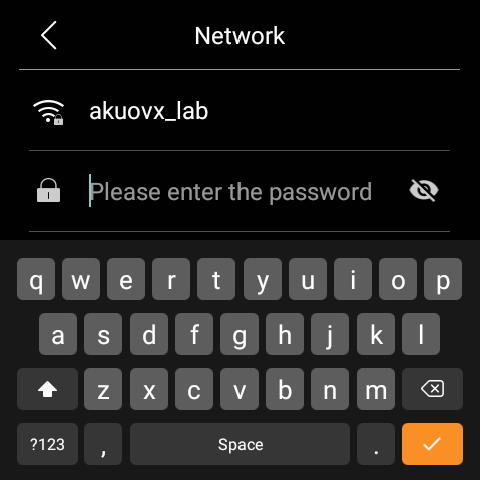
Wi-Fi connects the panel to the internet and cloud services.
Swipe down from the top edge of any screen and tap
 > Wi-Fi.
Select your network, enter the password, and tap
 > Connect.
Configure Network Priority
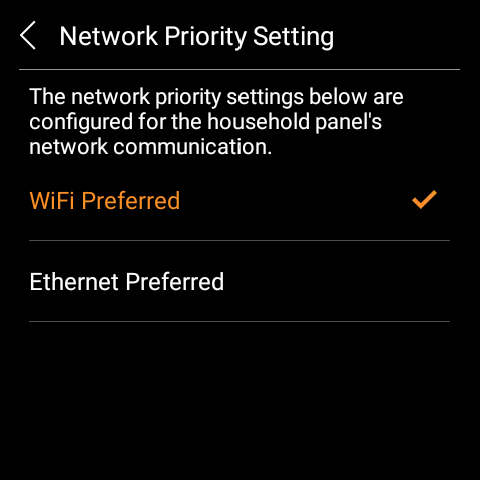
When both Wi-Fi and Ethernet are active, you can choose which network the device should prioritize:
Swipe down from the top edge of any screen and go to
 > Installer Settings > Network Priority Setting.
Select your preferred network. In this scenario, choose WiFi Preferred.
NOTE:
On HyPanel Elite 7(PG42) and HyPanel Lite(KS41), Wi-Fi automatically has higher priority; manual configuration is not supported.