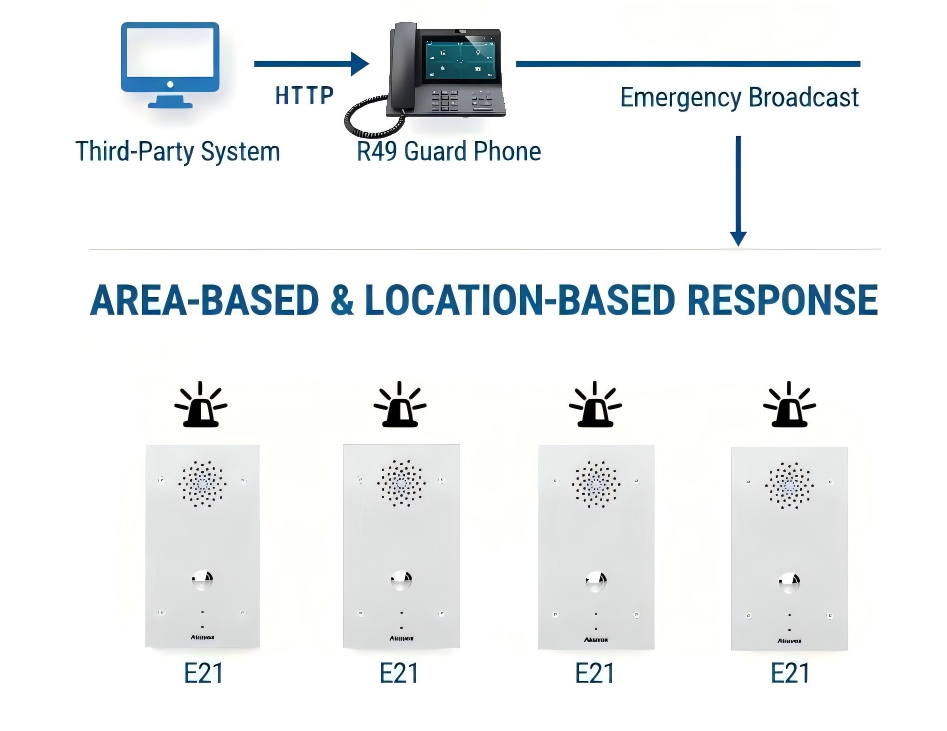
This guide explains how to configure the E21 to trigger audio and relay alarms when it receives an emergency broadcast from the R49 Guard Phone.
This setup is typically used in scenarios such as:
Fire or emergency evacuation alerts.
Zone-based alarm management in buildings.
Triggering external alarm devices (LED lights, sirens, speakers).
Differentiated relay control based on alarm location.
System Overview
A third-party system sends an API command to the R49.
The R49 sounds an alarm and broadcasts the emergency alert.
The E21:
Plays a predefined alarm audio file.
Activates relay outputs (for external alarm devices) based on the configured Location ID.
Before You Start
Ensure the following:
All devices are properly installed and powered on.
All devices are on the same local network.
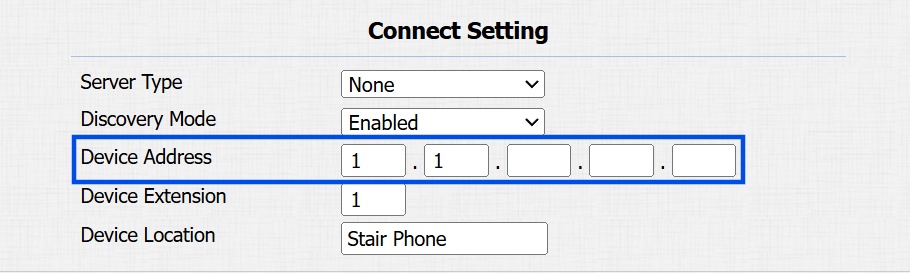
All devices share the same Device Address.
To check and modify the device address:
Use the device’s IP to log in to its web interface. The default username and password are admin.
Go to the Network > Advanced interface.
Confirm that the Device Address matches across devices.
Configure R49 to Trigger Emergency Broadcast
The third-party system sends an HTTP request to the R49 via API.
The request format is:
http://{R49’s IP}/fcgi/do?action=EmergencyAudioVisualAlert&alarm_type={AlarmID}&DeviceArea={DeviceAreaID}&DeviceLocation={DeviceLocationID}&LocationName={LocationName}For example, http://192.168.31.123/fcgi/do?action=EmergencyAudioVisualAlert&alarm_type=1&DeviceArea=1&DeviceLocation=1&LocationName=TunnelExit
Parameters:
AlarmID – Defines the alarm type(1~3).
DeviceAreaID – Target area(1~254). Used for broadcast filtering. Only E21 devices with matching Area ID will respond to the alarm.
DeviceLocationID – Target location(1~254).
Represents the device’s position index within an Area.
Indicates the sequence or order of E21 devices in that specific area.
Used to determine relay activation logic.
LocationName – Custom name for the location.
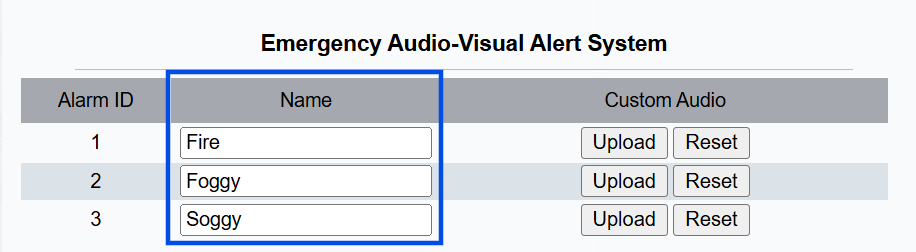
Default Alarm IDs:
1 — Fire
2 — Foggy
3 — Soggy
You can customize the alarm type’s name on the R49’s web interface. The name will display on the R49’s Alarm record page.
Use the device’s IP to log in to its web interface. The default username and password are admin.
Go to the Security > Basic interface.
Customize the alarm type and upload the alarm audio file if needed.
Submit the setting.
Configure E21 to Respond to Broadcast
All E21 devices on the same network and Device Address as the R49 can receive broadcasts from it.
You can define how each E21 responds based on Area ID and Location ID.
Use the device’s IP to log in to its web interface. The default username and password are admin.
Go to the Security > Basic interface.
Define the Device Area ID and Location ID.
Device Area ID: This defines the area number to which the E21 device belongs.
If configured, the device responds to alarm broadcasts targeting the same Area ID.
If left empty, the device is not restricted by area-based filtering.
Device Location ID: It is used to determine how the E21 activates its relay outputs when receiving an alarm broadcast containing a location ID.
If Received ID < Configured ID: Relay 1 is activated
If Received ID > Configured ID: Relay 2 is activated
If Received ID = Configured ID: Both Relay 1 and Relay 2 are activated
Upload the alarm audio file if needed.
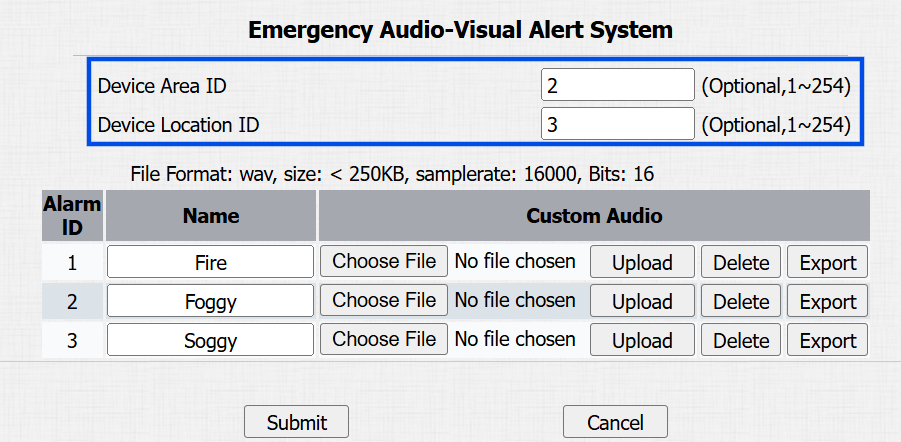
Submit the setting.
How the System Works After Configuration
The third-party system sends an emergency request to the R49.
The R49 sounds an alarm and broadcasts the alarm.
The E21:
Plays the configured alarm audio.
Activates relays according to Area ID and Location ID logic.
Triggers connected external alarm devices if applicable.
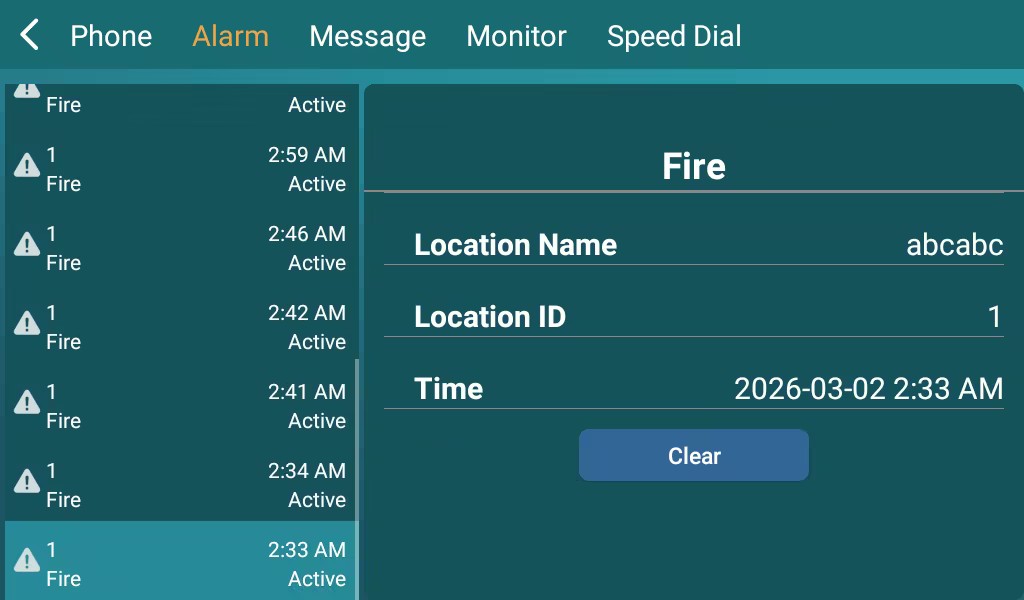
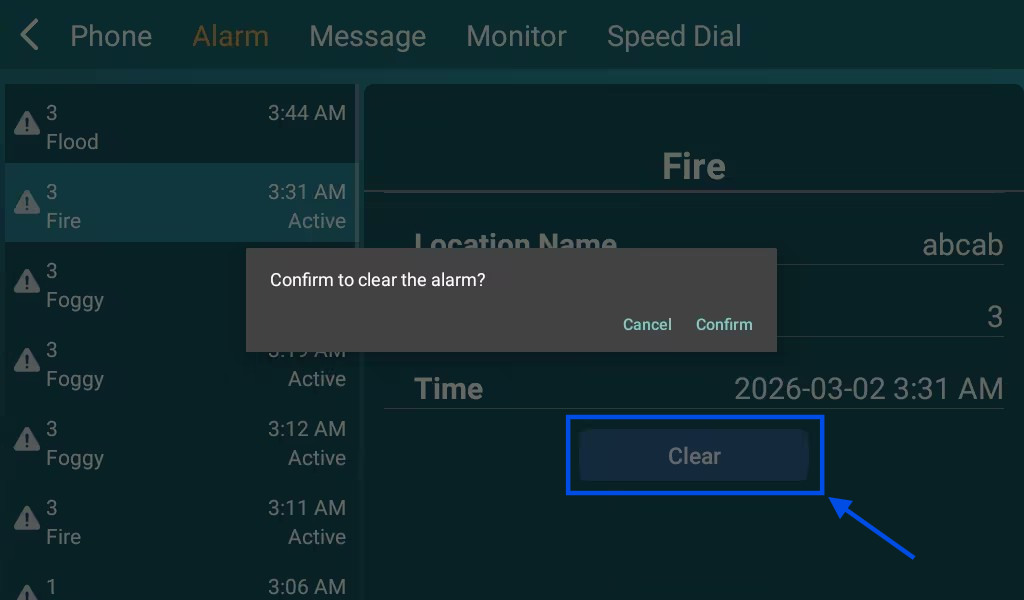
Clear Alarm from R49
After an alarm is triggered, the operator can manually clear the alarm on the R49.
Press Clear on the R49’s Alarm log page:
The R49 sends a broadcast message to all related E21 devices.
The E21 devices:
Stop playing the alarm audio.
Deactivate the relay outputs.
Turn off connected external alarm devices (LED, siren, etc.).