System Log for Debugging
System logs can be used for debugging purposes.
Set it up on the Upgrade > Advanced > System Log interface.
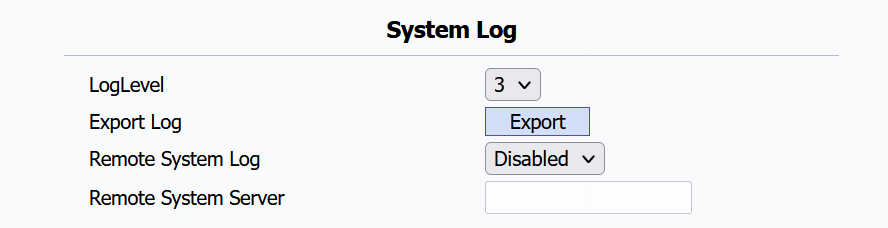
Log Level: Log level ranges from 1 to 7 levels. You will be instructed by Akuvox technical staff about the specific log level to be entered for debugging purposes. The default log level is 3. The higher the level is, the more complete the log is.
Export Log: Click the Export tab to export a temporary debug log file to a local PC.
Remote System Server: The remote server address to receive the system log. It will be provided by Akuvox technical support.
PCAP for Debugging
PCAP is used to capture the data package going in and out of the devices for debugging and troubleshooting purposes.
Set it up on the Upgrade > Advanced > PCAP interface.

PCAP: Click the Start tab and Stop tab to capture a certain range of data packets before clicking the Export tab to export the data packets to your Local PC.
PCAP Auto Refresh: When enabled, the PCAP will continue to capture data packets even after the data packets reach 50M maximum in capacity. When disabled, the PCAP will stop data packet capturing when the data packets reach the maximum capturing capacity of 1MB.
User Agent
User agent is used for identification purpose when you are analyzing the SIP data packet.
Set it up on the Account > Advanced > User Agent interface.
