The directory section lists all the user's information and the access controls you have set up for them. You can search, delete, and edit the users.
User Management
The private PIN code and RF card should be assigned to a particular user for door opening.
When adding a user, you can also customize settings such as defining the door access schedule to determine when the code is valid and specifying which relay to open.
To add a user, go to Directory > User interface and click +Add.


User ID: The unique identification number assigned to the user.
Name: The name of this user.
Unlock by Private PIN
The device can be connected to an external keypad. Users can open doors by entering their private PINs on the keypad.
On the Directory > User > +Add interface, scroll to the PIN section.

Code: Set a 2-8 digit PIN code solely for the use of this user. Each user can only be assigned a single PIN code.
Unlock by RF Card
The device can be connected to an external card reader. Users can open doors by swiping their cards on the reader.
On the Directory > User > +Add interface, scroll to the RF Card section.

Code: The card number that the card reader reads.
Note:
Each user can have a maximum of 5 cards added.
RF cards operating at 13.56 MHz and 125 KHz frequencies are compatible with the device for access.
Access Setting
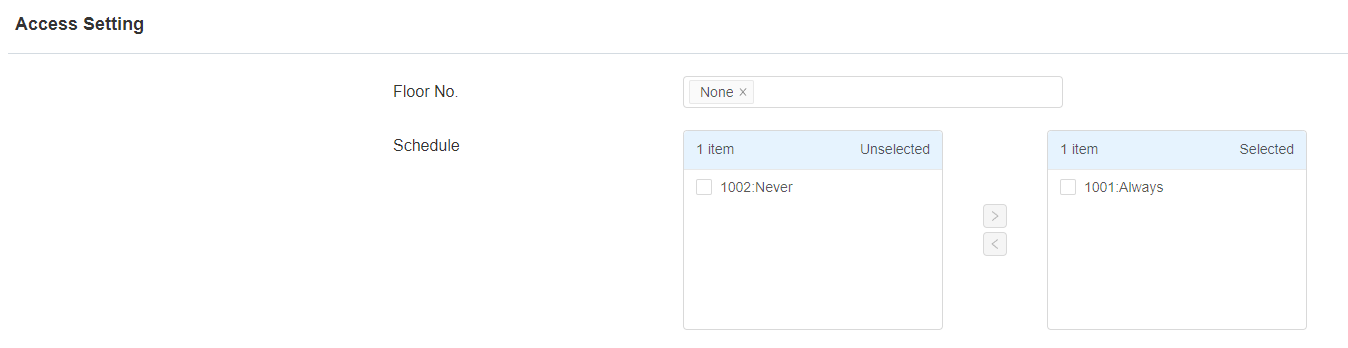
Floor No.: Floor No. : Specify the floor(s) that are accessible to the user via the elevator.
Schedule: Grant the user access to open designated doors during preset periods by relocating the desired schedule(s) from the left box to the right one. Besides custom schedules, there are 2 default options:
Always: Allows door opening without limitations on door open counts during the valid period.
Never: Prohibits door opening.