Lock & Unlock
External Unlocking
Palm vein recognition
Facial recognition
PIN code
RFID card
Mechanical key
Temporary password
BelaHome app
Internal Unlocking
Rotate the door handle
Tap and hold the unlock button
Use the BelaHome app
External Locking
Wake up the keypad and hold the ✔ key for 3 seconds
Wait for the lock to automatically engage after the door is closed
Use the mechanical keys
Internal Locking
Press the lock button
Rotate the door handle
Power Management
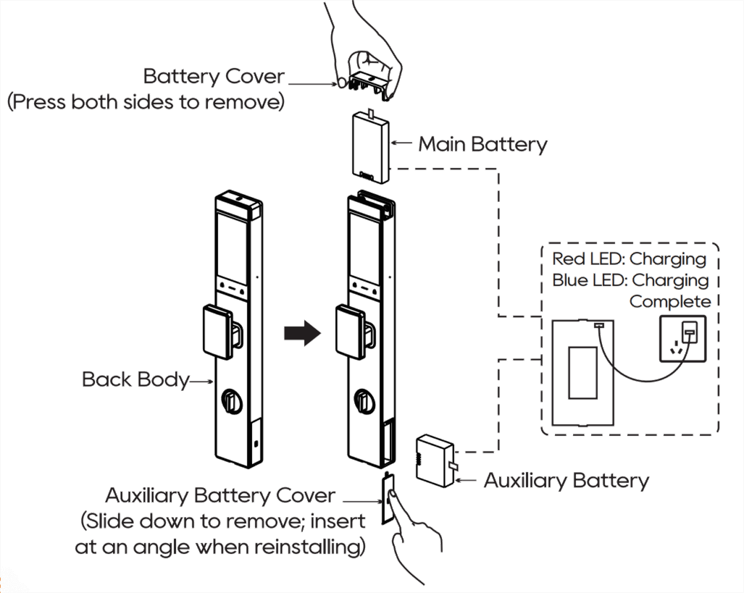
Battery Charging
Charge or replace the battery (or batteries) promptly in the following cases:
When you hear the voice prompt “Low battery”.
When you hear “Top battery low” the first time the door is unlocked each day, charge the main battery.
When you hear “Bottom battery low” the first time the door is unlocked each day, charge the auxiliary battery.
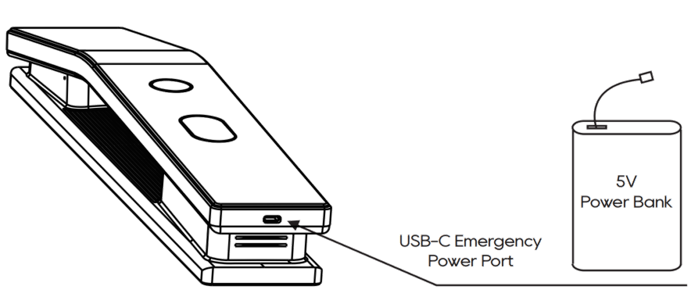
Emergency Power Supply
If the batteries are completely drained:
Connect a power bank (5V/2A or above) using a USB-C cable.
Turn on the power bank before connecting.
Unlock the door using valid credentials.
NOTE:
Use external power only in emergencies. After unlocking, disconnect the power bank and recharge or replace the batteries promptly.
Use Mechanical Keys
If the lock cannot be unlocked due to battery drain or an electronic malfunction:
Press the bottom of the keyhole cover to open it.
Insert and turn the mechanical key to unlock.
TIP:
Keep a spare key in a secure place outside your home.