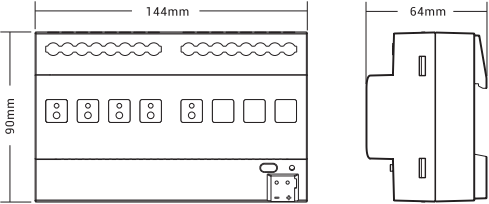
3.1 Dimensions
3.2 Wiring and Operation Elements
| 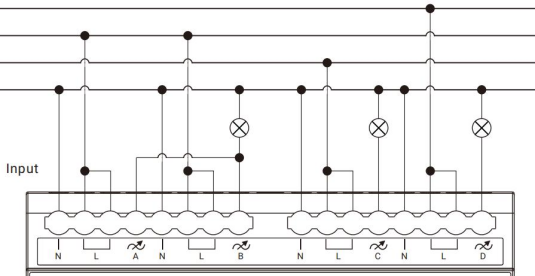 Parallel with 2 channels |
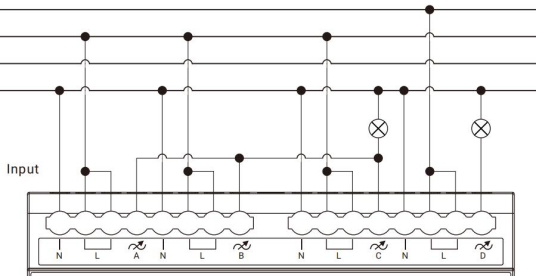 Parallel with 3 channels | |
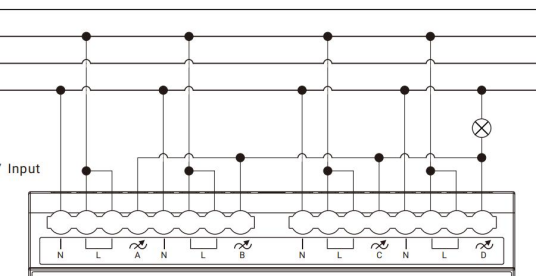 Parallel with 4 channels |
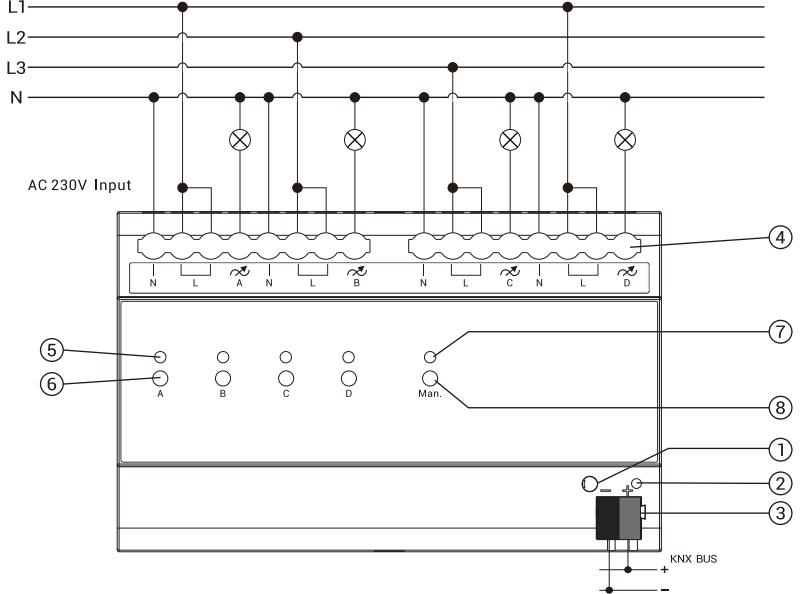
①Programming button
②Programming LED
③KNX bus connection terminal
④Input, Output, load terminal
⑤Channel LED
Normal state: LED off - Light off, LED on - Light on
Manual mode: Slow flashing - Manual dimming in progress
Fast flashing: Channel fault (short circuit, overvoltage, overtemperature, or power supply fault
⑥Channel button
Without application download: defaults to manual mode; press to turn light ON/OFF
In manual mode: Short press - ON/OFF, Long press - Dim up/down, Release after long press - Stop dimming
⑦⑧Man./Auto. switch and LED:
Long press to switch between manual and automatic modes.
Indicator ON — Manual mode
Indicator OFF — Automatic mode
TIP:
Restore factory settings
Long press the programming button for about 4 seconds, repeat 4 times, with each release interval less than 3 seconds.