Puedes configurar y actualizar el dispositivo a través de la interfaz web usando aprovisionamiento automático único o programado con archivos de configuración. Esto elimina la necesidad de configurar las configuraciones manualmente, ahorrándote tiempo y esfuerzo.
Provisioning Principle
Auto-provisioning is a feature used to configure or upgrade devices in batch via third-party servers. DHCP, PNP, TFTP, and FTP are the protocols used by the Akuvox devices to access the URL of the address of the third-party server that stores configuration files and firmware, which will then be used to update the firmware and the corresponding parameters on the device.
Please see the flow chart below:

Configuration Files for Auto-provisioning
Los archivos de configuración para el aprovisionamiento automático vienen en dos formatos: archivos de configuración generales y archivos de configuración basados en MAC.
Diferencias:
Provisión general de configuración:
Un archivo de configuración general se almacena en un servidor, permitiendo que todos los dispositivos relacionados descarguen el mismo archivo para actualizar los parámetros.
Provisión de configuración basada en MAC:
Los archivos de configuración basados en MAC son específicos de cada dispositivo, identificados por sus direcciones MAC únicas. Los archivos nombrados con la dirección MAC del dispositivo se emparejarán automáticamente antes de descargarlos para su provisionamiento.
Nota
Los archivos de configuración deben estar en formato CFG.
El nombre del archivo de configuración general para la provisión por lotes varía según el modelo.
El archivo de configuración basado en MAC recibe su nombre según su dirección MAC.
Los dispositivos accederán primero a los archivos de configuración generales antes que a los basados en MAC si ambos tipos están disponibles.
Puedes hacer clic aquí para ver el formato detallado y los pasos.
AutoP Schedule
Akuvox te ofrece diferentes métodos AutoP que permiten que el teléfono portátil realice provisiones por sí mismo en un momento específico según tu horario.
Set it up on the web System > Auto Provisioning > Automatic Autop interface.
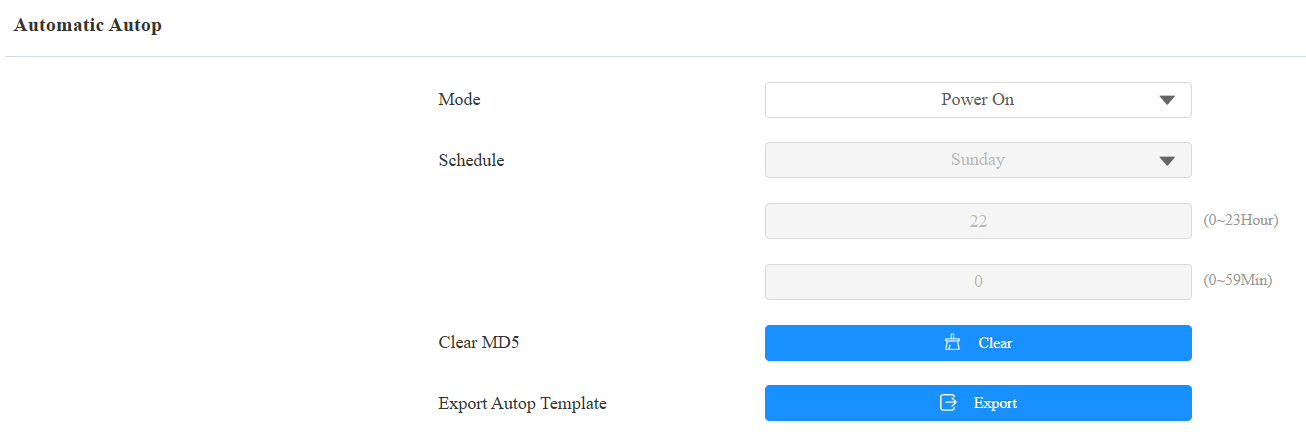
Mode:
Power On: Allow the device to perform Autop every time it boots up.
Repeatedly: Allow the device to perform Autop according to the schedule.
Power On + Repeatedly: Combine Power On and Repeatedly modes, allowing the device to perform Autop every time it boots up or according to the schedule.
Hourly Repeat: Allow the device to perform Autop every hour.
Schedule: When Power On + Repeatedly mode is selected, you can select the specific day and time for the Autop.
Clear MD5: Used to compare the existing autop file with the autop file on the server; if the files are the same, then the provisioning will be stopped, thus avoiding unnecessary auto-provisioning.
Static Provisioning
You can manually set up a specific server URL for downloading the firmware or configuration file. If an auto-provisioning schedule is set up, the device will perform the auto-provisioning at a specific time according to the auto-provisioning schedule you set up. In addition, TFTP, FTP, and HTTP are the protocols that can be used for upgrading the device firmware and configuration.
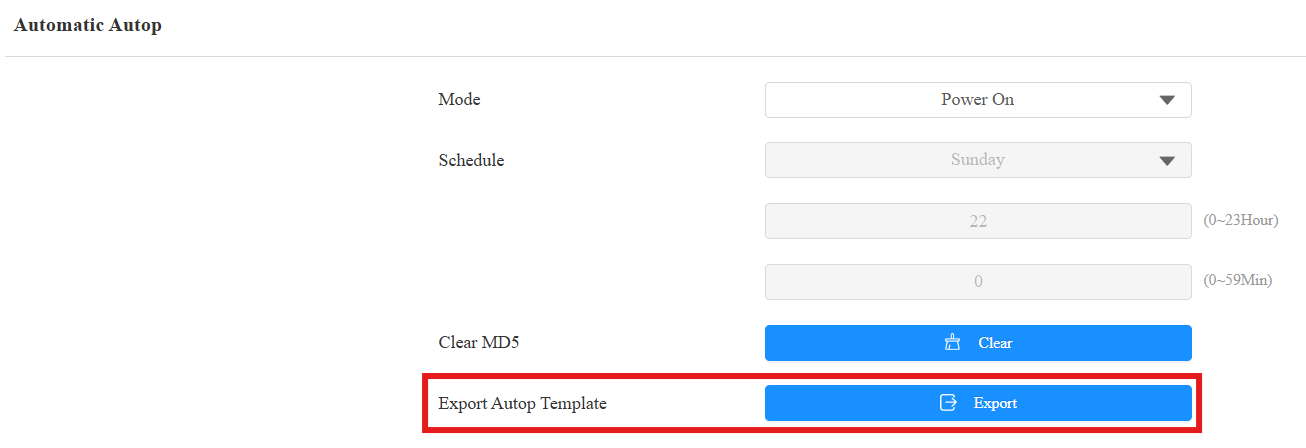
Download the Autop template on the System > Auto Provisioning > Automatic Autop.
Set the AutoP server on System > Auto Provisioning > Manual Autop interface.
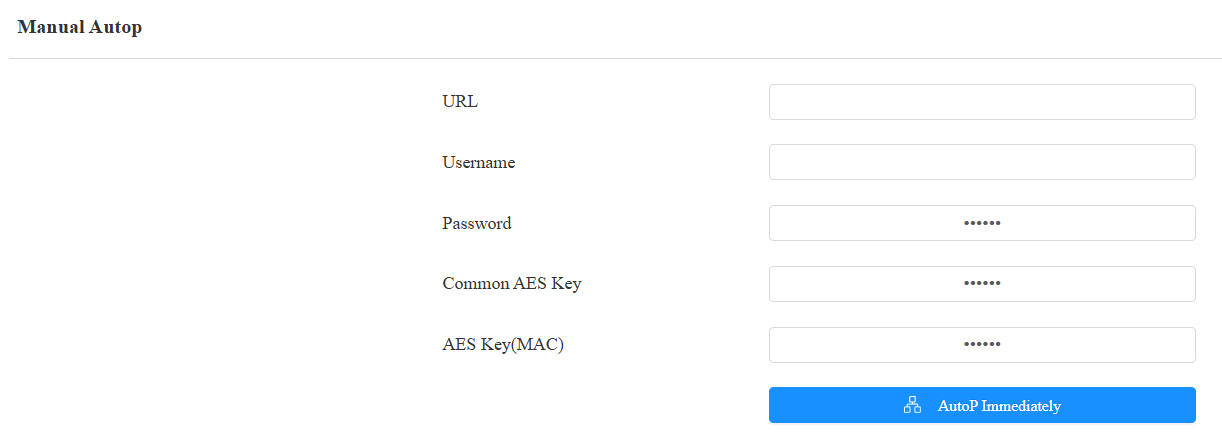
URL: The TFTP, HTTP, or FTP server address for provisioning.
User Name: Set up a username if the server requires a username to be accessed.
Password: Set up a password if the server requires a password to be accessed.
Common AES Key: Set up an AES code for the intercom to decipher the general Auto Provisioning configuration file.
AES Key(MAC): Set up the AES code for the intercom to decipher the MAC-based auto-provisioning configuration file.
Note
AES, as one type of encryption, should be configured only when the config file is encrypted with AES.
Server Address Format:
TFTP: tftp://192.168.0.19/
FTP: ftp://192.168.0.19/(allows anonymous login)
ftp://username:password@192.168.0.19/(requires a user name and password)
HTTP: http://192.168.0.19/(use the default port 80)
http://192.168.0.19:8080/(use other ports, such as 8080)
Tip
Akuvox does not provide a user-specified server. Please prepare the TFTP/FTP/HTTP server yourself.
DHCP Provisioning
La URL de aprovisionamiento automático también puede obtenerse usando la opción DHCP, que permite al dispositivo enviar una solicitud a un servidor DHCP para un código de opción DHCP específico. Si quieres usar CustomOptionsegún lo definido por los usuarios con códigos de opción que van de 128 a 255), estás obligado a configurar DHCP Custom Option en la interfaz web.

Nota
El tipo de Opción Personalizada debe ser una cadena. El valor es la URL del servidor TFTP.
Set up DHCP Autop with Power On mode and export Autop Template to edit the configuration.
Download the Autop template on the System > Auto Provisioning > Automatic Autop.
Set it up on System > Auto Provisioning > DHCP Option interface.

Custom Option: Enter the DHCP code that matches the corresponding URL so that the device will find the configuration file server for configuration or upgrading.
DHCP Option 66: If none of the above is set, the device will automatically use DHCP Option 66 to get the upgrade server URL. This is done within the software, and the user does not need to specify this. To make it work, you need to configure the DHCP server for option 66 with the updated server URL in it.
DHCP Option 43: If the device does not get a URL from DHCP Option 66, it will automatically use DHCP Option 43. This is done within the software, and the user does not need to specify this. To make it work, you need to configure the DHCP server for option 43 with the updated server URL in it.