System Log for Debugging
Los registros del sistema pueden usarse para fines de depuración.
Set it up on the web System > Maintenance > System Log interface.
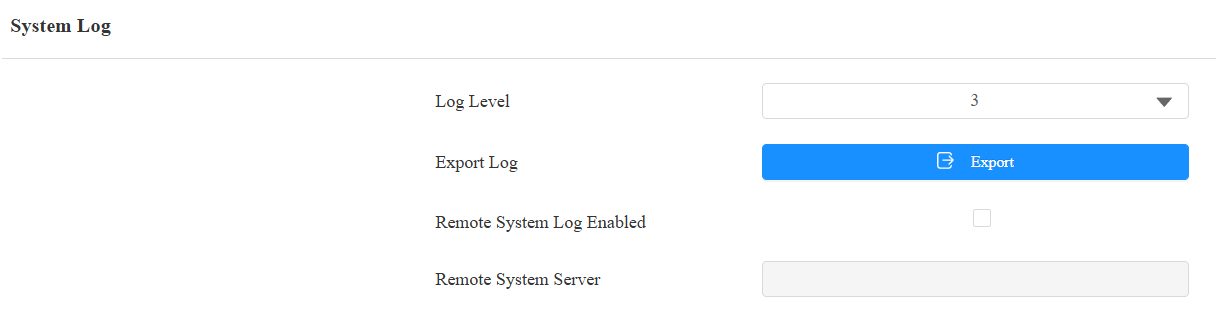
Log Level: Select log levels from 1 to 7. You will be instructed by Akuvox technical staff about the specific log level to be entered for debugging purposes. The default log level is 3. The higher the level is, the more complete the log is.
Export Log: Click the Export tab to export a temporary debug log file to a local PC.
Remote System Server: Set the remote server address to receive the device log. The remote server address will be provided by Akuvox technical support.
PCAP for Debugging
El PCAP se utiliza para capturar el paquete de datos que entra y sale de los dispositivos con fines de depuración y resolución de problemas.
Set it up on the web System > Maintenance > PCAP interface.

Specific Port: Select the specific ports from 1-65535 so that only the data packets from the specific port can be captured. You can leave the field blank by default.
PCAP: Click Start and Stop to capture a certain range of data packets before clicking the Export tab to export the data packets to your Local PC.
PCAP Auto Refresh Enabled: If it is enabled, then the PCAP will continue to capture data packets even after the data packets reach their 1M maximum capacity. If it is disabled, the PCAP will stop data packet capturing when the data packet captured reaches the maximum capturing capacity of 1MB.
Remote Debug Server
Cuando el dispositivo tiene un problema, puedes usar el servidor de depuración remoto para acceder al registro del dispositivo de forma remota con fines de depuración.
Set it up on the System > Maintenance > Remote Debug Server interface.
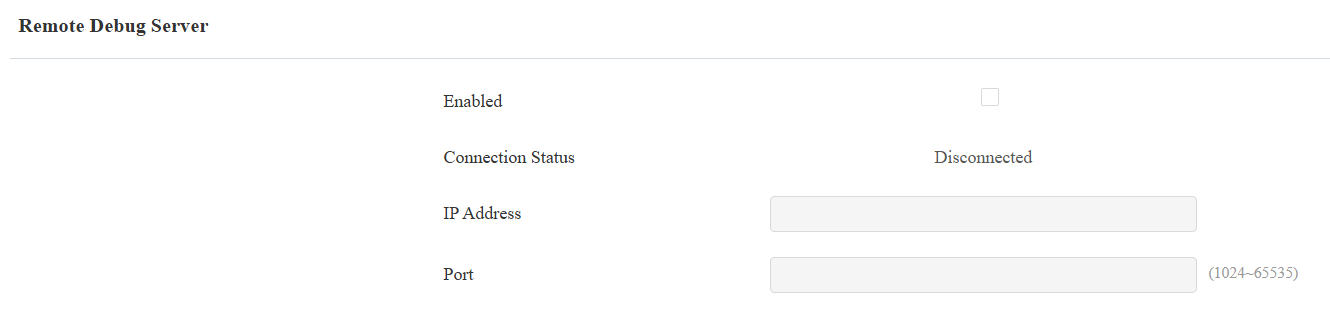
Connection Status: Display the connection status between the device and the server.
IP Address: Enter the IP address of the server.
Port: Enter the server port.
Ping
El dispositivo te permite verificar la accesibilidad del servidor objetivo.
Set it up on the System > Maintenance > Ping interface. Click Ping to start the detection, and the results will display on the web.
You can click Export to download the report.

Cloud Server: The server to be verified.
Verify the network address accessibility: The service type includes TCP connection, FTP service, SIP service, etc. You can select the service type or enter it manually.