SIP Call Configuration
El Protocolo de Inicio de Sesión (SIP) es un protocolo de transmisión de señalización utilizado para iniciar, mantener y terminar llamadas.
Una llamada SIP utiliza SIP para enviar y recibir datos entre dispositivos SIP, y puede utilizar internet o una red local para ofrecer una comunicación de alta calidad y segura. Iniciar una llamada SIP requiere una cuenta SIP, una dirección SIP para cada dispositivo y configurar los ajustes SIP en los dispositivos.
SIP Account Registration
Cada dispositivo necesita una cuenta SIP para realizar y recibir llamadas SIP.
Los dispositivos de intercomunicación Akuvox soportan la configuración de dos cuentas SIP, que pueden registrarse en dos servidores independientes.
Haz clic aquí para ver el ejemplo de registro de cuenta SIP.
Register SIP accounts on the web Account > Basic > SIP Account interface.
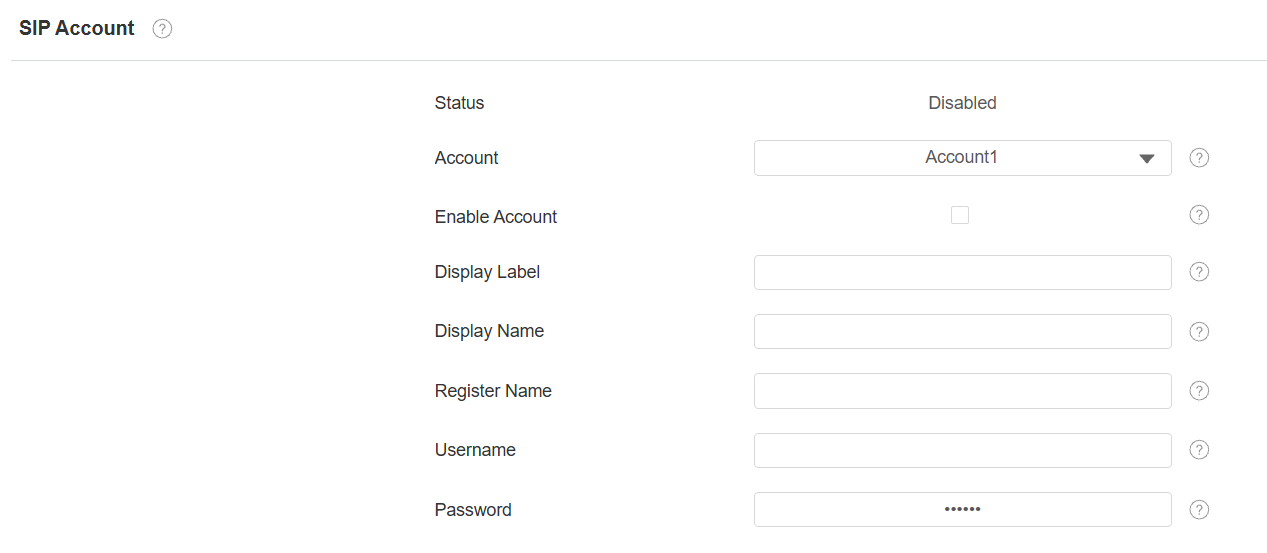
Account 1/Account 2: the door phone supports 2 SIP accounts.
- Account 1 is the default account for call processing. Also, it will be utilized when the Akuvox SmartPlus cloud service is activated.
- The system switches to Account 2 if Account 1 is not registered.
Tip
When the device is connected to the SmartPlus Cloud, the display label, register name, and username will show its SIP number.
Display Label: The label of the device.
Display Name: The display name of the device.
Register Name: Same as the username from the PBX server.
Username: Same as the username from the PBX server for authentication.
Password: Same as the password from the PBX server for authentication.
SIP Server Configuration
Los servidores SIP permiten a los dispositivos establecer y gestionar sesiones de llamada con otros dispositivos de intercomunicación utilizando el protocolo SIP. Pueden ser servidores de terceros o PBX integrado en un monitor interior Akuvos.
Navigate to the web Account > Basic interface.
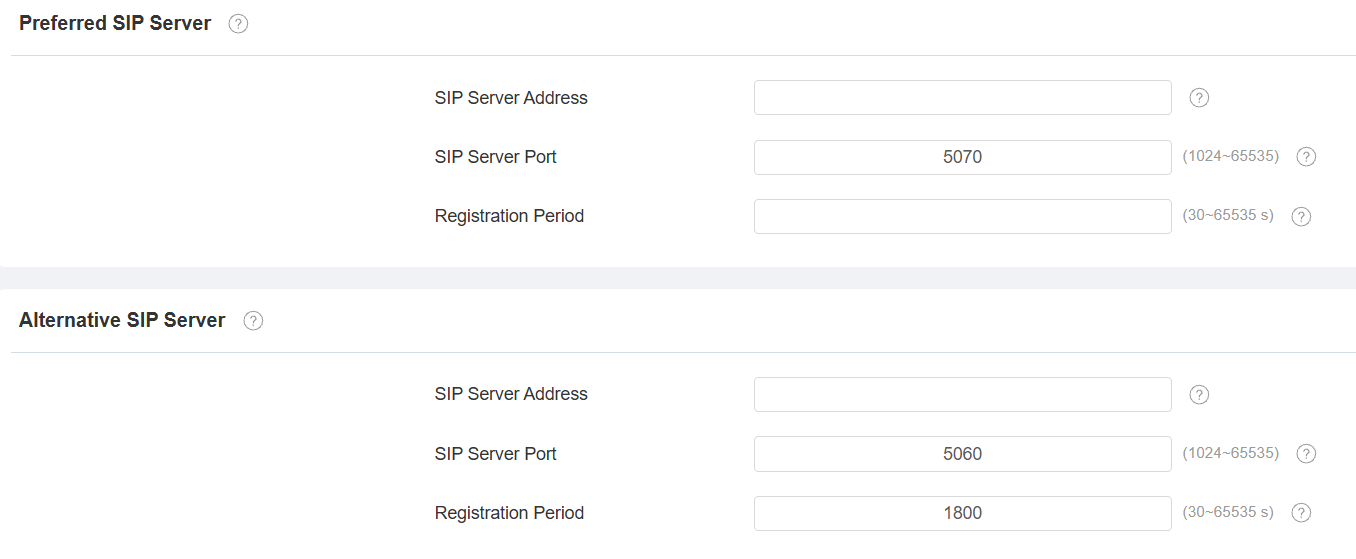
SIP Server Address: Enter the server’s IP address or its domain name.
SIP Server Port: Specify the SIP server port for data transmission.
Registration Period: Define the time limit for SIP account registration. Automatic re-registration will initiate if the account registration fails within this specified period.
Outbound Proxy Server
Se utiliza un servidor proxy saliente para recibir todos los mensajes de solicitud que inician y enrutarlos al servidor SIP designado para establecer una sesión de llamada mediante transmisión de datos basada en puertos.
Set it up on the web Account > Basic > Outbound Proxy Server interface.
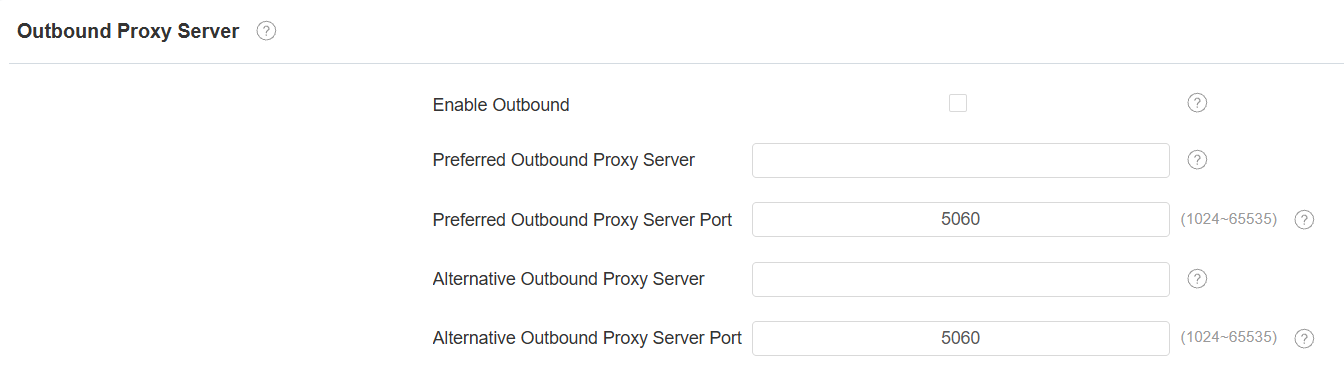
Preferred Outbound Proxy Server: Enter the SIP proxy IP address.
Preferred Outbound Proxy Server Port: Set the port for establishing a call session via the outbound proxy server.
Alternative Outbound Proxy Server: Enter the SIP proxy IP address to be used when the main proxy malfunctions.
Alternative Outbound Proxy Server Port: Set the proxy port for establishing a call session via the backup outbound proxy server.
Data Transmission Type
Los mensajes SIP pueden transmitirse en tres protocolos de transmisión de datos: UDP (User Datagram Protocol), TCP (Transmission Control Protocol), TLS (Transport Layer Security) y DNS-SRV. Mientras tanto, también puedes identificar el servidor del que provienen los datos.
Set it up on the Account > Basic > Transport Type interface.

UDP: An unreliable but very efficient transport layer protocol. It is the default transport protocol.
TCP: A less efficient but reliable transport layer protocol.
TLS: An encrypted and secured transport layer protocol. Select this option if you wish to encrypt the SIP messages for enhanced security or if the other party’s server uses TLS. To use it, you need to upload certificates for authentication.
SIP Hacking Protection
La escucha telefónica por Internet es un ataque de red que permite a partes no autorizadas interceptar y acceder al contenido de las sesiones de comunicación entre usuarios de intercomunicador. Esto puede exponer información sensible y confidencial a los atacantes. La protección contra SIP hacking es una técnica que protege las llamadas SIP para que no sean comprometidas en Internet.
Set it up on the Account > Advanced > Call interface.

Prevent SIP Hacking: Activate this feature to only receive calls from contacts in the whitelist. This protects users’ private and secret information from potential hackers during SIP calls.
Audio Codec Configuration
The device supports four types of codecs (PCMU, PCMA, G729, and G722) for encoding and decoding the audio data during the call session. Each codec varies in terms of sound quality. Higher bandwidth means the device can capture more detail, leading to clearer sound, and higher sample rates capture more data, reducing distortion and preserving sound quality.
You can select the specific codec with different bandwidths and sample rates flexibly according to the actual network environment.
To set it up, go to the web Account > Advanced interface.
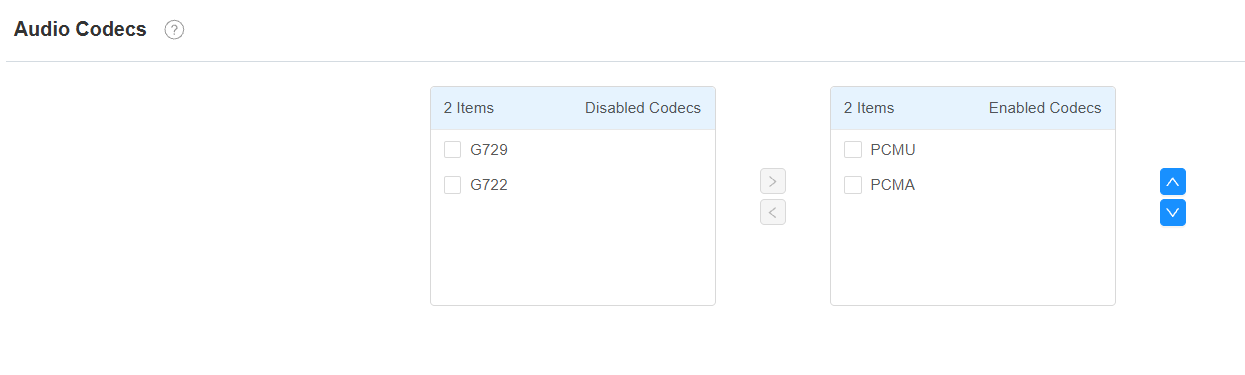
Please refer to the bandwidth consumption and sample rate for the codec types below:
Codec Type | Bandwidth Consumption | Sample Rate |
|---|---|---|
PCMA | 64 kbit/s | 8kHZ |
PCMU | 64 kbit/s | 8kHZ |
G729 | 8 kbit/s | 8kHZ |
G722 | 64 kbit/s | 16kHZ |