Para garantizar un funcionamiento normal, asegúrese de que el dispositivo tenga su dirección IP correctamente configurada o obtenida automáticamente desde el servidor DHCP.
To set it up, go to Network > Basic interface.
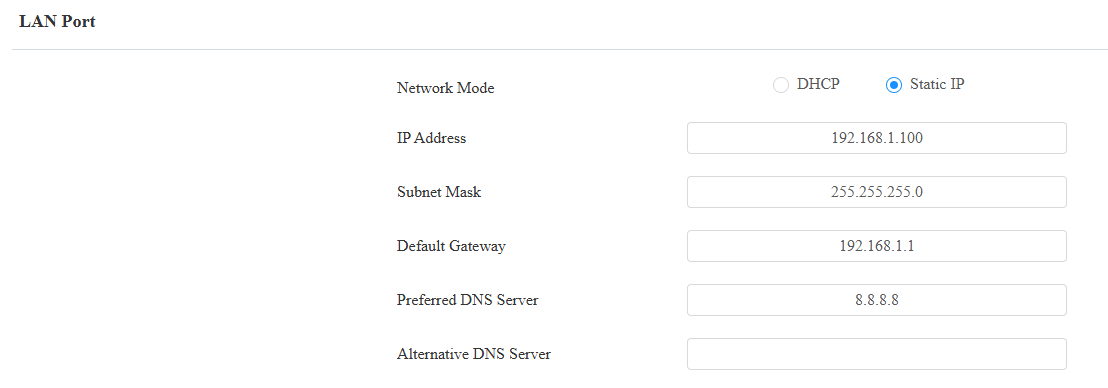
DHCP: DHCP mode is the default network connection. If the DHCP mode is selected, the device will be assigned by the DHCP server with an IP address, subnet mask, default gateway, and DNS server address automatically.
Static IP: When static IP mode is selected, the IP address, subnet mask, default gateway, and DNS server address should be configured according to the network environment.
IP Address: Set up the IP address when the static IP mode is selected. To access the device’s web settings, your computer should be on the same local network as the device.
Subnet Mask: A subnet mask tells your device which IP addresses are part of your local network and which ones are not. For example, if the subnet mask is 255.255.255.0, it means that devices with similar starting IPs (like 192.168.1.x) are in the same network.
Default Gateway: The gateway is like a bridge between your device and other networks, such as the internet. Usually, it’s the IP address of your router.
Preferred/Alternative DNS Server: Domain Name System(DNS) is the overall system or network that handles the translation of domain names (like www.example.com) into IP addresses (like 192.0.2.1), which computers use to identify each other on a network. The device connects to the alternate DNS server when the primary one is unavailable.
Device Web HTTP Setting
Esta función gestiona el acceso a los sitios web del dispositivo. El dispositivo soporta dos métodos de acceso remoto: HTTP y HTTPS (cifrado).
Set it up on the Network > Advanced interface.

HTTP Redirect: It is enabled by default, which means all HTTP requests will automatically be redirected to HTTPS. If it is disabled, the device's web interface can be accessed using HTTP directly.
SNMP Setting
El Protocolo Simple de Gestión de Red (SNMP) es un protocolo para gestionar dispositivos de red IP. Permite a los administradores de red monitorizar dispositivos y recibir alertas para condiciones que llamen la atención. SNMP proporciona variables que describen la configuración del sistema, organizadas en jerarquías y descritas por Bases de Información de Gestión (MIBs).
To set it up, go to Network > Advanced > SNMP interface.

Port: Set a specific port for data transmission from 1024 to 65535.
Trusted IP: The allowed SNMP server address. It can be an IP address or any valid URL domain name.