Pre-Sales Solution Evaluation
Q1: Is the system scalable? What is the maximum number of doors and users supported?
A1: There is no capacity limit.
Q2: Does it require on-premise server deployment, or is it entirely cloud-based?
A2: No on-premise deployment is required. It is based on cloud servers.
Installation and Configuration
Q1: How do I add a device to the cloud platform after installation?
A1: Add and bind the device to the cloud platform using its MAC address.
Q2: What are the network requirements? Which ports need to be opened?
A2: Refer to Network Firewall Settings for Akuvox Cloud Service.
Q3: How are the connections made (electric lock, door sensor, card reader)?
A3: For details, see Wiring.
Feature Support
Q1: What access methods are supported?
A1: Face recognition, fingerprint, card (including HID), PIN code, app, Bluetooth, NFC, Siri, iWatch.
Q2: Can complex access permission management be implemented (by time, user group, holiday)?
A2: Yes. Akuvox Smart Access supports flexible access schedule configuration.
Q3: Does it integrate with attendance tracking?
A3: The cloud platform supports attendance tracking and can generate attendance reports.
Q4: Does it support elevator control integration?
A4: Yes. We have our own elevator controller, EC33, and have also integrated with other elevator brands.
Q5: Is OSDP supported?
A5: OSDP 2.0 is already supported. Refer to Configure OSDP on Door Phones/Access Control Terminals.
Q6: Does it support log export?
A6: Yes.
Q7: Is the Fire Roll function supported?
A7: Yes, it is supported. In the event of a fire alarm, the escape door will automatically unlock, and a muster report will be generated automatically.
Troubleshooting
Q1: No device is available when creating a temp key.
A1: Check whether the device has been assigned to the company.
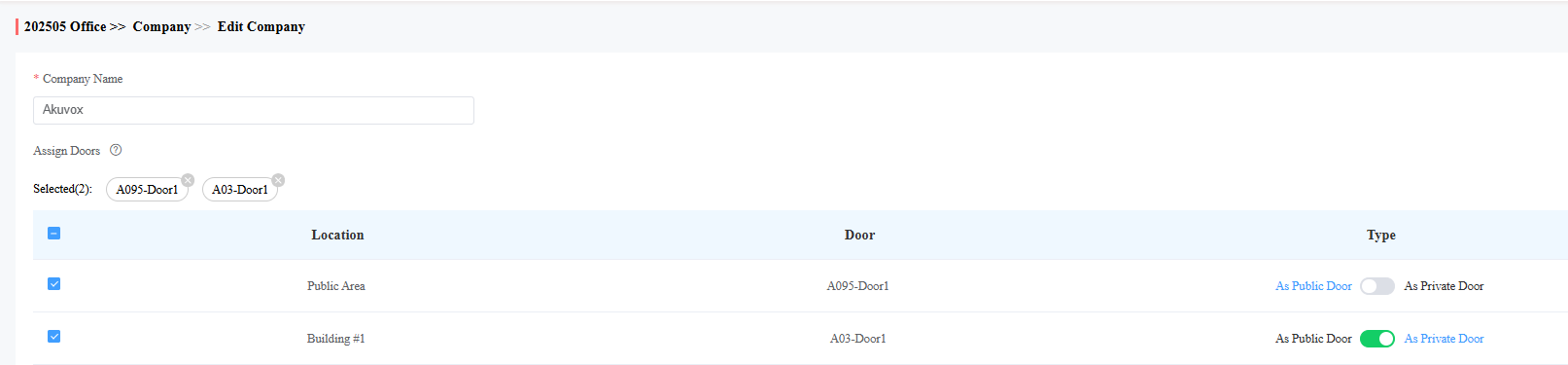
Q2: A certain employee does not appear in the directory on the door station.
A2:
Confirm that the device has been assigned to the company.
Enable the directory setting in the Group settings.
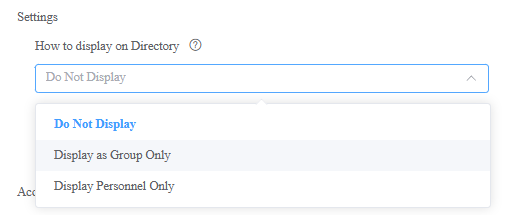
The group’s access group has permission to access this door phone.
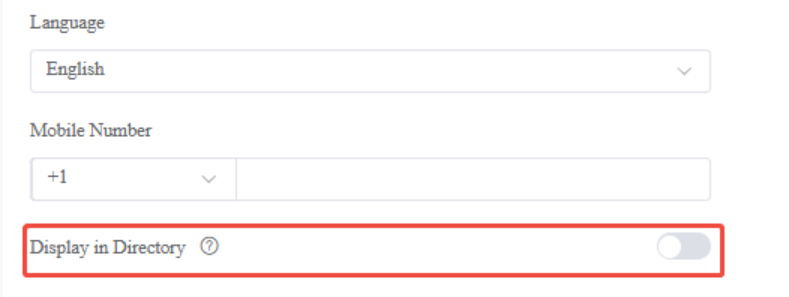
Enable “Display in Directory” in the personnel settings.