IP Call Configuration
Un appel IP est un appel direct entre deux interphones utilisant leurs adresses IP, sans serveur ni PBX. Les appels IP fonctionnent lorsque les appareils sont sur le même réseau.
Enable or disable the direct IP call function on the Intercom > Call Feature > Direct IP interface.
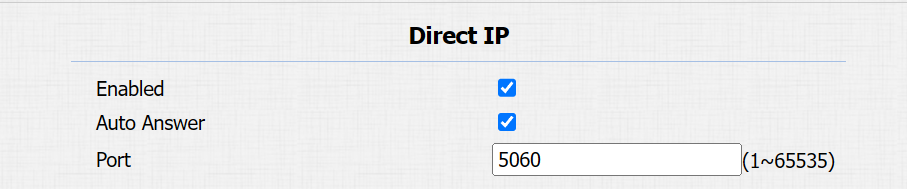
Port: Set the port for direct IP calls. The default is 5060, with a range from 1-65535. If you enter a value within this range other than 5060, ensure consistency with the corresponding device for data transmission.
SIP Call Configuration
Le protocole d’initiation de session (SIP) est un protocole de transmission de signalisation utilisé pour initier, maintenir et terminer des appels.
Un appel SIP utilise SIP pour envoyer et recevoir des données entre appareils SIP, et peut utiliser Internet ou un réseau local pour offrir une communication de haute qualité et sécurisée. L’initiation d’un appel SIP nécessite un compte SIP, une adresse SIP pour chaque appareil, ainsi que la configuration des paramètres SIP sur les appareils.
SIP Account Registration
Chaque appareil a besoin d’un compte SIP pour effectuer et recevoir des appels SIP.
Les dispositifs d’interphone Akuvox prennent en charge la configuration de deux comptes SIP, qui peuvent être enregistrés sur deux serveurs indépendants.
Cliquez ici pour voir l’exemple d’enregistrement du compte SIP.
Register the SIP account on the Account > Basic interface.
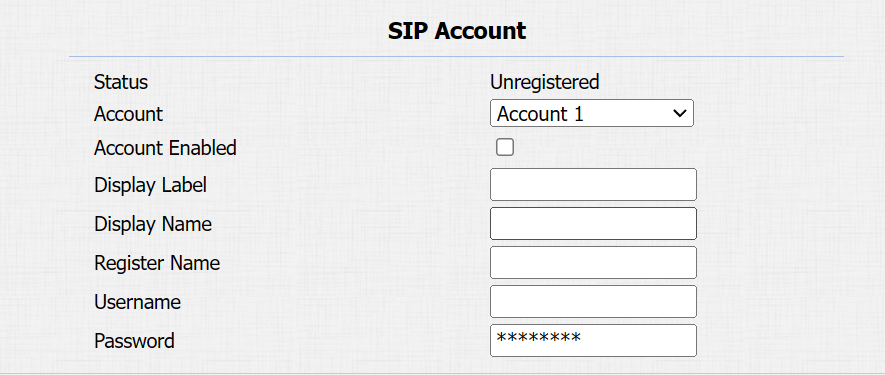
Status: Indicate whether the SIP account is registered or not.
Account 1/Account 2: The door phone supports 2 SIP accounts.
- Account 1 is the default account for call processing. Also, it will be utilized when the Akuvox SmartPlus cloud service is activated.
- The system switches to Account 2 if Account 1 is not registered.
Display Label: The label of the device.
Display Name: The designation for Account 1 or 2 is to be shown on the calling device’s screen.
Register Name: Same as the username from the PBX server.
Username: Same as the username from the PBX server for authentication.
Password: Same as the password from the PBX server for authentication.
Tip
When the device is connected to the SmartPlus Cloud, the display label, register name, and username will show its SIP number.
SIP Server Configuration
Les serveurs SIP permettent aux appareils d’établir et de gérer des sessions d’appel avec d’autres interphones en utilisant le protocole SIP. Ils peuvent être des serveurs tiers ou un PBX intégré dans un moniteur intérieur Akuvos.
To set it up, go to the web Account > Basic interface.
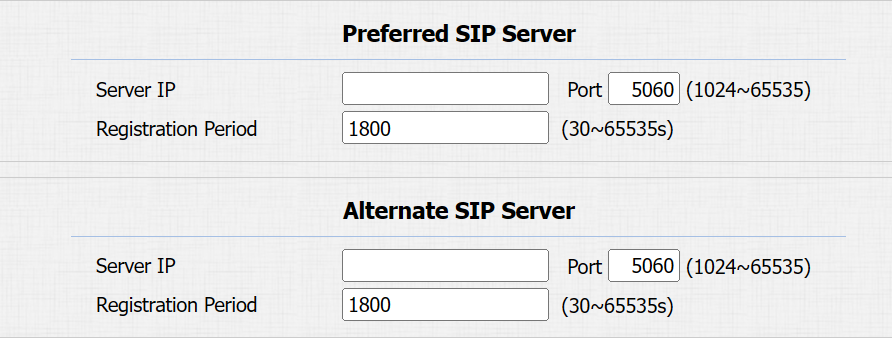
Server IP: Enter the server’s IP address or its domain name.
Port: Specify the SIP server port for data transmission.
Registration Period: Define the time limit for SIP account registration. Automatic re-registration will initiate if the account registration fails within this specified period.
Outbound Proxy Server
Un serveur proxy sortant est utilisé pour recevoir tous les messages de demande initiant et les acheminer vers le serveur SIP désigné afin d’établir une session d’appel via une transmission de données par port.
To set it up, go to the Account > Basic > Outbound Proxy Server interface.

Server IP: Enter the SIP proxy server’s IP address.
Port: Set the port for establishing a call session via the outbound proxy server.
Alternative Server IP: Enter the SIP proxy IP address to be used when the main proxy server malfunctions.
Port: Set the proxy port for establishing a call session via the backup outbound proxy server.
Data Transmission Type
Les dispositifs d’interphone Akuvox prennent en charge quatre protocoles de transmission de données : le Protocole de Datagramme Utilisateur (UDP), le Protocole de Contrôle de la Transmission (TCP), la Sécurité de la Couche de Transport (TLS) et le DNS-SRV.
Select the data transmission type on the Account > Basic > Transport Type interface.

UDP: An unreliable but very efficient transport layer protocol. It is the default transport protocol.
TCP: A less efficient but reliable transport layer protocol.
TLS: An encrypted and secure transport layer protocol. Select this option if you wish to encrypt the SIP messages for enhanced security or if the other party’s server uses TLS. To use it, you need to upload certificates for authentication.
DNS-SRV: A DNS service record defines the location of servers. This record includes the hostname and port number of the server, as well as the priority and weight values that determine the order and frequency of using the server.
SIP Hacking Prevention
L’écoute clandestine par téléphone Internet est une attaque réseau qui permet aux parties non autorisées d’intercepter et d’accéder au contenu des sessions de communication entre les utilisateurs de l’interphone. Cela peut exposer des informations sensibles et confidentielles aux attaquants. La protection contre le piratage SIP est une technique qui protège les appels SIP contre toute compromission sur Internet.
Enable SIP hacking prevention on the Account > Advanced > Call interface.
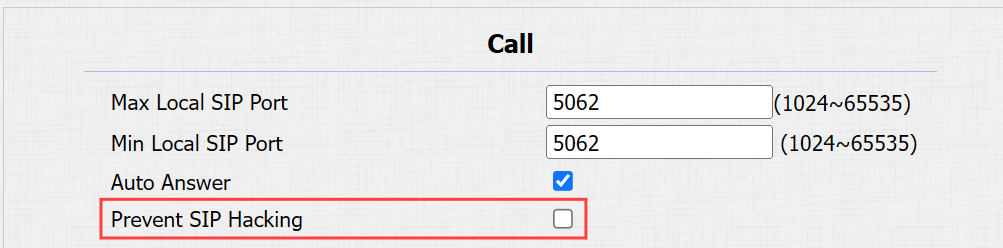
Prevent SIP Hacking: Activate this feature to only receive calls from contacts in the whitelist. This protects users’ private and secret information from potential hackers during SIP calls.