Ce guide explique comment déclencher des actions de porte sur le téléphone à l’aide de commandes HTTP provenant d’un serveur tiers.
Les actions soutenues incluent :
Ouverture de la porte
Serrure de porte (fermeture)
Garde la porte ouverte
Obtenez le statut de la porte
Refus d’accès
Modèle compatible et version minimale
E18 : 18.30.11.27
R20V5 : 320.30.12.28
Prérequis
Avant de procéder, assurez-vous que les conditions suivantes sont remplies :
L’appareil doit être accessible sur le même réseau que votre serveur.
Vous avez accès administrateur à l’interface web de l’appareil.
Cet article prend E18 comme exemple.
Comment ça fonctionne
Chaque action de porte est déclenchée en envoyant une requête HTTP à l’appareil.
La demande doit inclure :
L’adresse IP de l’appareil
Identifiants d’authentification
Le commandement d’action
Le numéro de porte (relais)
Étape 1 : Activer la porte ouverte via HTTP
Naviguez vers l’IP de l’appareil dans un navigateur. Le nom d’utilisateur de connexion et le mot de passe sont admin (par défaut).
Allez dans le contrôle d’accès > Relais > Relais ouvert via HTTP.
Activez la fonctionnalité.
Personnalisez le nom d’utilisateur et le mot de passe pour l’authentification.
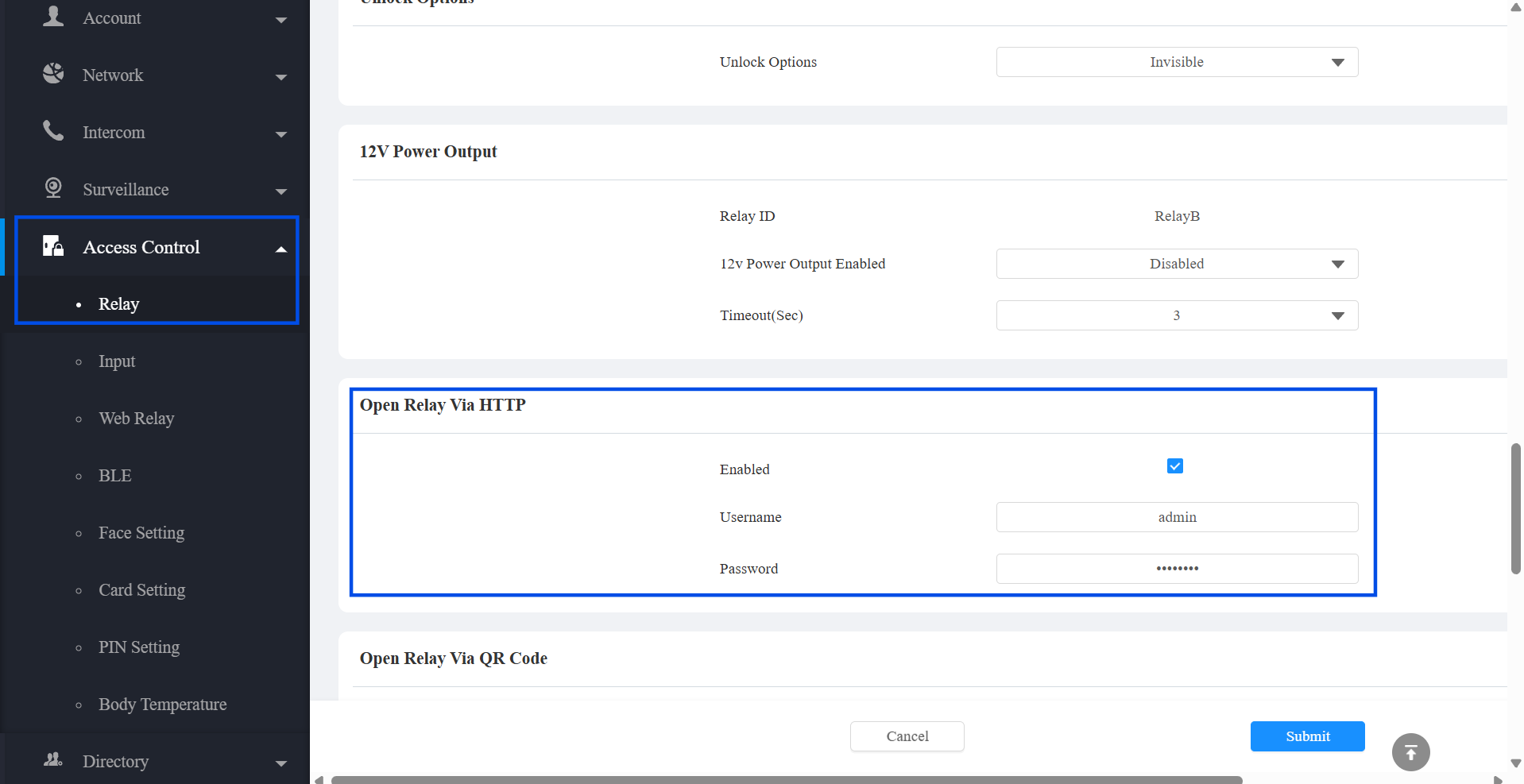
Cliquez sur Envoyer.
Recommandation de sécurité
Utilisez un mot de passe unique et fort pour les identifiants du relais HTTP. Évitez d’utiliser les identifiants administrateur par défaut.
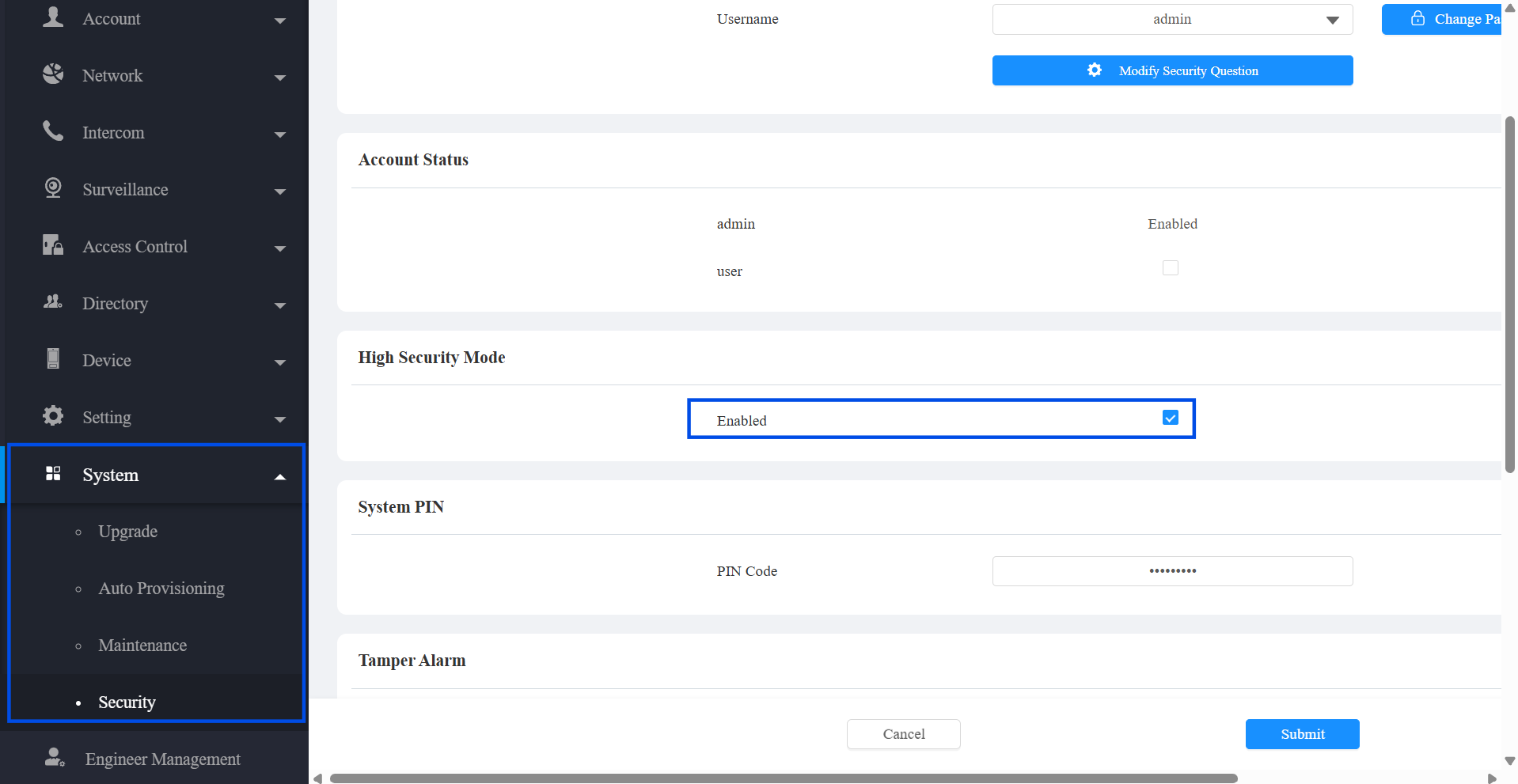
Étape 2 : Vérifiez le mode haute sécurité
Le mode haute sécurité influence le format URL accepté. Pour vérifier le réglage actuel, allez dans Système > Sécurité > Mode Haute Sécurité. Il est activé par défaut.
Désactivation du mode haute sécurité : L’ancienne URL et la nouvelle URL sont toutes deux prises en charge.
Activation du mode haute sécurité : Seule la nouvelle URL est prise en charge.
Étape 3 : Utilisez le format URL standard
Choisissez le format URL approprié en fonction de votre réglage de Mode Haute Sécurité . Seul le paramètre Action doit changer entre différentes commandes de porte.
Nouveau format d’URL (recommandé)
http://{username}:{password}@{device_ip}/fcgi/OpenDoor?action={Action}&DoorNum={DoorNum}Exemple — Porte ouverte
http://admin:Admin123@192.168.88.118/fcgi/OpenDoor?action=OpenDoor&DoorNum=1Ancien format URL
http://{device_ip}/fcgi/do?action={Action}&UserName={username}&Password={password}&DoorNum={DoorNum}Exemple — Porte ouverte
http://192.168.88.118/fcgi/do?action=OpenDoor&UserName=admin&Password=Admin123&DoorNum=1Étape 4 : Remplacer les paramètres
Remplacez les placeholders dans l’URL par vos valeurs réelles :
Paramètre | Description |
|---|---|
| La porte ouverte via HTTP (défini à l’étape 1) |
| La porte ouverte via un mot de passe HTTP (défini à l’étape 1) |
| Adresse IP de l’appareil |
| L’action à exécuter (voir Actions soutenues ci-dessous) |
| Le relais doit être déclenché.
|
Actions soutenues
Action | Description |
|---|---|
OpenDoor | Ouvre la porte |
CloseDoor | Ferme la porte |
OpenDoorForever | Garde la porte ouverte |
DoorStatus | Obtenez le statut de la porte |
RefuserOuvrirPorteErroneIdentifiantCarte | Refuser l’accès en raison d’une carte invalide |
Étape 5 : Exemples
Les exemples suivants utilisent le nouveau format d’URL. Remplacez vos identifiants et vos IP par vos propres valeurs.
Ouvre la porte
http://admin:Admin123@192.168.88.118/fcgi/OpenDoor?action=OpenDoor&DoorNum=1Ferme la porte
http://admin:Admin123@192.168.88.118/fcgi/OpenDoor?action=CloseDoor&DoorNum=1Garde la porte ouverte
http://admin:Admin123@192.168.88.118/fcgi/OpenDoor?action=OpenDoorForever&DoorNum=1Obtenir le statut de la porte
http://admin:Admin123@192.168.88.118/fcgi/OpenDoor?action=DoorStatus&DoorNum=1Refuser l’accès (carte invalide)
http://admin:Admin123@192.168.88.118/fcgi/OpenDoor?action=RefuseOpenDoorWrongCardID&DoorNum=1