The General sensor interface, as shown in Figure 2.2.3, configures settings for internal and external sensor detection, including temperature and humidity.
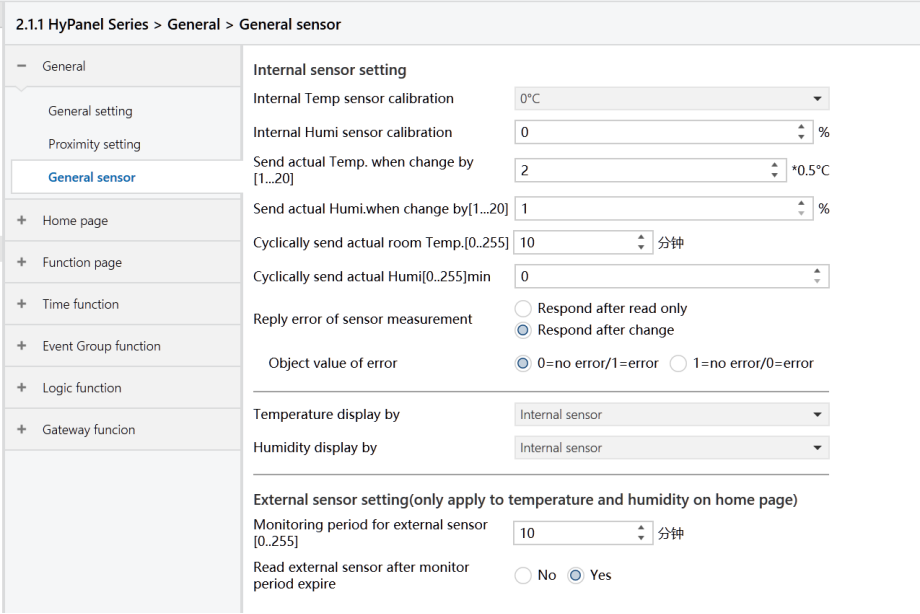
Figure2.2.3: General sensor interface
The following parameters configure the calibration value, sending conditions, and error reporting of the device's built-in sensors. Other functions using these sensors follow the settings outlined here.
Internal sensor calibration
Set the calibration value for the internal temperature sensor to align its measured value with the current ambient temperature. The calibration value influences only the output telegrams and does not affect the panel display.
Options: -5℃~5℃
Internal Humi sensor calibration
Set the calibration value for the internal humidity sensor to align its measured value with the current ambient humidity.
Options: -20% ~ 20%
Send actual Temp. when change by[1.. 20]*0.5℃
Configure the device to send the current temperature data to the bus when the temperature changes by a certain amount.
Options: 1 ~ 20
Send actual Humi. when change by[1.. 20]
Configure the device to send the current humidity data to the bus when the humidity changes by a certain amount.
Options: 1 ~ 20
Cyclically send actual room Temp.[0.. 255]min
Set the time interval for periodically sending temperature data to the bus.
Options: 0 ~ 255 min
This cycle operates independently, starting its timing upon programming completion or reset, and remains unaffected by changes in value sent.
Cyclically send actual room Humi.[0.. 255]min
Set the time interval for periodically sending humidity data to the bus.
Options: 0 ~ 255min
Reply error of sensor measurement
Set the condition for the device to send an error status telegram when an internal sensor error occurs.
Options:
Respond after read only: The “Internal sensor - Temp. Error report” object sends error status to the bus only when the device receives error status from other bus devices or the bus reads the error status.
Respond after change: The “Internal sensor - Temp. Error report” object immediately sends a telegram to the bus reporting the error status when the error status changes.
Object value of error
Define the object value for the error status.
Options:
0=no error/1=error
1=no error/0=error
Note
If the internal sensor is disconnected or detects a temperature beyond the range of -40°C to 80°C, it will be deemed a sensor malfunction or error by the device.
Temperature display by
Not applicable for HyPanel devices, which only display values from built-in temperature sensors.
Humidity display by
Not applicable for HyPanel devices, which only display values from built-in humidity sensors.
When external sensor fault, Internal sensor display
This parameter is visible when an external temperature or humidity sensor is selected. It decides whether to display internal sensor measurements when the external sensor fails.
Options:
No: When external sensor fails, do not display internal sensor data, defaulting to 0 on the panel.
Yes: When external sensor fails, display internal sensor data.
Reply error of sensor measurement
This parameter is visible when an external temperature or humidity sensor is selected. It sets the condition for the device to send an error status telegram when an internal sensor error occurs.
Options:
Respond after read only: The “External sensor - Temp. Error report” object sends error status to the bus only when the device receives error status from other bus devices or the bus reads the error status.
Respond after change: The “External sensor - Temp. Error report” object immediately sends a telegram to the bus reporting the error status when the error status changes.
Object value of error
Define the object value for the error status.
Options:
0=no error/1=error
1=no error/0=error
The following two parameters determine the monitoring period for the external temperature and humidity sensors, exclusively for the sensor data display on the device's homepage.
Monitoring period for external sensor [0.. 255]min
Set the monitoring period for the device's external sensors. When the device receives a value, this period will reset.
Options: 0 ~ 255
When the monitoring period ends without receiving a measurement data from the external sensor, the device marks the sensor as malfunction and displays “---”. Alternatively, it can display of internal sensor data by enabling the “When external sensor fault, Internal sensor display” parameter.
Note
To prevent bus congestion and missed measurement data, set the monitoring period at least twice the sensor’s sending cycle.
Read external sensor after monitor period expire
Determine whether to send a read request telegram to the external sensor after the monitoring period.
Options:
No: Do not send a read request telegram.
Yes: If no data is received from the external sensor after the monitoring period, a read request telegram is sent.