The "Proximity Setting" interface, as shown in Figure 2.2.2, configures the proximity sensing feature. Users can set telegrams for when a person approaches or leaves the sensing area, along with the delay time for sending them. The "approaching" means someone is detected by the built-in sensor and "leaving" indicates no presence detected.
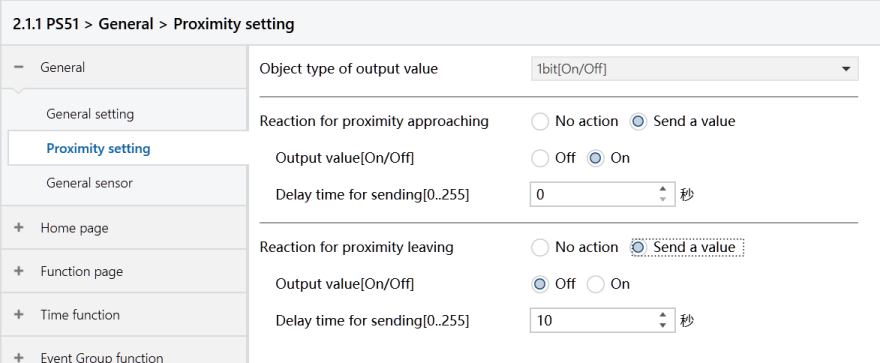
Figure2.2.2 : Proximity setting interface
Object type of output value
Set the object type of the telegrams sent to the bus when a person approaches and leaves the sensing area.
Options:
1bit [On/Off]
1byte [scene control]
1byte [0..255]
1byte [0..100%]
Reaction for approaching/leaving
Set whether send telegrams when a person approaches or leaves the sensing area.
Options:
No send
Send a value: When selected, the following setting parameters become available:
Output value [On/Off]
Output scene NO. [1.. 64]
Output value [0.. 255]
Output value [0.. 100%]
These parameters are for setting the telegram values sent to the bus when the device detects a person approaching or leaving. The range of values is determined by the selected data type.
Delay time for sending[0.. 255]
Set the delay time for telegram sending.
Options: 0 ~ 255
Note
During the delay time for sending "approaching" telegrams, if the system needs to send a "leaving" telegram because the detected person leaves, the previous "approaching" telegram will not be sent. The telegram is only sent when the approaching state changes.