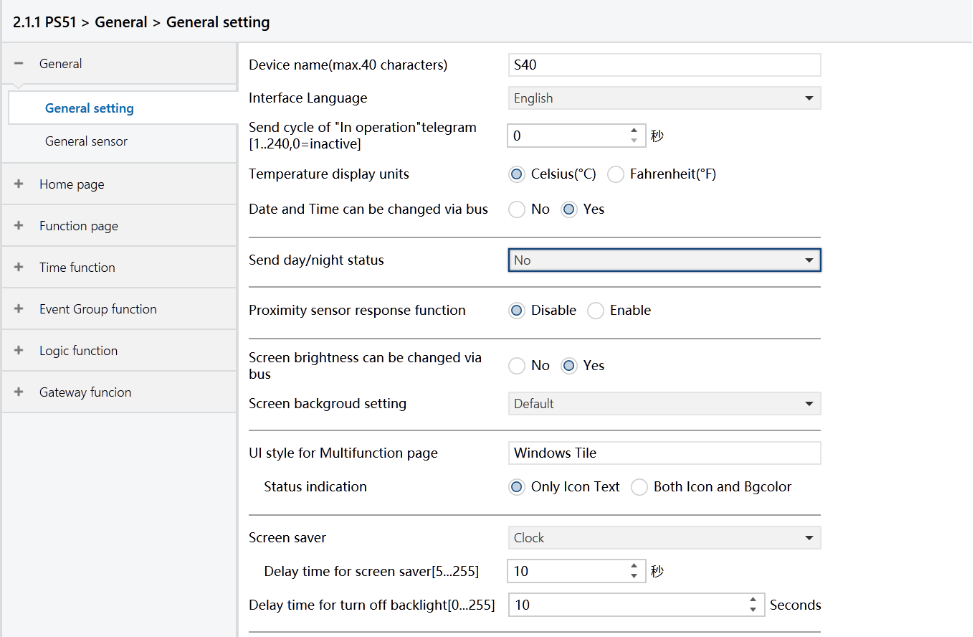
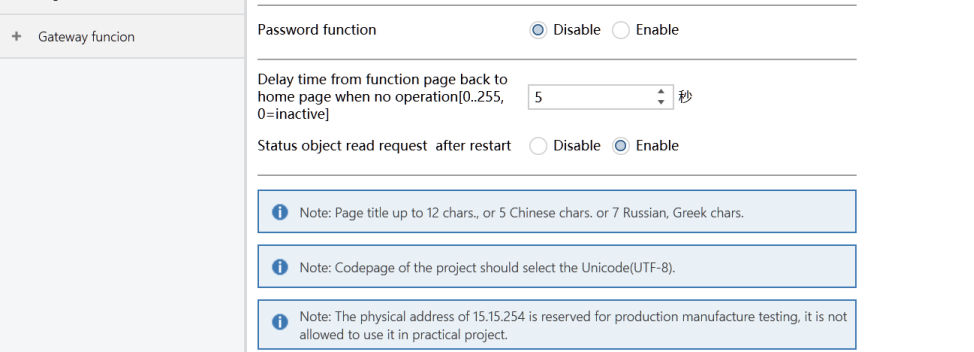
Figure: General setting interface
Device name(max.40 characters)
Not applicable for HyPanel.
Interface Language
Set the panel’s display language.
Options:
Chinese, English, German, French, Portuguese, Russian, Spanish, Arabic, and Others.
If your desired language is not listed, select “Others” and enter it in the Language name field.
Language name
When choosing “Others” for the Interface Language, select your desired language from those supported by HyPanel and enter it here.
Note
If the entered language is not supported by HyPanel, English will be used by default.
Send cycle of “In operation” telegram [1 to 240s, 0 = inactive]
Set the time interval when this device cycle send telegrams through the bus to indicate this module in normal operation.
When set to “0”, the object “In operation” will not send a telegram.
If the value is not “0”, the object “In operation” will send a telegram with a logic “1” to the bus at the preset time interval.
Options: 0 ~ 240s, 0=inactive.
To minimize the bus load as much as possible, the maximum time interval should be selected according to actual needs.
Temperature display units
Set the display of temperature unit.
Options:
Celsius (℃)
Fahrenheit (℉)
Date and Time can be changed via bus
Support for bus modification of the date/time displayed on the HyPanel.
Options:
No: Not supported
Yes: Supported. When selected, the "Date" and "Time" objects will be visible. Adjust them according to your requirements.
Send day/night status
Not applicable for HyPanel.
Proximity sensor response function
Enable/disable the proximity sensor response function.
Options:
Disable
Enable
Screen brightness can be changed via bus
Support for bus modification of brightness values.
Options:
No
Yes
Screen background setting
Not applicable for HyPanel.
UI style for Multifunction page
Not applicable for HyPanel.
Status indication
Not applicable for HyPanel.
Screen saver
Not applicable for HyPanel.
Delay time for screen saver [5..255]s
Not applicable for HyPanel.
Delay time for turn off backlight [0..255]s
Not applicable for HyPanel.
Password function
Not applicable for HyPanel.
Delay time from function page back to home page when no operation[0.. 255,0=inactive] Seconds
Not applicable for HyPanel.
Status object read request after restart
Set whether to send status request telegrams when the device starts up.
Options:
Disable
Enable
This parameter is applicable to feedback of switch status, dimming status, blind position, air quality display items, outdoor temperature detection, and energy monitoring in the function page.
Once enabled, and upon device startup or bus power restoration, the device will send the following telegrams to the bus:
Telegram to read the status of switches or dimming brightness.
Telegram to read the blind position status.
Telegram to gather data on temperature, humidity, CO2, PM2.5, etc., detected by sensors.
Telegram to retrieve information on current, voltage, power, energy, etc., monitored by actuators.